
Introduction
This manual provides instructions for the safe and efficient operation of your Claymore Capon 65A Ultra-Lightweight Rechargeable LED Clip-On Light. Please read this manual thoroughly before using the product and retain it for future reference.
Safety Information
- Do not look directly into the LED light when it is on, as this may cause temporary vision impairment.
- Keep the device away from water and excessive moisture.
- Do not attempt to disassemble or modify the device. This will void the warranty and may cause damage or injury.
- Use only the specified charging method (USB) and ensure the charging cable is in good condition.
- Keep out of reach of children.
- Avoid exposing the device to extreme temperatures.
Package Contents
Verify that all items are present in your package:
- Claymore Capon 65A LED Clip-On Light
- USB Charging Cable
- Carabiner Ring
- User Manual
Product Overview
Familiarize yourself with the components of your Claymore Capon 65A light.
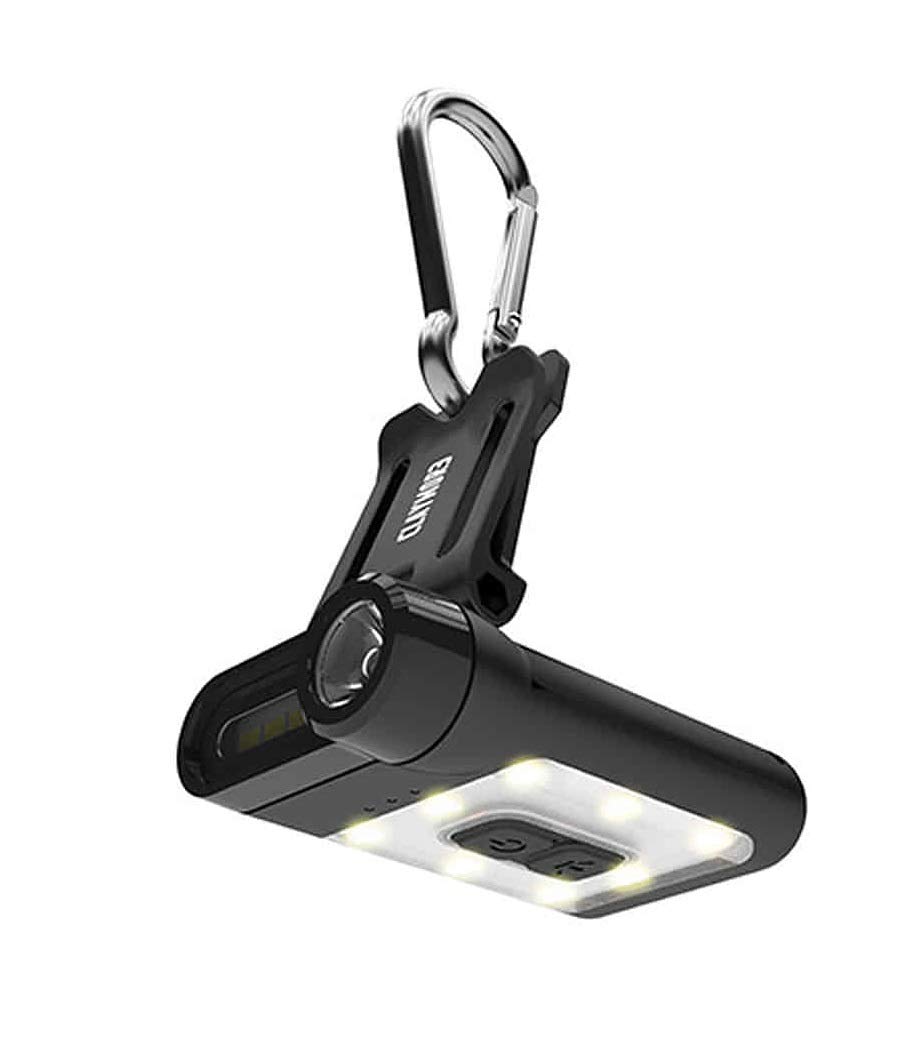
Figure 1: Claymore Capon 65A Clip-On Light, front view showing the main light and controls.

Figure 2: Angled view of the Claymore Capon 65A, highlighting the clip mechanism and light housing.
Key components include the main LED light, control buttons, USB charging port, and the integrated clip for attachment.
Setup
Charging the Device
- Locate the USB charging port on the device.
- Connect the provided USB charging cable to the device's charging port.
- Connect the other end of the USB cable to a compatible USB power source (e.g., computer, wall adapter).
- The charging indicator light will illuminate during charging. A full charge takes approximately 1 hour and 40 minutes.
- Once fully charged, the indicator light will change or turn off. Disconnect the charging cable.

Figure 3: The Claymore Capon 65A connected to a USB power source for charging.
Operating Instructions
Attaching the Light
- The integrated clip allows attachment to caps, hats, helmets, backpack straps, or tent loops.
- For additional hanging options, use the included carabiner ring.
Power On/Off and Mode Selection
The Capon 65A features three lighting modes: Spot Light (focus), Flood Light (front), and Flood Light (warm yellow, upward). There are 5 pre-set brightness levels within each mode.
- Power On: Press and hold the power button for approximately 1 second. The light will turn on in the last used mode and brightness setting.
- Change Mode: Briefly press the power button to cycle through the three lighting modes.
- Adjust Brightness: While a mode is active, press the brightness adjustment button to cycle through the 5 pre-set brightness levels.
- SOS Mode: To activate SOS mode for emergencies, press and hold the brightness adjustment button for approximately 2 seconds.
- Power Off: Press and hold the power button for approximately 1 second.
Adjusting the Light Angle
The clip mechanism allows the light to be adjusted up to 180 degrees, providing multiple viewing angles for optimal illumination.

Figure 4: User demonstrating the hands-free operation of the Capon 65A, clipped to a hat.
Maintenance
Cleaning
- Wipe the device with a soft, dry cloth.
- Do not use abrasive cleaners or solvents.
Storage
- Store the device in a cool, dry place away from direct sunlight.
- For long-term storage, ensure the battery is partially charged (around 50%) to prolong battery life. Recharge every 3-6 months if not in use.
Troubleshooting
| Problem | Possible Cause | Solution |
|---|---|---|
| Light does not turn on. | Battery is depleted. | Charge the device fully. |
| Light flickers or is dim. | Low battery. | Recharge the device. |
| Device not charging. | Faulty cable or power source. | Try a different USB cable or power adapter. Ensure connections are secure. |
| Buttons are unresponsive. | Temporary software glitch. | Allow the battery to fully discharge, then recharge and try again. If issue persists, contact support. |
Specifications
| Feature | Detail |
|---|---|
| Model Number | CLP-310BK |
| Light Source Type | LED |
| Brightness | Up to 230 Lumens |
| Lighting Modes | Spot Light, Flood Light (Front), Flood Light (Warm Yellow) |
| Brightness Levels | 5 pre-set levels per mode |
| Battery Type | Lithium Polymer |
| Battery Capacity | 650 mAh |
| Max Run Time | Up to 19 hours (depending on mode/brightness) |
| Charging Time | Approx. 1 hour 40 minutes |
| Weight | 36g (0.04 Kilograms) |
| Material | ABS |
| Adjustable Angle | Up to 180 degrees |
Warranty and Support
For warranty information or technical support, please refer to the official Claymore website or contact your local distributor. Keep your proof of purchase for warranty claims.