
Introduction
This manual provides comprehensive instructions for the setup, operation, maintenance, and troubleshooting of your IFYOO XONE Wired PC Controller. Designed for a wide range of gaming platforms, this controller offers a reliable and immersive gaming experience. Please read this manual thoroughly to ensure proper use and to maximize your enjoyment of the product.
Setup
The IFYOO XONE Wired PC Controller is designed for plug-and-play functionality across multiple platforms. Follow these steps to connect your controller:
- Connect the USB Cable: Insert the detachable USB cable into the controller's port.
- Connect to Device: Plug the USB end of the cable into an available USB port on your PC, laptop, PS3, or Android device.
- Android Device Compatibility: For Android mobile phones, tablets, or TV boxes (version 4.0 or above), an OTG adapter or cable may be required if your device has a Type-C or Micro-USB port. Ensure your Android device supports OTG function.
- Driver Installation: No additional drivers are typically required for Windows 10/8/7, Steam, Android, or PS3. For Windows XP, driver installation may be necessary.
- Game Configuration: Some games may require manual button mapping or the use of third-party software to recognize the controller.

Figure 1: Multi-platform compatibility and plug-and-play setup.
Operating Instructions
Your IFYOO XONE controller offers several features to enhance your gaming experience:
Multi-Mode Support
The controller supports multiple modes for broad compatibility:
- Xinput Mode: Primarily for PC games that support Xinput.
- Dinput Mode: For PC games that support Dinput.
- Android Mode: For Android mobile games.
- PS3 Mode: For PlayStation 3 consoles.
JD-SWTICH Function
This function allows you to switch the input between the Left Joystick and the D-pad, providing flexibility based on game requirements or personal preference.
TURBO Function
Activate the TURBO function for continuous rapid fire without needing to repeatedly press the button. This can be useful in games requiring fast, repetitive inputs.
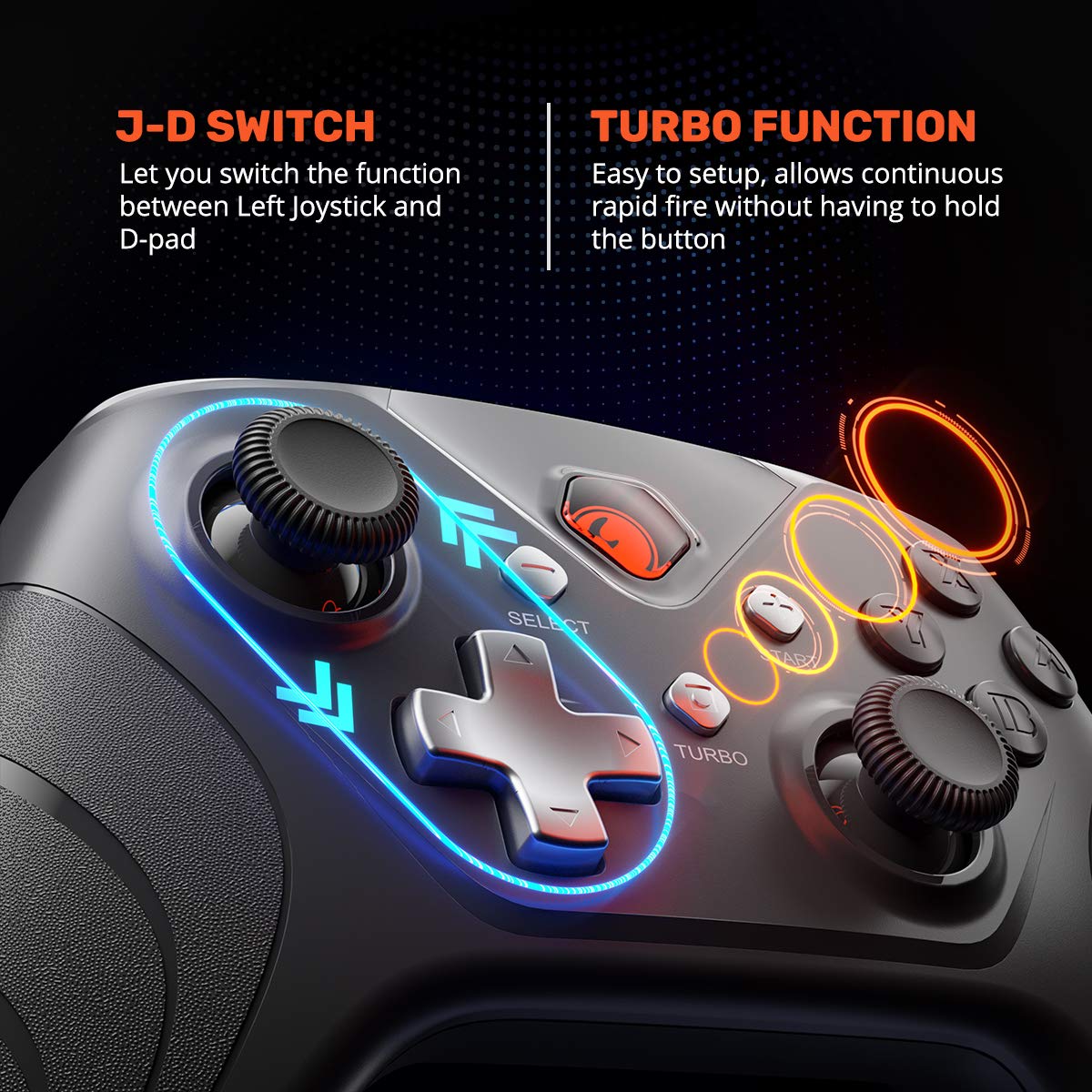
Figure 2: JD-SWTICH and TURBO function indicators.
Vibration Feedback
The controller features dual rumble motors that provide vibration feedback, enhancing immersion by allowing you to feel in-game actions like hits, crashes, and explosions.

Figure 3: Illustration of dual rumble motors for immersive feedback.
Ergonomic Design and Controls
The controller is designed for comfort and precision:
- Textured Grip: Provides enhanced comfort and prevents slippage during extended gaming sessions.
- Wear-resistant Anti-slip Joysticks: Durable joysticks designed for precise control.
- High Precision D-pad: Offers tactile feedback for accurate directional input.
- Engraved ABXY Buttons: Clearly marked and responsive buttons.
- Revolutionary Designed Shoulder Buttons: Provide a new experience with responsive presses.
- 255 Level Magnetic Induction Trigger: Offers excellent linearity and responsiveness for precise control.

Figure 4: Key design features for enhanced control.

Figure 5: Ergonomic design in use.
Video 1: Official product video demonstrating the IFYOO XONE Wired PC Controller's features, including compatibility, multi-mode operation, ergonomic design, detachable cable, and various functions like Turbo and JD-Switch.
Maintenance
To ensure the longevity and optimal performance of your IFYOO XONE Wired PC Controller, follow these maintenance guidelines:
- Cleaning: Use a soft, dry cloth to wipe down the controller. For stubborn dirt, slightly dampen the cloth with water. Avoid using harsh chemicals or abrasive cleaners.
- Storage: Store the controller in a cool, dry place away from direct sunlight and extreme temperatures. When not in use, consider detaching the USB cable and coiling it neatly to prevent tangles and damage.
- Avoid Drops: While durable, repeated drops can damage internal components. Handle the controller with care.
- Cable Care: Do not pull on the cable to disconnect it from the controller or device. Always grasp the plug firmly.
Troubleshooting
If you encounter issues with your IFYOO XONE Wired PC Controller, refer to the following common problems and solutions:
- Controller Not Recognized:
- Ensure the USB cable is securely connected to both the controller and the device.
- Try connecting to a different USB port on your computer or device.
- Restart your computer or gaming device.
- For Windows XP, verify that necessary drivers are installed.
- Buttons or Joysticks Not Responding:
- Check in-game settings to ensure the controller is selected as the input device and buttons are correctly mapped.
- Test the controller on another game or device to determine if the issue is specific to one application.
- Ensure no debris is lodged around the buttons or joysticks.
- Vibration Not Working:
- Verify that vibration feedback is enabled in your game's settings.
- Some older games may not support vibration feedback.
- Lag or Input Delay:
- Ensure no other high-bandwidth USB devices are connected to the same USB hub.
- Try connecting the controller directly to a main USB port on your computer, bypassing any USB hubs.
If problems persist after trying these steps, please contact customer support.
Specifications
| Feature | Detail |
|---|---|
| Model Number | IFYOO-X208-Wired |
| Connectivity | Wired USB (3.2M Detachable Cable) |
| Compatibility | PC/Laptop (Windows 10/8/7/XP, Steam), Android Mobile Phone/Tablet/TV/Box (v4.0+ with OTG), PlayStation 3 (PS3) |
| Modes Supported | Xinput, Dinput, Android, PS3 |
| Special Features | Vibration Feedback, JD-SWTICH Function, TURBO Function, 255 Level Magnetic Induction Trigger |
| Item Weight | 13.1 ounces |
| Package Dimensions | 6.97 x 5.12 x 2.87 inches |
| Manufacturer | IFYOO |
Warranty and Support
IFYOO offers a comprehensive guarantee for your XONE Wired PC Controller. You may return or request a refund for any reason, or exchange/replace the product for any quality issue within 3 months of purchase.
For further assistance, technical support, or warranty claims, please feel free to contact IFYOO customer service. Refer to the product packaging or the official IFYOO website for the most current contact information.