
LiftMaster 940ESTD
LiftMaster 940ESTD Keyless Entry Garage Door Keypad Instruction Manual
Model: 940ESTD
Introduction
This manual provides instructions for the installation, programming, operation, and maintenance of your LiftMaster 940ESTD Keyless Entry Garage Door Keypad. This keypad is designed for use with LiftMaster, Chamberlain, and Craftsman garage door openers featuring Security+ 2.0 technology.
Safety Information
- Read all instructions carefully before installation and use.
- Keep hands and clothing clear of the garage door when operating.
- Do not allow children to play with the garage door opener or keypad.
- Replace batteries promptly when low to ensure reliable operation.
Package Contents
- LiftMaster 940ESTD Keyless Entry Keypad
- 9V Battery (included)
- Mounting Screws and Anchors
- Instruction Manual (this document)
Setup and Installation
1. Battery Installation
The keypad requires one 9V battery, which is included.
- Open the keypad cover.
- Locate the battery compartment.
- Insert the 9V battery, observing polarity (+/-).
- Close the battery compartment.
2. Programming the Keypad
This keypad is compatible with LiftMaster, Chamberlain, and Craftsman garage door openers manufactured after 2011 that feature a yellow learn button (Security+ 2.0).
- Locate the Learn Button: On your garage door opener motor unit, find the yellow "Learn" button.
- Press Learn Button: Press and immediately release the yellow "Learn" button. The LED indicator on the opener will light steadily for 30 seconds.
- Enter PIN on Keypad: Within 30 seconds, enter a 4-digit personal identification number (PIN) of your choice on the keypad.
- Press ENTER: Press and hold the "ENTER" button on the keypad.
- Release ENTER: Release the "ENTER" button when the garage door opener lights flash or two clicks are heard. This indicates successful programming.
- Test Keypad: Enter your PIN and press "ENTER" to test the keypad. The garage door should activate.
3. Mounting the Keypad
Choose a convenient location outside your garage, at least 5 feet (1.5 meters) above the ground, out of reach of small children.
- Open the keypad cover.
- Mark the two mounting holes on the surface.
- Drill pilot holes if necessary.
- Secure the keypad using the provided screws and anchors.
- Close the keypad cover.
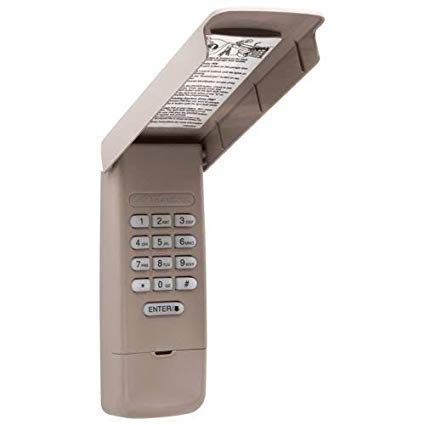
Image: LiftMaster 940ESTD Keyless Entry Keypad. The image displays the keypad with its protective cover open, revealing the numeric buttons (0-9, #, ENTER) and the internal warning label.
Operating Instructions
To operate your garage door using the keypad:
- Enter your programmed 4-digit PIN.
- Press the "ENTER" button.
- The garage door will activate (open or close).
To stop the door while in motion, enter your PIN and press "ENTER" again.
Maintenance
Battery Replacement
When the keypad backlight dims or the keypad becomes unresponsive, it is time to replace the 9V battery. Follow the battery installation steps in the "Setup and Installation" section.
Cleaning
Clean the keypad with a soft, damp cloth. Do not use abrasive cleaners or solvents.
Troubleshooting
- Keypad not responding: Check the battery. Replace if necessary. Ensure the keypad is within range of the garage door opener.
- Garage door not activating after entering PIN: Re-program the keypad following the "Programming the Keypad" steps. Ensure your garage door opener has a yellow learn button (Security+ 2.0).
- Limited range: Ensure the keypad is mounted in an optimal location, away from large metal objects that might interfere with the signal. Replace the battery.
- Keypad lights flash but door does not move: This may indicate an issue with the garage door opener itself or an obstruction. Consult your garage door opener manual.
Specifications
- Model: 940ESTD
- Compatibility: LiftMaster, Chamberlain, Craftsman garage door openers with Security+ 2.0 (yellow learn button)
- Power: 1 x 9V Alkaline Battery (included)
- Operating Temperature: -4°F to 140°F (-20°C to 60°C)
- Manufacturer: LiftMaster
- Date First Available: May 13, 2019
Warranty and Support
For warranty information and technical support, please refer to the official LiftMaster website or contact their customer service. Keep your purchase receipt for warranty claims.
Ask a question about this manual
Ask about setup, troubleshooting, compatibility, parts, safety, or missing instructions. Manuals+ will review the question and use this page’s manual context to help answer it.