
Introduction
Thank you for choosing the XINJIA Digital Sports Watch Model 2410006. This manual provides comprehensive instructions to help you set up, operate, and maintain your watch. Please read this manual carefully to ensure proper use and to fully utilize all features of your new timepiece.
Product Overview
The XINJIA Digital Sports Watch Model 2410006 is a versatile timepiece designed for daily wear and sports activities. It features a digital display, stopwatch, alarm, date, and backlight. The watch is constructed with a durable plastic and silicone strap, and a stainless steel case back.

Figure 1: Front view of the XINJIA Digital Sports Watch Model 2410006, showing the digital display and control buttons.
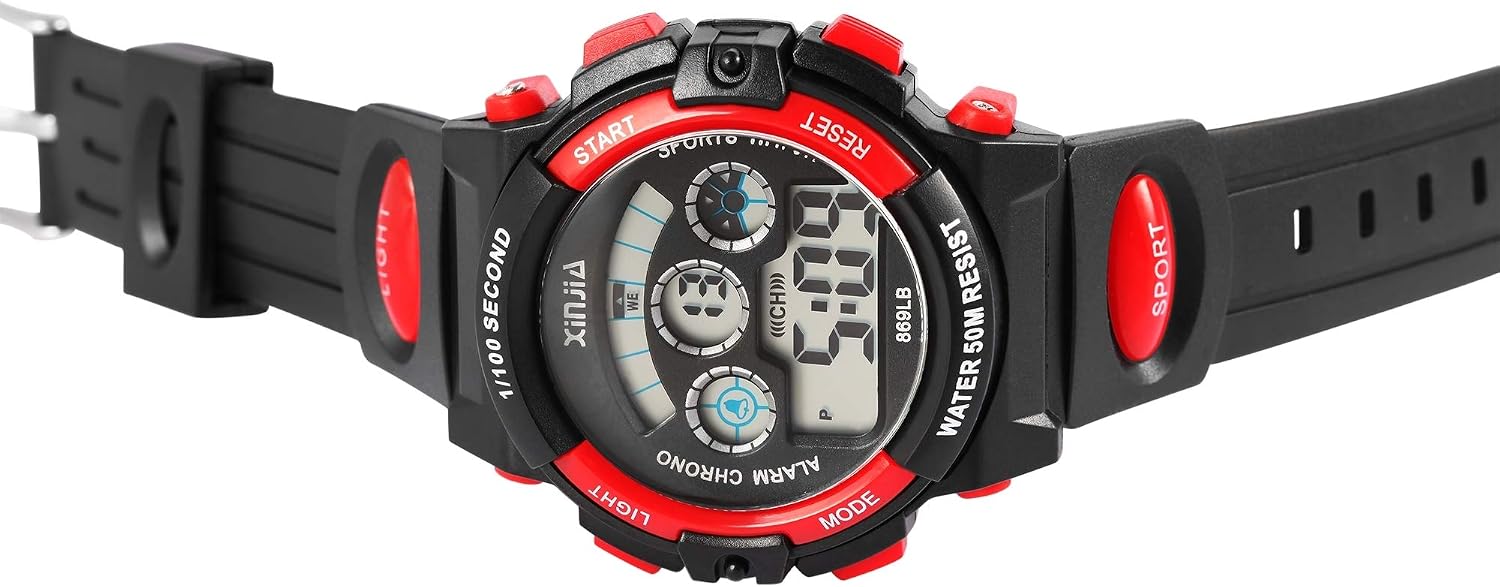
Figure 2: Side view of the XINJIA Digital Sports Watch, highlighting the watch's profile and button placement.

Figure 3: Back view of the XINJIA Digital Sports Watch, showing the stainless steel case back and silicone strap.
Setup and Initial Configuration
Your XINJIA Digital Sports Watch comes with a pre-installed LR44 battery. Follow these steps to set the time and date.
- Button Identification:
- LIGHT: Activates the backlight.
- MODE: Cycles through display modes (Time, Alarm, Stopwatch).
- START: Used to start/stop stopwatch, adjust values in setting mode.
- RESET: Used to reset stopwatch, select values in setting mode.
- Setting Time and Date:
- From the normal time display, press the MODE button three times to enter time setting mode. The seconds will flash.
- Press the RESET button to select the value you wish to adjust (seconds, hour, minute, month, date, day of week).
- Press the START button to increase the selected value.
- Once all settings are adjusted, press the MODE button to return to normal time display.
Operating Instructions
- Normal Time Display:
The watch displays the current time (hour, minute, second) and day of the week. Press the LIGHT button to illuminate the display in low-light conditions.
- Alarm Function:
- From normal time display, press MODE once to enter Alarm mode.
- Press RESET to toggle the alarm ON/OFF.
- To set the alarm time, press START. The hour will flash. Use RESET to adjust the hour, then press START to move to minutes. Use RESET to adjust minutes.
- Press MODE to exit alarm setting.
- The watch may feature an hourly chime. To disable or enable this, refer to the troubleshooting section or experiment with the alarm settings.
- Stopwatch Function:
- From normal time display, press MODE twice to enter Stopwatch mode.
- Press START to begin timing.
- Press START again to pause timing.
- Press RESET to clear the stopwatch to zero.
- Press MODE to exit stopwatch mode.
Maintenance
- Cleaning:
Wipe the watch regularly with a soft, damp cloth. Avoid using harsh chemicals or abrasive materials that could damage the watch's finish or plastic components.
- Water Resistance:
This watch is water resistant up to 50 meters (5 ATM). It is suitable for short periods of recreational swimming, but not for diving or snorkeling. Do not press any buttons while the watch is submerged in water.
- Battery Replacement:
The watch uses one LR44 battery. When the display becomes dim or functions become erratic, it may be time to replace the battery. Battery replacement should ideally be performed by a qualified technician to ensure water resistance is maintained.
- Storage:
Store the watch in a cool, dry place away from direct sunlight and extreme temperatures when not in use for extended periods.
Troubleshooting
- Display is blank or dim:
The battery may be low or depleted. Replace the LR44 battery.
- Buttons are unresponsive:
Ensure the watch is not in a locked mode (if applicable, though not a common feature for this model). If the issue persists, a battery replacement might resolve it, or contact support.
- Hourly Chime (Beep) cannot be disabled:
Some users have reported difficulty disabling an hourly chime. This function is typically linked to the alarm settings. Try the following:
- Enter Alarm mode by pressing the MODE button once.
- Look for an indicator on the display that signifies the hourly chime (often a small bell icon or "CH").
- Use the RESET or START button to toggle this indicator ON/OFF.
- If the issue persists, it may be a design characteristic of the specific watch module.
Specifications
| Model Number | 2410006 |
| Brand | XINJIA |
| Movement | Digital Quartz |
| Display Type | Digital |
| Case Material | Stainless Steel (back) |
| Case Diameter | 42 mm |
| Strap Material | Plastic and Silicone |
| Strap Width | 24 mm |
| Total Length | 23.5 cm |
| Weight | 50 grams |
| Crystal Material | Plastic |
| Water Resistance | 50 meters (5 ATM) |
| Battery Type | 1 x LR44 (included) |
Warranty and Support
For warranty information or technical support, please refer to the retailer where the product was purchased or contact XINJIA customer service. Specific warranty terms may vary by region and retailer. Keep your proof of purchase for any warranty claims.

