Introduction
The Gigastone 512GB 4K Camera Pro Micro SD Card is designed for high-performance storage in a variety of devices, including smartphones, action cameras, drones, and more. It features A2 and V30 speed grades, supporting fast application loading and smooth 4K Ultra HD video recording. This manual provides essential information for setting up, operating, maintaining, and troubleshooting your Micro SD card.

Image: The Gigastone 512GB 4K Camera Pro Micro SD Card, highlighting its capacity and speed ratings.
Setup
1. Inserting the Micro SD Card
Carefully insert the Gigastone Micro SD card into the designated slot on your compatible device. Ensure the card is oriented correctly to avoid damage.
2. Using the SD Adapter
If your device requires a standard SD card slot, use the included Gigastone Micro SD to SD adapter. Insert the Micro SD card into the adapter, then insert the adapter into your device. Both adapter designs function identically and provide the same high-quality experience.

Image: Two designs of the Gigastone Micro SD to SD adapter, illustrating their universal fit and identical function.
3. Formatting the Micro SD Card (If Needed)
For optimal performance and compatibility, especially with dash cams and surveillance devices, formatting the Micro SD card may be necessary. Always refer to your device's user manual for specific instructions.
- For 64GB or above capacity: The default file system should be exFAT.
- For 32GB or below capacity: The default file system should be FAT32.
- If your device only supports FAT32, please format your Micro SD card to FAT32 to ensure compatibility.
Note: If your device's user manual is unavailable, contact the device manufacturer directly for supported file systems and maximum capacity.
Image: Instructions for formatting Gigastone Micro SD cards for dash cams and surveillance devices, detailing file system requirements based on capacity.
Operating
1. Speed Performance
The Gigastone 512GB 4K Camera Pro Micro SD Card offers read speeds up to 150MB/s and write speeds up to 120MB/s. It features a V30 speed grade, ensuring consistent performance for Ultra HD (UHD) 4K video recording and UHD 4K gaming.

Image: Visual representation of the Gigastone Micro SD card's read and write speeds, indicating up to 150 MB/s read and 120 MB/s write.
2. Application Performance (A2 Grade)
With an A2 grade, this card provides faster application loading performance for smartphones and tablets, enhancing the user experience when running apps directly from the Micro SD card.

Image: Diagram illustrating the improved Input/Output Operations Per Second (IOPS) for A2 grade memory cards compared to A1, benefiting app performance.
3. 4K UHD Video Recording
Capture vivid moments and high-quality 4K UHD videos with confidence. The card's V30 speed grade ensures smooth and reliable recording for demanding video applications.

Image: A Gigastone Micro SD card shown with a DSLR camera, emphasizing its capability for capturing 4K UHD videos.
4. Device Compatibility
This Micro SD card is compatible with a wide range of devices for storage expansion, including laptops, tablets, PCs, smartphones, cameras (DSLR), dash cams, camcorders, surveillance systems, e-readers, drones, and gaming consoles like Nintendo Switch. It supports various file types including files, videos, and music.
Image: A scenic view with a camera, illustrating the broad compatibility of Gigastone Micro SD cards for various devices and storage needs.
Image: An action camera being used for 4K UHD recording, highlighting the suitability of Gigastone Micro SD cards for such devices.
5. GoPro Certification
Gigastone Micro SD cards are certified by GoPro, ensuring reliable performance with GoPro cameras for capturing high-quality footage.

Image: A GoPro camera displayed with various Gigastone Micro SD card models, indicating GoPro certification.
Maintenance
1. Durability Features
The Gigastone 4K Camera Pro Micro SD card is built to withstand challenging conditions. It is:
- Waterproof: Protects against accidental water exposure.
- Shockproof: Designed to resist damage from drops and impacts.
- X-ray Proof: Safe for use at airports and other environments with X-ray scanners.
- Extreme Temperature Resistance: Operates reliably in a wide range of temperatures.

Image: A Gigastone Micro SD card depicted in extreme environments (desert and ice), highlighting its waterproof, shockproof, and X-ray proof features.
2. Buffer Memory
All Micro SD cards reserve some buffer memory for firmware, applications, and software. A larger buffer memory generally contributes to a longer lifetime for the card. This means the usable capacity will be slightly less than the advertised capacity. For example, a 512GB card typically has a usable capacity of around 465GB to 476GB.
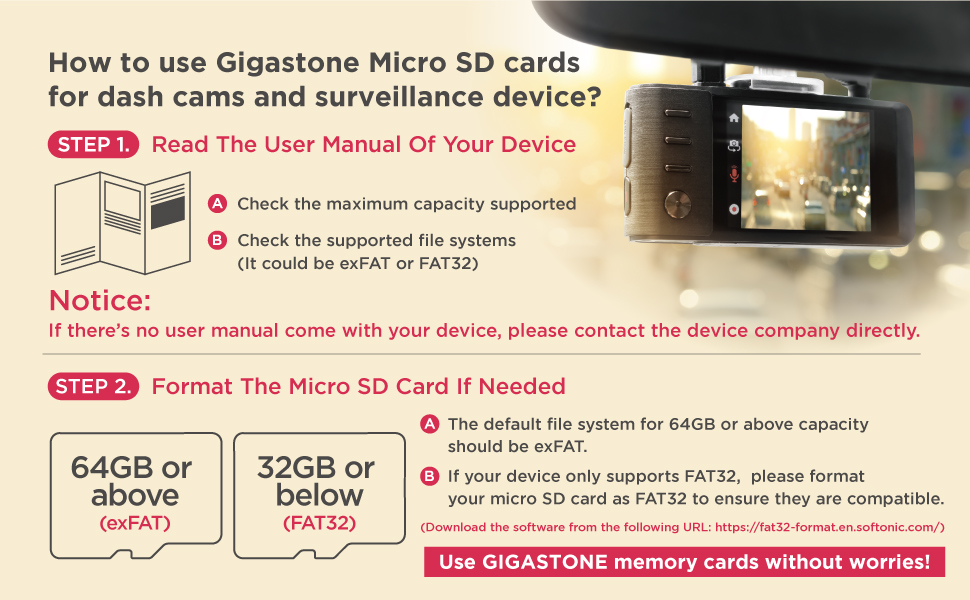
Image: A chart explaining the concept of buffer memory in Micro SD cards and its impact on usable storage and card lifetime.
Troubleshooting
1. Slow Transfer Speeds
If you experience transfer speeds lower than the advertised 120MB/s write speed, consider the following:
- Device Compatibility: Ensure your device (e.g., card reader, computer port) supports USB 3.0 or higher for optimal speeds. Older USB 2.0 ports will significantly limit transfer rates.
- File System: Incorrect formatting (e.g., FAT32 for large capacities) can impact performance. Ensure the card is formatted to exFAT for capacities 64GB and above.
- File Size and Type: Transferring many small files can be slower than transferring a few large files, even if the total data size is the same.
- Background Processes: Other applications or processes running on your computer can consume system resources and affect transfer speeds.
2. Card Not Recognized
- Reinsert Card: Remove and reinsert the Micro SD card firmly into the slot.
- Check Adapter: If using an adapter, ensure the Micro SD card is properly seated within it. Try a different adapter if available.
- Test on Another Device: Try the card in a different compatible device to determine if the issue is with the card or the original device.
- Clean Contacts: Gently clean the metal contacts on the card with a soft, dry cloth.
3. Data Corruption or Errors
- Safely Eject: Always safely eject the Micro SD card from your device before removing it to prevent data corruption.
- Scan for Errors: Use your computer's disk utility tools to scan and repair any errors on the card.
- Reformat: If issues persist, reformatting the card (after backing up any recoverable data) may resolve the problem.
Specifications
| Feature | Detail |
|---|---|
| Brand | Gigastone |
| Model Name | GS-2IN1666XU3V30A1 |
| Flash Memory Type | Micro SDXC |
| Memory Storage Capacity | 512 GB |
| Read Speed | Up to 150 MB/s |
| Write Speed | Up to 120 MB/s |
| Secure Digital Association Speed Class | Class 10, UHS-I U3, V30, A2 |
| Special Features | Water Proof, X Ray Proof, Shockproof, Extreme Temperature Resistance |
| Compatible Devices | Camera, Dash Cam, Drone, GoPro, Security Camera, Smartphone, Tablet, PC, Laptop, e-Reader, Gaming |
| Item Weight | 0.704 ounces |
| Package Dimensions | 5.12 x 3.46 x 0.28 inches |
| UPC | 804272753455 |
Detailed Speed Information by Capacity
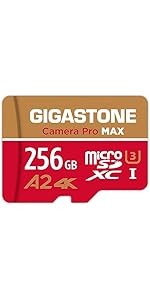
Image: A table detailing read/write speeds and estimated storage for music, full HD photos, and full HD video across different Gigastone Micro SD card capacities and file systems.
Warranty and Support
Gigastone provides a 5-year limited warranty for this Micro SD card, which includes free data recovery services. This service offers peace of mind, knowing that your valuable data has an additional layer of protection.

Image: A visual representation of the Gigastone 5-year free data recovery warranty, showing different success rates for various data types.
For warranty claims, technical assistance, or data recovery inquiries, please contact Gigastone customer support through their official website or the contact information provided with your product packaging.


