1. Introduction
This manual provides essential information for the safe and efficient operation, installation, and maintenance of your Clivet EZCOOL 35M Monosplit Air Conditioner. Please read this manual thoroughly before using the unit and keep it for future reference.
The Clivet EZCOOL 35M is a 12000 BTU monosplit air conditioning system designed for both cooling and heating, featuring A++/A+ energy efficiency ratings and utilizing R32 refrigerant.

Figure 1: Clivet EZCOOL 35M indoor unit in a typical home setting.
2. Safety Information
Always adhere to the following safety precautions to prevent injury or damage to the unit.
- Professional Installation: Installation, maintenance, and repair of this appliance must be performed by qualified and authorized personnel only. Improper installation can lead to electric shock, fire, or water leakage.
- Power Supply: Ensure the power supply matches the specifications of the unit. Do not use extension cords or multi-outlet adapters.
- Grounding: The unit must be properly grounded to prevent electric shock.
- Refrigerant: This unit uses R32 refrigerant. Handle with care and ensure proper ventilation during installation and servicing.
- Cleaning: Disconnect power before cleaning the unit. Use a soft, dry cloth. Do not use volatile liquids or abrasive cleaners.
- Children and Pets: Keep children and pets away from the unit, especially during operation.
- Obstructions: Do not block the air inlet or outlet of either the indoor or outdoor unit.
3. Product Overview
The Clivet EZCOOL 35M monosplit system consists of an indoor unit, an outdoor unit, and a remote control for convenient operation.

Figure 2: Complete Clivet EZCOOL 35M Monosplit System.
3.1 Indoor Unit (ILA1-Y35M)
The indoor unit is designed to be mounted on a wall within the conditioned space. It houses the evaporator coil, fan, and control electronics.
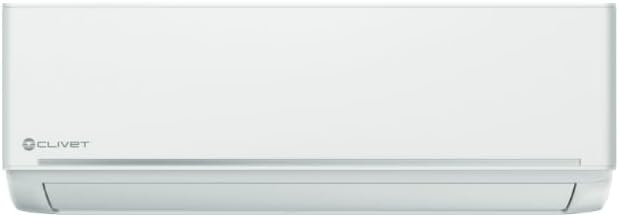
Figure 3: Clivet EZCOOL 35M Indoor Unit.
3.2 Outdoor Unit (MLA1-Y35M)
The outdoor unit contains the compressor, condenser coil, and expansion valve. It is responsible for releasing heat to the outside during cooling and absorbing heat from the outside during heating.

Figure 4: Clivet EZCOOL 35M Outdoor Unit.
3.3 Remote Control (RG10A-D2S-BGEF)
The wireless remote control allows you to conveniently adjust settings such as operating mode, temperature, fan speed, and timer functions from a distance.
4. Setup & Installation
Important: Installation of this air conditioning system requires specialized knowledge and tools. It must be performed by a certified HVAC technician to ensure proper operation, safety, and compliance with local regulations.
4.1 Pre-Installation Checks
- Verify that the power supply meets the unit's requirements (240 Volt).
- Ensure adequate space for air circulation around both indoor and outdoor units.
- Confirm the structural integrity of the wall where the indoor unit will be mounted.
4.2 Installation Steps (Overview for Technician)
- Mount the indoor unit securely on the wall.
- Install the outdoor unit on a stable, level surface, ensuring proper drainage.
- Connect the refrigerant lines and electrical wiring between the indoor and outdoor units.
- Perform vacuuming of the refrigerant lines to remove air and moisture.
- Charge the system with the correct amount of R32 refrigerant.
- Connect the condensate drain line.
- Connect the power supply and perform a test run.
Refer to the detailed installation manual provided with the product for specific instructions and diagrams for professional installers.
5. Operating Instructions
Your Clivet EZCOOL 35M air conditioner can be operated using the supplied wireless remote control.
5.1 Basic Operation
- Power ON/OFF: Press the ON/OFF button to start or stop the unit.
- Mode Selection: Press the MODE button to cycle through available modes:
- Cooling (Cool): For cooling the room.
- Heating (Heat): For heating the room (heat pump function).
- Dehumidifying (Dry): For reducing humidity.
- Fan (Fan Only): For air circulation without heating or cooling.
- Auto (Auto): The unit automatically selects the operating mode based on the room temperature.
- Temperature Adjustment: Use the TEMP UP/DOWN buttons to set your desired temperature.
- Fan Speed: Press the FAN button to adjust the fan speed (Auto, Low, Medium, High).
5.2 Advanced Functions
- Timer Function: Set the unit to turn ON or OFF automatically after a specified period. Refer to the remote control manual for detailed timer settings.
- Sleep Mode: Adjusts temperature and fan speed for comfortable sleep and energy saving.
- Swing Function: Controls the vertical louver movement for optimal air distribution.
6. Maintenance
Regular maintenance ensures optimal performance and extends the lifespan of your air conditioner.
6.1 Air Filter Cleaning
The air filters in the indoor unit should be cleaned every two weeks or more frequently depending on usage and air quality.
- Turn off the unit and disconnect the power supply.
- Open the front panel of the indoor unit.
- Remove the air filters.
- Clean the filters with a vacuum cleaner or wash them with lukewarm water and a mild detergent.
- Rinse thoroughly and allow them to dry completely in a shaded area before re-installing.
- Close the front panel.
6.2 Outdoor Unit Cleaning
Periodically check the outdoor unit for obstructions (leaves, debris) and clean the coil fins gently with a soft brush or water hose. Ensure the area around the outdoor unit is clear for proper airflow.
6.3 Professional Servicing
It is recommended to have your air conditioner professionally serviced at least once a year by a qualified technician. This includes checking refrigerant levels, electrical connections, and overall system performance.
7. Troubleshooting
Before contacting customer support, please refer to the following common issues and their solutions.
| Problem | Possible Cause | Solution |
|---|
| Unit does not start | No power supply; Remote control batteries dead; Timer function active. | Check power connection and circuit breaker; Replace batteries; Deactivate timer. |
| Insufficient cooling/heating | Dirty air filters; Blocked outdoor unit; Doors/windows open; Temperature setting incorrect. | Clean air filters; Clear obstructions; Close doors/windows; Adjust temperature setting. |
| Unusual noise | Loose parts; Unit not level; Fan obstruction. | Contact a qualified technician. |
| Water leakage from indoor unit | Clogged drain pipe; Improper installation. | Check and clear drain pipe; Contact a qualified technician for re-installation check. |
If the problem persists after attempting these solutions, please contact a qualified service technician.
8. Specifications
Detailed technical specifications for the Clivet EZCOOL 35M Monosplit Air Conditioner.
| Feature | Specification |
|---|
| Brand | CLIVET |
| Model Number | Essential650414203209 |
| Indoor Unit Model Code | ILA1-Y35M |
| Outdoor Unit Model Code | MLA1-Y35M |
| Remote Control Model | RG10A-D2S-BGEF |
| Cooling Capacity | 3.50 kW (1.1~4.2 kW) / 12000 BTU |
| Heating Capacity | 3.8 kW (1.1~4.2 kW) |
| SEER (Seasonal Energy Efficiency Ratio) | 6.10 |
| SCOP (Seasonal Coefficient of Performance - Average Climate) | 4.00 |
| SCOP (Seasonal Coefficient of Performance - Warm Climate) | 5.10 |
| Energy Efficiency Class (Cooling) | A++ |
| Energy Efficiency Class (Heating - Average Climate) | A+ |
| Energy Efficiency Class (Heating - Warm Climate) | A+++ |
| Refrigerant Type | R32 |
| Indoor Unit Dimensions (LxWxH) | 835 x 208 x 295 mm (32.87 x 8.19 x 11.61 inches) |
| Outdoor Unit Dimensions (LxWxH) | 720 x 270 x 495 mm (28.35 x 10.63 x 19.49 inches) |
| Product Dimensions (Overall) | 29.5 x 20.8 x 29.5 cm (11.61 x 8.19 x 11.61 inches) |
| Voltage | 240 Volt |
| Special Feature | Dehumidifier |
| Color | White |
| First Available Date | April 1, 2019 |
9. Warranty & Support
For warranty information and customer support, please refer to the documentation provided with your purchase or contact your authorized Clivet dealer.
The product typically comes with a manufacturer's warranty covering defects in materials and workmanship. Specific warranty terms and conditions, including duration and coverage, may vary by region and retailer.
For technical assistance, spare parts, or professional servicing, please contact a certified Clivet service center or your installer.


