
Introduction
This manual provides essential instructions for the safe and effective use of the Light Source MTP12B 12-Inch Mega-Truss Pick. Please read this manual thoroughly before installation and operation to ensure proper handling and to prevent damage or injury.
The Mega-Truss Pick is engineered for suspending truss systems in live sound and stage lighting applications. It is CNC machined from solid 1″ × 6″ 6061 T-6 aluminum billet, designed for durability and strength.
Product Overview
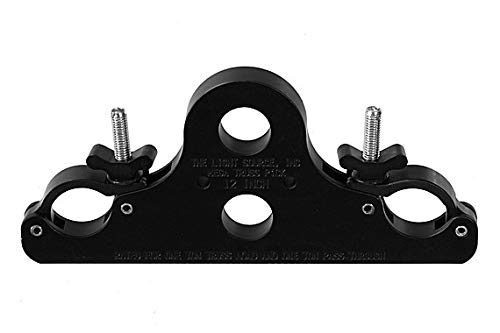
Figure 1: The Light Source MTP12B 12-Inch Mega-Truss Pick. This image displays the main body, the two pockets with coupler-style aluminum pivoting links, and the half-inch swivel bolts with solid wing nuts designed to secure around a truss tube. The top and bottom rigging holes for shackle or motor attachment are also visible.
The MTP12B Mega-Truss Pick features two pockets with coupler-style aluminum pivoting links, half-inch swivel bolts, and solid wing nuts. These components are designed to securely wrap around a truss tube. It includes one top and one bottom rigging hole for attaching the truss to a shackle, motor, or chain hook.
Key Features:
- Working Load Limit: 1 ton truss / 2 ton total.
- Hardware: 1/2"-13 steel swivel eyebolts, with solid aluminum wing nuts.
- Construction: CNC machined from solid 1" x 6" 6061 T-6 aluminum billet.
- Compatibility: Fits 5/8" Shackle and larger.
Setup and Installation
- Inspection: Before each use, inspect the Mega-Truss Pick for any signs of damage, wear, or deformation. Ensure all bolts and nuts are present and in good condition. Do not use if any damage is observed.
- Truss Attachment:
- Position the Mega-Truss Pick against the truss tube.
- Open the coupler-style aluminum pivoting links.
- Wrap the links around the truss tube, ensuring the half-inch swivel bolts align with the corresponding holes.
- Securely tighten the solid aluminum wing nuts until the Mega-Truss Pick is firmly attached to the truss. Ensure there is no play or movement.
- Load Attachment:
- Attach your shackle, motor, or chain hook to either the top or bottom rigging hole of the Mega-Truss Pick.
- Ensure the attachment hardware is rated for the intended load and is properly secured.
- Verify that the total suspended load does not exceed the Working Load Limit of 2 tons (1 ton for the truss itself, plus an additional 1 ton suspended under the truss).
Safety Note: Always consult with a qualified rigging professional for complex installations and ensure all local safety regulations and standards are met.
Operating Instructions
The Light Source MTP12B Mega-Truss Pick is a passive component designed to facilitate the suspension of truss systems. Its operation primarily involves ensuring correct installation and adherence to load limits.
- Load Distribution: Ensure that the load is evenly distributed and does not create undue stress on any single point of the truss pick or the truss structure.
- Dynamic Loads: Avoid sudden jerks or dynamic loading that could exceed the static Working Load Limit.
- Regular Checks: During operation, periodically check the security of all connections, including the truss pick attachment to the truss and the load attachment to the pick.
Maintenance
Proper maintenance ensures the longevity and safe operation of your Mega-Truss Pick.
- Cleaning: Clean the Mega-Truss Pick with a soft, damp cloth. Avoid abrasive cleaners or solvents that could damage the anodized finish.
- Lubrication: Periodically check the swivel bolts for smooth operation. Apply a light lubricant if necessary, ensuring it does not attract excessive dirt.
- Storage: Store the Mega-Truss Pick in a dry, clean environment away from corrosive materials when not in use.
- Annual Inspection: A thorough inspection by a qualified technician is recommended annually, or more frequently depending on usage, to check for fatigue, cracks, or other structural integrity issues.
Troubleshooting
| Problem | Possible Cause | Solution |
|---|---|---|
| Mega-Truss Pick feels loose after tightening. | Improper seating on truss; worn wing nuts or bolts; incorrect truss size. | Re-seat the pick on the truss, ensuring full contact. Inspect wing nuts and bolts for wear and replace if necessary. Verify truss diameter is compatible. |
| Difficulty attaching load hardware. | Rigging hole obstruction; incompatible hardware size. | Clear any debris from the rigging hole. Ensure shackle/hook size is compatible (fits 5/8" Shackle and larger). |
| Visible deformation or cracks on the pick. | Overloading; impact damage; material fatigue. | Immediately cease use. The unit is compromised and must be replaced. Do not attempt repairs. |
Specifications
| Feature | Detail |
|---|---|
| Model Number | MTP12B |
| Material | 6061 T-6 Aluminum Billet |
| Finish | Black Anodized |
| Working Load Limit (WLL) | 1 ton (truss load) / 2 tons (total suspended load) |
| Hardware | 1/2"-13 steel swivel eyebolts, solid aluminum wing nuts |
| Dimensions (L x W x H) | 13-3/8" x 6" x 1" (approximate) |
| Weight | 4.15 lbs (12" truss version) |
| Rigging Hole Compatibility | Fits 5/8" Shackle and larger |
Warranty and Support
Warranty information for Light Source products is typically provided at the point of purchase or on the manufacturer's official website. Please refer to your purchase documentation or contact Light Source directly for specific warranty terms and conditions.
For technical support or inquiries, please contact your authorized Light Source dealer or visit the official Light Source website for contact information.


