1. Introduction
This manual provides essential information for the safe and efficient use of your LG SL5Y 2.1 Channel High Resolution Sound Bar with DTS Virtual:X. Please read it thoroughly before operating the device and retain it for future reference.
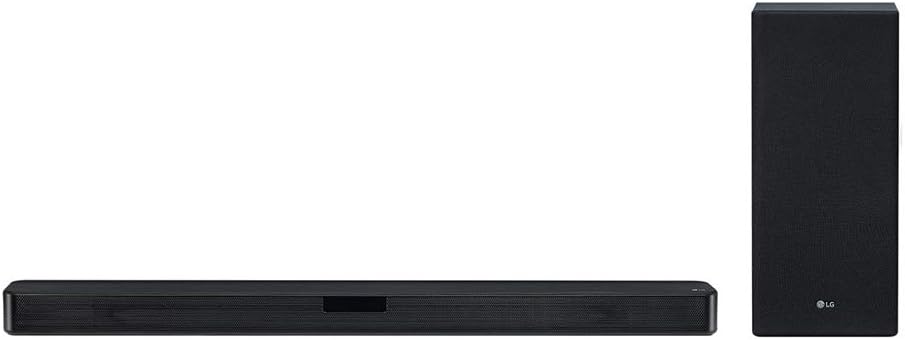
This image displays the LG SL5Y sound bar, a long, slender black unit, positioned horizontally, alongside its accompanying wireless subwoofer, a taller, rectangular black unit, positioned vertically. Both components feature a mesh grille design.
2. Safety Information
Observe the following safety precautions to prevent electric shock, fire, or damage to the product:
- Power Source: Connect the product only to an AC outlet rated 100-240V, 50/60Hz.
- Ventilation: Ensure adequate ventilation. Do not block ventilation openings.
- Water and Moisture: Do not expose the product to water, rain, or moisture. Do not place objects filled with liquids, such as vases, on the apparatus.
- Heat Sources: Keep the product away from heat sources such as radiators, heat registers, stoves, or other apparatus (including amplifiers) that produce heat.
- Cleaning: Unplug the product from the wall outlet before cleaning. Use a dry cloth only.
- Servicing: Do not attempt to service this product yourself. Refer all servicing to qualified service personnel.
3. Package Contents
Verify that all items are present in the package:
- LG SL5Y Sound Bar
- Wireless Subwoofer
- Remote Control
- Batteries (AAA x 2)
- Optical Cable
- Wall Mount Bracket
- Warranty Card
4. Setup
4.1. Placement
Place the sound bar centrally below your TV. The wireless subwoofer can be placed anywhere in the room, ideally near the sound bar for optimal bass distribution. Ensure there is clear space around both units for proper sound projection and ventilation.
4.2. Connecting to Your TV
Choose one of the following connection methods:
- HDMI ARC (Recommended):
- Connect one end of an HDMI cable (not included) to the HDMI OUT (TV ARC) port on the sound bar.
- Connect the other end to the HDMI IN (ARC) port on your TV.
- Enable HDMI ARC/CEC functions in your TV's settings. This allows your TV remote to control the sound bar's volume.
- Optical Cable:
- Connect the included optical cable to the OPTICAL IN port on the sound bar.
- Connect the other end to the Optical Digital Audio Out port on your TV.
- Select 'Optical' as the input source on the sound bar using the remote control.
4.3. Wireless Subwoofer Connection
The wireless subwoofer should automatically pair with the sound bar when both units are powered on. If the connection is not established:
- Ensure both the sound bar and subwoofer are plugged into power outlets.
- Check the LED indicator on the subwoofer. A solid green light indicates a successful connection. A blinking green light indicates it is searching for a connection.
- If pairing fails, press the PAIRING button on the back of the wireless subwoofer. The LED will blink green. Then, turn off and on the sound bar. The subwoofer should pair automatically.
5. Operating the Sound Bar
5.1. Basic Controls
Use the included remote control to operate the sound bar:
- Power (⑁): Turns the unit on or off.
- Volume (+/-): Adjusts the master volume level.
- Function (F): Selects the input source (HDMI ARC, Optical, Bluetooth, USB).
- Mute (🔇): Mutes or unmutes the sound.
5.2. Sound Modes
The LG SL5Y features DTS Virtual:X technology for an immersive audio experience. Use the remote control to select various sound effects:
- AI Sound Pro: Optimizes sound settings automatically based on content.
- DTS Virtual:X: Provides a virtual surround sound experience.
- Standard: For general listening.
- Bass Blast+: Enhances bass sound.
5.3. Bluetooth Connection
To connect a Bluetooth device:
- Press the Function (F) button on the remote control until 'BT' appears on the sound bar display.
- On your Bluetooth device (e.g., smartphone), enable Bluetooth and search for available devices.
- Select 'LG SL5Y' from the list of devices.
- Once paired, the sound bar will indicate a successful connection, and you can play audio from your device.
6. Maintenance
Proper care ensures the longevity of your sound bar:
- Cleaning: Use a soft, dry cloth to clean the surfaces of the sound bar and subwoofer. Do not use liquid cleaners or abrasive materials.
- Ventilation: Keep the ventilation openings clear of dust and debris.
- Storage: If storing the unit for an extended period, unplug it from the power outlet and store it in a cool, dry place.
7. Troubleshooting
Refer to the following table for common issues and their solutions:
| Problem | Possible Cause | Solution |
|---|---|---|
| No power | Power cord not connected. | Ensure the power cord is securely plugged into the wall outlet and the sound bar. |
| No sound | Incorrect input source selected. Volume is too low or muted. | Press the Function (F) button to select the correct input. Increase volume or unmute. |
| Subwoofer not connecting | Subwoofer is out of range or not paired. | Move the subwoofer closer to the sound bar. Follow the manual pairing steps in Section 4.3. |
| Bluetooth connection fails | Device not in pairing mode or out of range. | Ensure the sound bar is in Bluetooth pairing mode. Move your device closer to the sound bar. |
| Remote control not working | Batteries are depleted or inserted incorrectly. Obstruction between remote and sound bar. | Replace batteries with new AAA batteries. Ensure correct polarity. Remove any obstructions. |
8. Specifications
| Feature | Detail |
|---|---|
| Model Number | SL5Y |
| Speaker Type | Soundbar |
| Surround Sound Channel Configuration | 2.1 |
| Output Wattage | 400 Watts |
| Connectivity Technology | Wireless (Bluetooth, Subwoofer) |
| Compatible Devices | Laptop, Personal Computer, Smartphone, Tablet |
| Product Dimensions (Sound Bar) | 3.3"D x 35"W x 2.2"H |
| Item Weight | 0.01 Ounces (Soundbar only, approximate) |
| Control Method | Remote Control, App |
| Power Source | Corded Electric |
| Warranty Type | 1 Year Parts & Labor |
| UPC | 719192629035 |
9. Warranty and Support
This LG SL5Y Sound Bar comes with a 1 Year Parts & Labor warranty. For detailed warranty terms and conditions, please refer to the warranty card included in your package.
For technical support, troubleshooting assistance, or service inquiries, please visit the official LG website or contact LG customer service directly. Contact information can typically be found on the LG website or in your product documentation.