
Kid Galaxy 10320
Kid Galaxy 20V Rechargeable High Speed Silverado Truck Instruction Manual
Brand: Kid Galaxy | Model: 10320
1. Introduction and Overview
Thank you for purchasing the Kid Galaxy 20V Rechargeable High Speed Silverado Truck. This high-performance remote-controlled vehicle is designed for thrilling outdoor adventures, offering impressive speed and durability. Please read this manual thoroughly before operating your new truck to ensure safe and optimal performance.
Key Features:
- Full function 2.4G RC for precise control.
- Powerful 20V rechargeable battery for high speed and extended play.
- Achieves speeds up to 30mph.
- Authentic Silverado licensed vehicle design.
- Ready to run out of the box; all necessary batteries are included.

Image: The Kid Galaxy 20V Rechargeable High Speed Silverado Truck, showcasing its vibrant red, white, and black design with large off-road tires.
2. Safety Information
WARNING: Not for infants. This product is intended for users aged 8 years and up.
- Always operate the vehicle in open areas away from people, pets, and obstacles.
- Do not operate near streets, busy roads, or bodies of water.
- Keep fingers, hair, and loose clothing away from moving parts.
- Do not touch the motor or battery immediately after use, as they may be hot.
- Use only the provided charger and battery. Improper charging can cause fire or injury.
- Adult supervision is recommended for younger users.
3. Package Contents
Please check the package contents to ensure all items are present:
- Kid Galaxy 20V Rechargeable High Speed Silverado Truck
- 2.4GHz Professional Grade Controller
- 20V Rechargeable Lithium-Ion Battery
- Battery Charger
- 2 x AA Batteries (for controller)

Image: All components included in the package: the Silverado truck, the 2.4GHz controller, the 20V rechargeable battery, and its charger.
4. Setup
4.1 Charging the 20V Battery
- Connect the 20V rechargeable battery to the provided charger.
- Plug the charger into a standard wall outlet.
- Allow the battery to charge fully before first use. Refer to the charger's indicator lights for charging status.
- Do not overcharge the battery. Disconnect once fully charged.

Image: A close-up of the yellow 20V Power Drive Lithium-Ion battery, showing its specifications and warnings.
4.2 Installing Batteries in the Controller
- Locate the battery compartment on the underside of the 2.4GHz controller.
- Open the battery compartment cover.
- Insert 2 x AA batteries, ensuring correct polarity (+/-).
- Close the battery compartment cover securely.

Image: The black 2.4GHz Professional Grade Controller with its steering wheel and trigger controls.
4.3 Installing the 20V Battery in the Truck
- Locate the battery compartment on the underside or designated area of the truck.
- Carefully insert the charged 20V battery into the compartment, ensuring it clicks into place or is securely fastened.
- Close the battery compartment cover.
4.4 Pairing the Controller and Truck
The 2.4GHz system typically pairs automatically. Follow these steps:
- Turn on the truck's power switch.
- Turn on the controller's power switch.
- The indicator lights on both the truck and controller should stop flashing and remain solid, indicating a successful connection.
- If pairing fails, turn both devices off and repeat the steps.
5. Operating Instructions
5.1 Basic Controls
- Throttle Trigger: Pull the trigger to move forward. Push the trigger away from you to brake or reverse.
- Steering Wheel: Rotate the wheel left or right to steer the truck in the corresponding direction.
5.2 Driving Tips
- Start slowly to get a feel for the controls before attempting high speeds.
- Practice steering in wide turns before attempting sharper maneuvers.
- The truck has a range of over 150 feet. Keep the truck within sight and range for optimal control.
- Avoid driving on wet surfaces or through puddles to prevent damage to electronics.

Image: The Silverado truck appearing to be in motion, demonstrating its high-speed capability.
5.3 Camera Mount (Optional)
This truck features a camera mount compatible with most standard action cameras (camera not included). To use:
- Secure your action camera to the designated mount on the truck's roll bar.
- Ensure the camera is firmly attached before operation to prevent loss or damage.
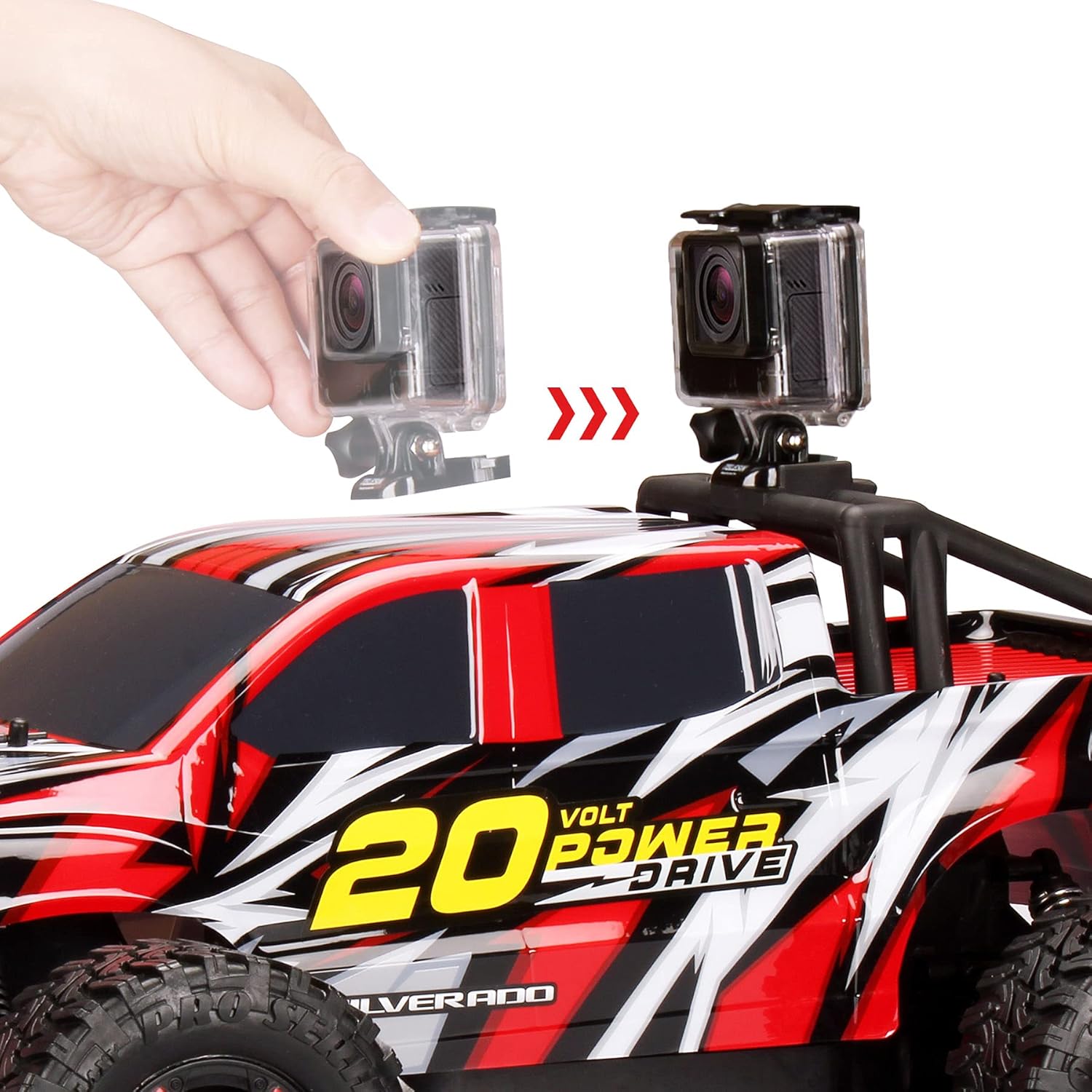
Image: A hand demonstrating how to attach an action camera to the integrated mount on the truck's roof.
6. Maintenance
6.1 Cleaning
The truck's material is designed for easy cleaning:
- Wipe clean with a damp cloth. Do not immerse the truck in water.
- Remove any dirt or debris from the wheels and suspension components regularly.
6.2 Battery Care and Storage
- Always remove the 20V battery from the truck when not in use.
- Store the battery and truck in a cool, dry place away from direct sunlight and extreme temperatures.
- If storing for extended periods, charge the battery to approximately 50% capacity.
- Remove AA batteries from the controller if not used for a long time to prevent leakage.
7. Troubleshooting
Truck Not Responding:
- Ensure both the truck and controller are turned ON.
- Check if the 20V battery in the truck is fully charged and properly installed.
- Check if the AA batteries in the controller are fresh and installed with correct polarity.
- Re-pair the controller and truck by turning both off and then on again.
Poor Range or Intermittent Control:
- Ensure there are no strong radio interference sources nearby (e.g., other RC devices, Wi-Fi routers).
- Operate the truck in an open area away from large metal objects or concrete structures.
- Check battery levels in both the truck and controller. Low batteries can affect range.
Truck Not Moving Straight:
- Check for any debris or damage to the steering mechanism or front wheels.
- Some controllers may have a steering trim adjustment. Refer to the controller's specific instructions if available.
8. Specifications
| Feature | Detail |
|---|---|
| Model Number | 10320 |
| Number of Pieces | 3 (Truck, Controller, Battery/Charger) |
| Assembly Required | No |
| Batteries Required | Yes |
| Batteries Included | Yes (1x 20V Li-Ion, 2x AA) |
| Battery Type (Controller) | Alkaline |
| Material Type(s) | Metal, Plastic |
| Material Care Instructions | Wipe Clean |
| Remote Control Included | Yes |
| Colour | Toy (Red/White/Black) |
| Release Date | Jan. 15, 2020 |
| Manufacturer Recommended Age | 8 years and up |
| Product Dimensions | 74.93 x 43.18 x 40.64 cm |
| Item Weight | 2.72 kg |
| ASIN | B07Q4DVFJG |
| Manufacturer | Kid Galaxy |
9. Warranty and Support
Kid Galaxy stands behind the quality of its products. For any questions, concerns, or warranty inquiries, please contact our customer support:
- Phone: 1-800-916-1193
- Website: Visit our website
- Place of Business: Manchester, NH 03101, USA
Please retain your proof of purchase for warranty claims.
Ask a question about this manual
Ask about setup, troubleshooting, compatibility, parts, safety, or missing instructions. Manuals+ will review the question and use this page’s manual context to help answer it.