
ARCADE1UP 815221022867
ARCADE1UP Street Fighter Classic 3-in-1 Home Arcade
Model: 815221022867
Brand: ARCADE1UP
1. Safety Information
To ensure safe operation of the product, be sure to read this Operation Manual before use. Keep this Operation Manual in a safe place for easy reference when needed.
2. Product Overview
The ARCADE1UP Street Fighter Classic 3-in-1 Home Arcade is a 3/4 scale replica of classic arcade cabinets, designed to bring authentic arcade gaming into your home. This unit features three iconic Street Fighter games: Street Fighter II Champion Edition, Street Fighter II The New Challengers, and Street Fighter II Turbo.
It boasts a 17-inch color LCD screen, real-feel arcade controls, and artwork that closely resembles the original arcade machines. The cabinet dimensions are approximately 45.8 inches (H) x 22.75 inches (W) x 19 inches (D), with a weight of about 58.5 pounds.

3. Setup and Assembly
Your ARCADE1UP arcade machine requires assembly. All necessary hardware and tools (a simple Phillips head screwdriver) are included. For a detailed visual guide, please refer to the official assembly video below. Ensure all parts are accounted for before beginning assembly.
The product comes securely packaged to prevent damage during transit. The packaging clearly displays the product name and brand.

4. Operating Instructions
The ARCADE1UP Street Fighter machine is designed for easy operation, offering a coinless free-play experience. Simply plug the unit into a standard AC outlet to power it on. The machine features a 17-inch color LCD screen and authentic arcade controls for an immersive gaming experience.
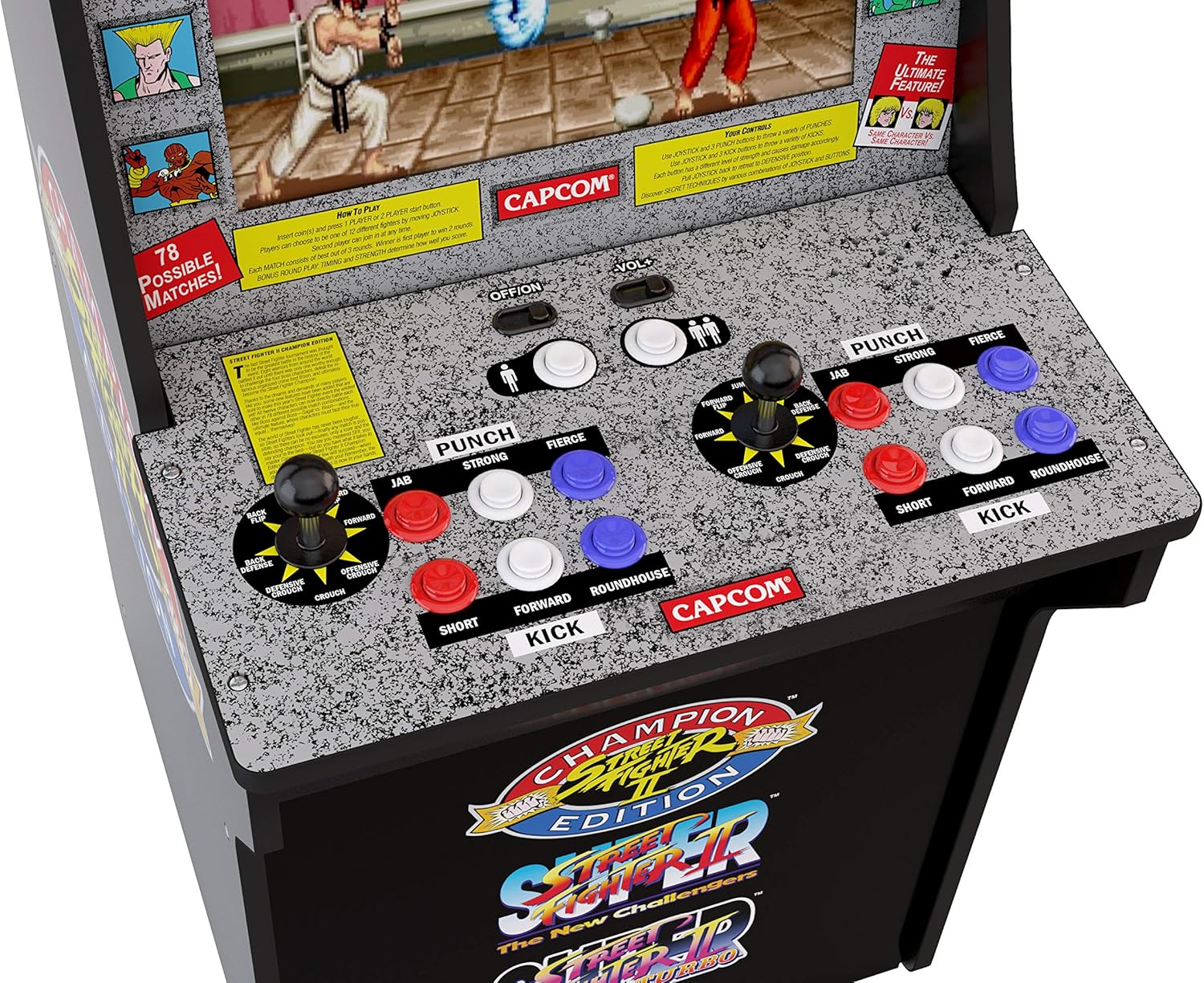
Game Selection: The machine includes three classic Street Fighter titles: Street Fighter II Champion Edition, Street Fighter II The New Challengers, and Street Fighter II Turbo. Use the joystick and buttons to navigate the on-screen menu and select your desired game.
Controls: The arcade features two sets of joysticks and six action buttons per player, replicating the original arcade feel. Controls are highly responsive for precise gameplay.

For a general overview of the Arcade1Up experience and gameplay, watch the video below:

5. Maintenance
To ensure the longevity and optimal performance of your ARCADE1UP machine, follow these simple maintenance guidelines:
- Cleaning: Use a soft, dry cloth to wipe down the cabinet and screen. Avoid abrasive cleaners or excessive moisture, which can damage the finish or electronics.
- Dusting: Regularly dust the control panel and screen to prevent buildup that could affect button and joystick performance.
- Storage: Store the machine in a cool, dry place away from direct sunlight and extreme temperatures.
- Power: Always unplug the machine from the power outlet when not in use for extended periods or during cleaning.
6. Troubleshooting
If you encounter any issues with your ARCADE1UP machine, please refer to the following common troubleshooting tips:
- No Power: Ensure the power cord is securely plugged into both the machine and a working electrical outlet. Check if the outlet is receiving power.
- No Display: Verify that the LCD screen's power cable is properly connected. If the screen remains blank, try unplugging and re-plugging the unit.
- Controls Unresponsive: Check all cable connections to the control panel. Ensure no debris is obstructing the buttons or joysticks.
- Sound Issues: Adjust the volume controls on the machine. Ensure no external audio devices are interfering.
- Game Freezing: Try restarting the machine by unplugging it from the power source for 10 seconds and then plugging it back in.
If problems persist after attempting these steps, please contact customer support.
7. Specifications
| Feature | Detail |
|---|---|
| Brand | ARCADE1UP |
| Model Number | 815221022867 |
| Product Dimensions | 19.29 x 23.23 x 45.67 inches |
| Item Weight | 1 pounds (approx. 58.5 lbs assembled) |
| Screen Size | 17 inches |
| Display Type | LCD |
| Controller Type | Joystick, Button Control |
| Material | Wood |
| Included Games | Street Fighter II Champion Edition, Street Fighter II The New Challengers, Street Fighter II Turbo |
| Recommended Age | 14 years and up |
| Release Date | May 29, 2019 |
8. Warranty and Support
For warranty information and customer support, please refer to the documentation included with your product or visit the official ARCADE1UP website. Keep your proof of purchase for any warranty claims.
Online Resources:
Ask a question about this manual
Ask about setup, troubleshooting, compatibility, parts, safety, or missing instructions. Manuals+ will review the question and use this page’s manual context to help answer it.