
Introduction
Thank you for choosing the OSITO Medical Foot Massager. This device utilizes advanced EMS (Electrical Muscle Stimulation) and TENS (Transcutaneous Electrical Nerve Stimulation) technologies to provide therapeutic relief and improve circulation in your feet and legs. This manual provides essential information for the safe and effective use, setup, operation, and maintenance of your device. Please read it thoroughly before use and retain it for future reference.
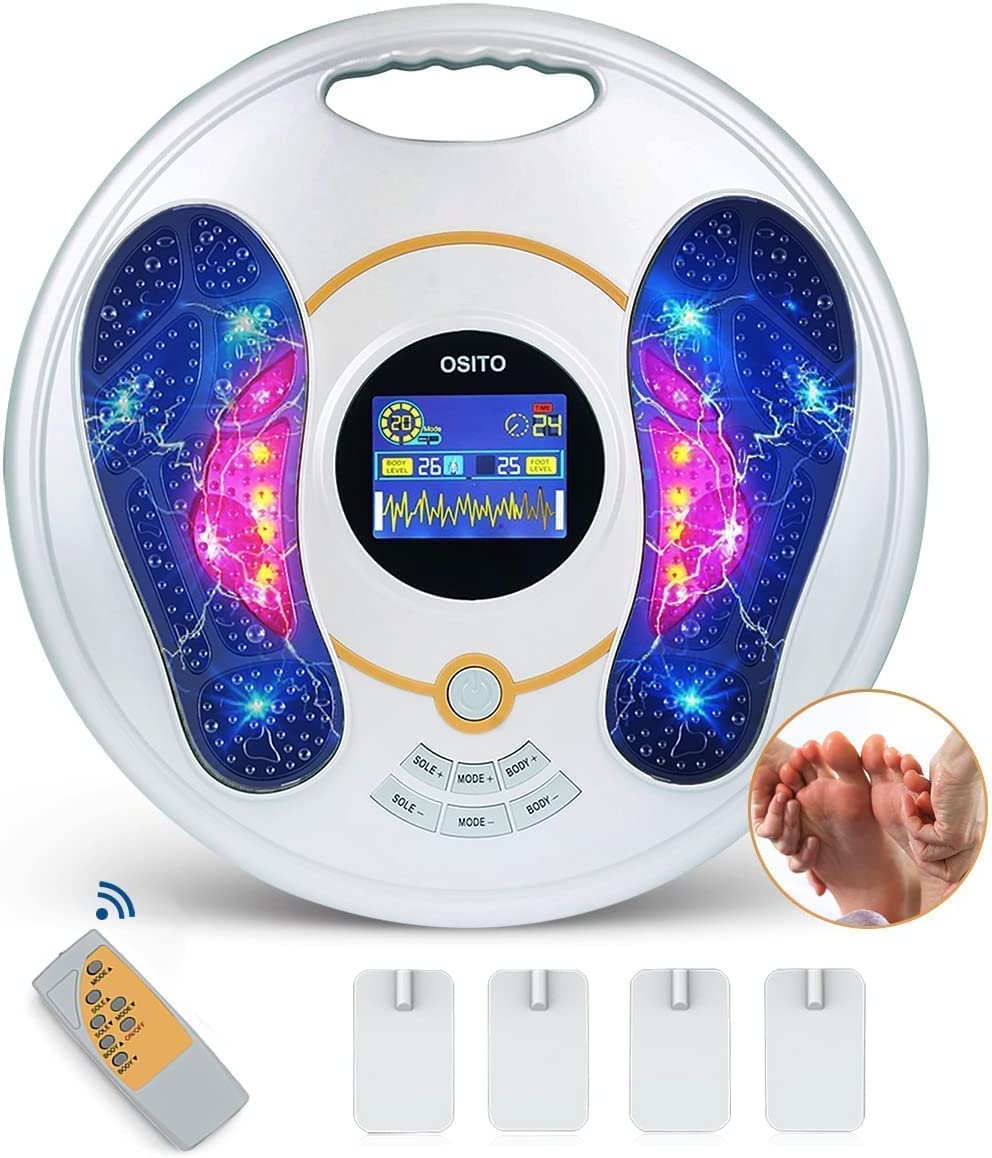
Image: The OSITO Medical Foot Massager main unit, featuring foot-shaped pads and a central control panel with an LCD screen.
Important Safety Information
This device is a Class II medical device approved by the FDA (Certificate Code: K133929). Always consult your physician before using any new medical device, especially if you have pre-existing conditions. Do not use this device if you have a pacemaker, implanted defibrillator, or any other electronic medical implant. Do not use if you are pregnant, have epilepsy, deep vein thrombosis, or cancer. Keep out of reach of children. Do not use on open wounds or irritated skin. Discontinue use if you experience discomfort or adverse reactions.
Package Contents
- OSITO Medical Foot Massager Main Unit
- Infrared Remote Control
- 4 Gel Electrode Pads
- Electrode Cables
- AC Power Adapter (not explicitly listed but implied for main unit operation)
- 2 AAA Batteries (for remote control)
- User Manual
Product Overview
The OSITO Medical Foot Massager features a central control panel with a large blue LCD screen for displaying settings. It includes foot-shaped pads for direct foot stimulation and ports for connecting external electrode pads for body stimulation.

Image: Examples of electrode pad placement on the neck, shoulders, and arms for targeted body stimulation.
Key Features:
- Dual Treatment Systems: One for foot stimulation (EMS) and another for body stimulation (TENS) using electrode pads.
- 25 Waveform Massage Modes: Offers a variety of stimulation patterns.
- 99 Intensity Levels: Adjustable intensity for both foot and body systems.
- Infrared Remote Control: For convenient operation.
- Large Blue LCD Screen: Clear display of settings and treatment parameters.
- Portable Design: Equipped with a handle for easy transport.
- Non-Vibrating: This device uses electrical stimulation, not mechanical vibration, kneading, or shiatsu massage.
Setup
- Unpack: Carefully remove all components from the packaging.
- Power Connection: Connect the AC power adapter to the main unit and plug it into a standard electrical outlet.
- Remote Control Batteries: Open the battery compartment on the infrared remote control and insert the 2 AAA batteries, ensuring correct polarity.
- Electrode Pad Connection (for body use): If using the body stimulation feature, connect the electrode cables to the main unit's designated ports. Attach the gel electrode pads to the ends of the cables.
Operating Instructions
Foot Stimulation:
- Ensure your feet are clean and dry.
- Sit comfortably and place both bare feet on the foot pads of the main unit.
- Press the Power button on the main unit or remote control to turn on the device.
- The LCD screen will illuminate. Use the Mode button to select one of the 25 available waveform massage modes.
- Adjust the intensity using the '+' and '-' buttons. Start with a low intensity and gradually increase until you feel a comfortable, gentle pulsing sensation.
- The recommended session duration is typically 20-30 minutes. The device may have an automatic shut-off feature.
Body Stimulation (with Electrode Pads):
- Ensure your skin is clean and dry where the pads will be applied.
- Attach the gel electrode pads firmly to the desired body areas (e.g., calf, ankle, legs, hips, lower back, shoulders, waist). Refer to the image in the Product Overview section for examples.
- Connect the electrode cables to the main unit.
- Turn on the device.
- Select a mode and adjust the intensity for the body system independently.
- The foot and body stimulation systems can be used simultaneously or separately.
Note: Always ensure both feet are on the pads for foot stimulation, or that electrode pads are properly adhered for body stimulation, to ensure proper circuit completion and effective treatment.
Maintenance
- Cleaning: Wipe the main unit and foot pads with a soft, damp cloth after each use. Do not use abrasive cleaners or immerse the device in water.
- Electrode Pads: The gel electrode pads are reusable but have a limited lifespan. Clean them gently with a damp cloth and store them on their protective film after use to maintain adhesiveness. Replace pads when they lose their stickiness.
- Storage: Store the device in a cool, dry place, away from direct sunlight and extreme temperatures.
- Batteries: Replace remote control batteries when the remote's functionality diminishes. Remove batteries if the device will not be used for an extended period.
Troubleshooting
| Problem | Possible Cause | Solution |
|---|---|---|
| Device does not turn on. | Power adapter not connected or faulty. | Check power connection. Try a different outlet. |
| No sensation during foot stimulation. | Feet not properly placed or dry. Intensity too low. | Ensure both bare feet are fully on the pads. Increase intensity gradually. Ensure feet are clean and slightly moist if necessary. |
| No sensation during body stimulation. | Electrode pads not adhering well or cables loose. Intensity too low. | Ensure pads are firmly attached to clean skin. Check cable connections. Increase intensity gradually. Replace old pads. |
| Remote control not working. | Dead batteries or incorrect battery placement. | Replace AAA batteries. Check polarity. Ensure no obstruction between remote and main unit. |
Specifications
- Model Number: 8011511836752
- Dimensions (L x W x H): 47.98 x 42.67 x 15.39 cm (18.89 x 16.80 x 6.06 inches)
- Weight: 2 Kilograms (4.4 lbs)
- Power Source: AC Power Adapter (main unit), 2 AAA Batteries (for remote control)
- Material: Silicone
- Color: White
- FDA Approval: Class II Medical Device (K133929)
- Massage Modes: 25 Waveform Modes
- Intensity Levels: 99 for both foot and body systems
- Wireless: Refers to the remote control functionality. The main unit requires an AC power connection.
Warranty and Support
OSITO offers a 100% satisfaction guarantee. If you are not satisfied with your purchase within 30 days, you may return it for a full refund or replacement. For any questions, technical support, or warranty claims, please contact OSITO customer service. Refer to the product packaging or the official OSITO website for contact details.
Manufacturer: OSTO