
1. Introduction
The Retekess T130 Wireless Tour Guide System is designed for clear and efficient one-way audio transmission, ideal for tours, conferences, simultaneous interpretation, and assistive listening. This system includes a transmitter (T130) and multiple receivers (T131), ensuring your message is heard clearly by all participants.
Key features include easy auto/manual pairing, stable signal with PLL technology, a working range of up to 50 meters, and 99 available channels to avoid interference. The compact and lightweight design makes it convenient for both presenters and listeners.
Video: Retekess T130 tour guide system details show. This video provides an overview of the system's components and design.
2. Setup Guide
2.1 Package Contents
Before starting, ensure all components are present:
- 1 x Wireless Transmitter (T130)
- 15 x Wireless Receivers (T131)
- 1 x 32-slot Charging Base
- 1 x Lavalier Microphone
- 15 x Single Earphones
- 16 x USB Charging Cables
- 16 x Lanyards

Image: A visual representation of all items included in the Retekess T130 Wireless Tour Guide System package.
2.2 Charging the Devices
Both the transmitter and receivers are powered by rechargeable Lithium-Ion batteries. Use the provided USB charging cables or the 32-slot charging base for convenient charging.
- Transmitter (T130): Connect the USB charging cable to the DC5V port on the side of the transmitter. A full charge provides approximately 12 hours of operation.
- Receiver (T131): Connect the USB charging cable to the charging interface on the receiver. A full charge provides approximately 18 hours of operation.

Image: Illustrates the two charging methods: individual USB charging and using the multi-slot charging base.

Image: A charging case designed to conveniently charge multiple receivers and transmitters simultaneously.
2.3 Connecting Accessories
- Transmitter: Plug the lavalier microphone into the MIC interface on the side of the T130 transmitter.
- Receiver: Plug the single earphone into the 3.5mm earphone jack on the T131 receiver.

Image: Shows the lanyard for wearing the device, the lavalier microphone, and the single earphone for listening.
3. Operating Instructions
3.1 Power On/Off
To power on or off both the transmitter and receiver, press and hold the power button (usually the 'M' button on the transmitter and the central button on the receiver) for a few seconds until the screen illuminates or turns off.
3.2 Channel Pairing (Automatic)
The T130 system features an automatic pairing function for quick setup:
- On the Transmitter (T130): Press and hold the 'M' button and the '>>|' (next track) button simultaneously until the ID number and antenna icon start flashing. This indicates the transmitter is in pairing mode.
- On the Receiver (T131): Press and hold the '|<' (previous track) and '>>|' (next track) buttons simultaneously until the receiver powers on and displays '00'.
- Release the '|<' button on the receiver. The receiver will automatically search for and pair with the transmitter's channel.
- Once paired, the ID number on the receiver will match the transmitter's ID, and the antenna icon will stop flashing.
Video: Demonstrates the simple automatic pairing method for the Retekess T130 tour guide system.
Video: Explains how the Retekess T130 tour guide system automatically pairs channels.
3.3 Channel Pairing (Manual)
If automatic pairing is not desired or fails, you can manually set the channel:
- On the Transmitter (T130): Press the 'M' button to enter channel setting mode. Use the '|<' and '>>|' buttons to select the desired channel (1-99). Press 'M' again to confirm.
- On the Receiver (T131): Press the 'M' button to enter channel setting mode. Use the '|<' and '>>|' buttons to select the same channel number as the transmitter. Press 'M' again to confirm.
Video: A detailed guide on how to use the Retekess T130 tour guide system, including manual channel selection.

Image: Illustrates the use of 99 channels for simultaneous translation to different language groups.
3.4 Adjusting Volume
On the receiver (T131), use the '|<' and '>>|' buttons to adjust the listening volume to a comfortable level.
3.5 Auxiliary Audio Input
The transmitter supports one-way audio transmission from external media devices. Connect your mobile phone, notebook, or computer to the transmitter using an AUX cable (not included) to broadcast audio to all paired receivers.

Image: Demonstrates connecting an external audio source, such as a smartphone, to the transmitter for broadcasting.
4. Maintenance
- Cleaning: Use a soft, dry cloth to clean the devices. Avoid using harsh chemicals or abrasive materials.
- Battery Care: To prolong battery life, avoid fully discharging the devices frequently. Charge them regularly, especially if they will be stored for an extended period.
- Storage: Store the system in a cool, dry place away from direct sunlight and extreme temperatures. The portable carrying case is ideal for safe storage and transport.

Image: The system comes with a portable carrying case for easy and secure transport and storage.
5. Troubleshooting
- No Sound from Receiver:
- Ensure the receiver is powered on and fully charged.
- Verify that the receiver is on the same channel as the transmitter. Re-pair if necessary.
- Check the earphone connection and volume level on the receiver.
- Ensure the transmitter's microphone is properly connected and the transmitter is powered on.
- Interference or Poor Sound Quality:
- Change the channel on the transmitter and re-pair all receivers to a new, clearer channel.
- Ensure the transmitter and receivers are within the specified working range (up to 50m).
- Avoid physical obstructions between the transmitter and receivers.
- Devices Not Charging:
- Check if the charging cables are securely connected to both the device and the power source.
- Ensure the charging base is properly powered.
- Try a different USB port or power adapter.
6. Specifications
| Feature | Detail |
|---|---|
| Item Weight | 12.36 pounds (total package) |
| Product Dimensions | 19.69 x 10.43 x 5.51 inches (package) |
| Model Number | FF9443D-N9424D |
| Batteries | 16 Lithium Ion batteries required (included) |
| Color Name | Black |
| Size | Medium |
| Battery Type | Lithium Ion |
| Transmitter Battery Life | Approx. 12 hours |
| Receiver Battery Life | Approx. 18 hours |
| Working Range | Up to 50 meters (164 feet) |
| Channels | 99 channels |
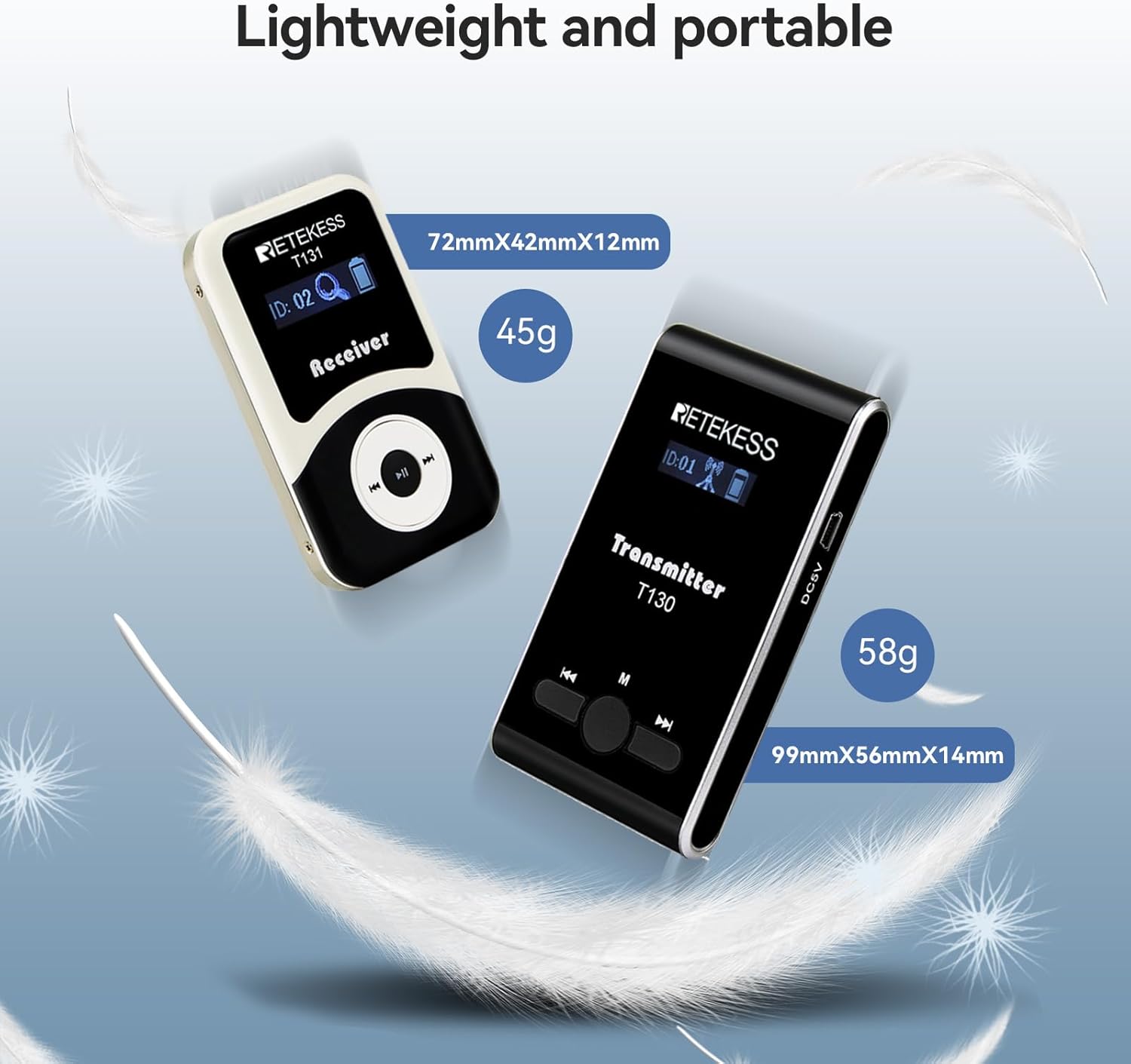
Image: Shows the compact and lightweight design of the T130 transmitter (58g, 99x56x14mm) and T131 receiver (45g, 72x42x12mm).

Image: Illustrates the long battery life: Transmitter (900mAh) lasts 12 hours, Receiver (600mAh) lasts 18 hours.

Image: Depicts the effective working distance of the system, up to 60 meters (approximately 197 feet).
7. Warranty & Support
Retekess products come with a three-year service warranty. For detailed warranty information, product support, or service inquiries, please refer to the warranty card included in your package or visit the official Retekess website. You may also contact the seller directly for assistance.
Manufacturer: Retekess
Contact: Refer to product packaging or official Retekess website for customer service contact information.