
1. Introduction
Thank you for choosing the OneDer V12 4.2 Bluetooth Speaker. This manual provides essential instructions for setting up, operating, and maintaining your speaker. Please read it carefully before use to ensure optimal performance and longevity of your device.
2. Package Contents
Verify that all items are present in your package:
- OneDer V12 Bluetooth Speaker
- Micro USB Charging Cable
- User Manual (this document)
- Protective Pouch
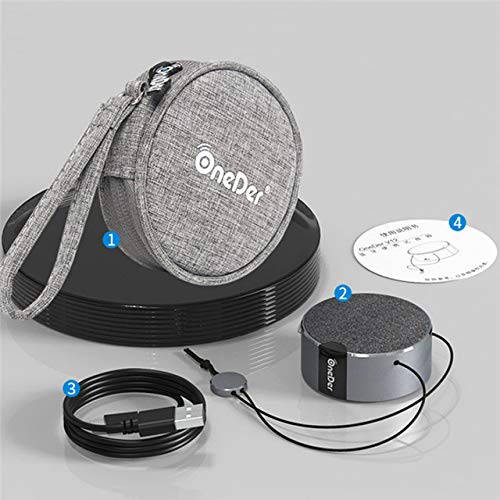
Figure 2.1: The OneDer V12 speaker, micro USB cable, and protective pouch included in the package.
3. Product Overview
The OneDer V12 is a compact and portable Bluetooth speaker designed for wireless audio playback and hands-free calling. It features a durable metal construction and a convenient lanyard for portability.

Figure 3.1: Top-down view of the OneDer V12 Bluetooth Speaker, showcasing its compact design and integrated lanyard.
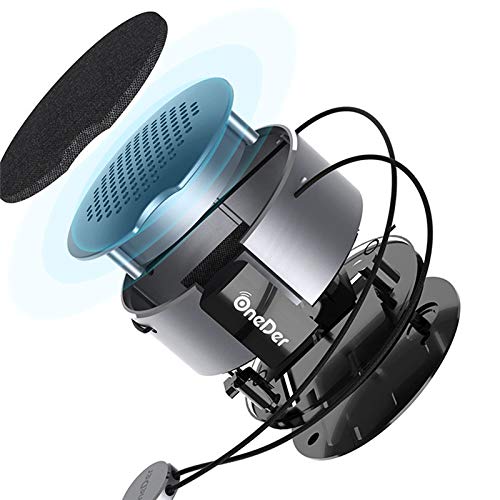
Figure 3.2: An exploded diagram illustrating the internal components and construction of the OneDer V12 speaker.
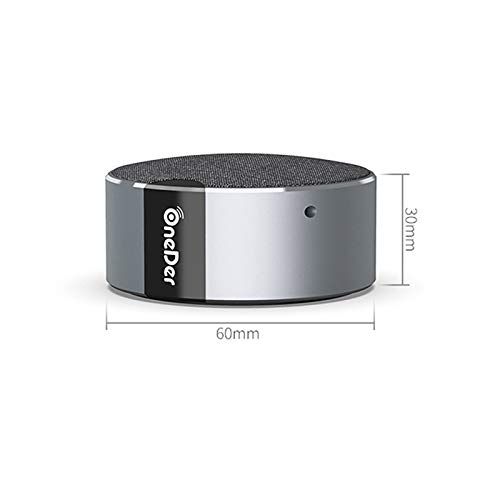
Figure 3.3: Diagram showing the compact dimensions of the OneDer V12 speaker: 60mm diameter and 30mm height.
4. Setup
4.1. Power On
Press and hold the power button to turn on the speaker. A prompt tone will sound, and the speaker will automatically enter Bluetooth pairing mode, indicated by a rapidly flashing blue light.
4.2. Device Connection (Bluetooth Pairing)
- Ensure the OneDer V12 speaker is powered on and in Bluetooth pairing mode (blue light flashing).
- On your mobile device (smartphone, tablet, or laptop), enable Bluetooth.
- Search for 'OneDer V12' in the list of available Bluetooth devices.
- Select 'OneDer V12' to connect. A prompt tone will confirm successful pairing, and the blue light on the speaker will become solid.
The speaker will automatically disconnect when powered off and attempt to reconnect to the last paired device when powered on again for convenient use.
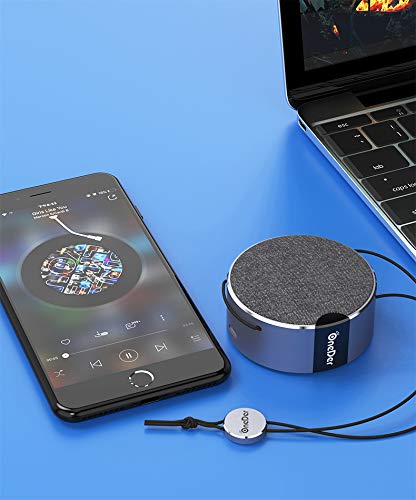
Figure 4.1: The OneDer V12 speaker connected wirelessly to a smartphone and a laptop, demonstrating its versatile connectivity.
5. Operating Instructions
5.1. Bluetooth Playback
When your mobile device is connected to the speaker via Bluetooth, you can control media playback (e.g., play, pause, skip tracks) directly from your mobile device. The speaker acts as the audio output.
5.2. TWS (True Wireless Stereo) Function
The TWS function allows you to pair two OneDer V12 speakers together for a stereo audio experience.
5.2.1. TWS Pairing
- Ensure both OneDer V12 speakers are powered on and in Bluetooth pairing mode.
- Short press the Power Button on either speaker. The speakers will interconnect, and a prompt tone will sound. The blue lights on both speakers will become solid.
- On your mobile device, search for 'OneDer V12' in the Bluetooth device list and connect. Audio will now play in stereo through both speakers.
5.2.2. TWS Disconnection
After two speakers are successfully paired in TWS mode, short press the Power Button on either speaker again. A prompt tone will indicate that the speakers have disconnected from TWS mode.
5.3. Calling Function
The OneDer V12 speaker includes a built-in microphone for hands-free calling when connected to your mobile device.
- Answering a Call: When the speaker is connected via Bluetooth and a call is received, a prompt tone will sound. Short press the power button to answer the call.
- Ending a Call: During a call, short press the power button again to end the call.
- Rejecting a Call: When an incoming call is received, press and hold the power button for approximately 2 seconds to reject the call.
6. Specifications
| Feature | Description |
|---|---|
| Model Name | OneDer V12 4.2 |
| Brand | OneDer |
| Connectivity Technology | Bluetooth 4.2, Wireless |
| Special Feature | Bluetooth speaker with built-in microphone |
| Recommended Uses | For Smartphones or Tablets |
| Compatible Devices | Smartphone, Tablet |
| Power Source | Battery Powered |
| Item Weight | 67 Grams |
| Material | Metal |
| Is Waterproof | Yes |
| Mounting Type | Tabletop Mount |

Figure 6.1: The OneDer V12 speaker demonstrating its portability, attached to clothing during outdoor activity.
7. Maintenance
To ensure the longevity and optimal performance of your OneDer V12 speaker, follow these maintenance guidelines:
- Cleaning: Use a soft, dry cloth to clean the speaker's exterior. Avoid using abrasive cleaners, solvents, or harsh chemicals.
- Storage: Store the speaker in a cool, dry place away from direct sunlight and extreme temperatures. Use the provided protective pouch when not in use or during travel.
- Battery Care: To preserve battery life, avoid fully discharging the speaker frequently. Charge the speaker regularly, even if not in use for extended periods.
- Water Resistance: While the speaker is waterproof, avoid prolonged submersion in water. Ensure the charging port cover is securely closed before exposure to water.
8. Troubleshooting
If you encounter issues with your OneDer V12 speaker, refer to the following common troubleshooting steps:
- Speaker does not power on: Ensure the battery is charged. Connect the speaker to a power source using the micro USB cable and try again.
- Cannot pair with Bluetooth device:
- Ensure the speaker is in pairing mode (blue light flashing).
- Make sure Bluetooth is enabled on your mobile device.
- Move the speaker closer to your device.
- Turn off and on both the speaker and your mobile device's Bluetooth.
- Clear the 'OneDer V12' entry from your device's Bluetooth history and attempt to pair again.
- No sound or low volume:
- Increase the volume on both the speaker and your connected device.
- Ensure the speaker is properly connected via Bluetooth.
- Check if the speaker's battery is low.
- TWS pairing fails: Ensure both speakers are fully charged and in Bluetooth pairing mode before attempting TWS pairing. Try resetting both speakers by powering them off and on.
9. Warranty and Support
The OneDer V12 Bluetooth Speaker comes with a standard manufacturer's warranty. Please refer to the warranty card included in your package for specific terms and conditions, including warranty duration and coverage details.
For technical support, troubleshooting assistance beyond this manual, or warranty claims, please contact OneDer customer service through the contact information provided on the product packaging or the official OneDer website. Please have your product model number (V12) and proof of purchase ready when contacting support.