
HUAWEI P30 Lite
HUAWEI P30 Lite Smartphone User Manual
Model: MAR-LX3A
1. Introduction
This manual provides essential instructions for setting up, operating, and maintaining your HUAWEI P30 Lite smartphone. Please read this guide thoroughly to ensure proper use and to maximize the device's capabilities.
2. Product Overview
The HUAWEI P30 Lite is a dual SIM smartphone featuring a 6.15-inch IPS LCD display, an AI triple camera system, and 128GB of internal storage with 4GB RAM. It operates on Android 9.0 (Pie) and is powered by a Hisilicon Kirin 710 processor.
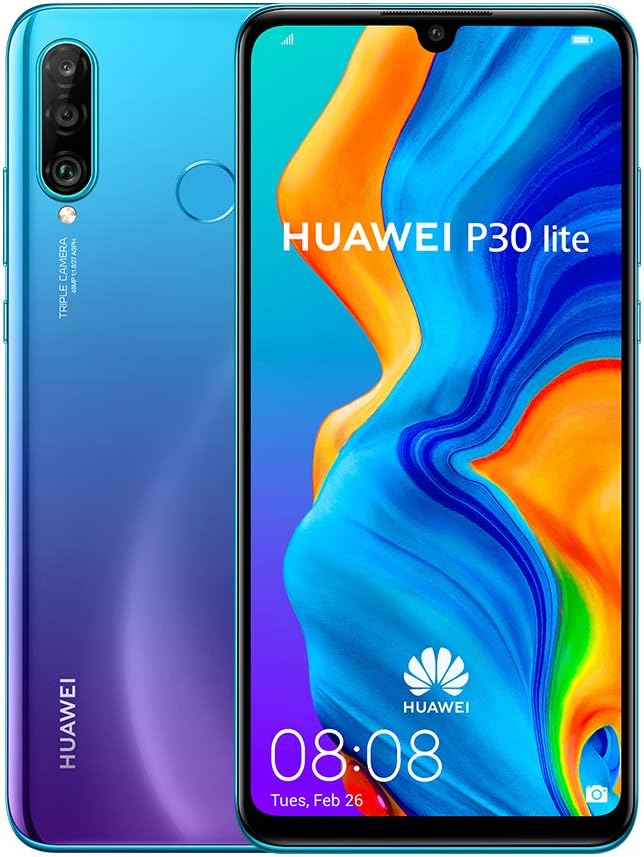
Figure 2.1: Front and back view of the HUAWEI P30 Lite smartphone, showcasing its display and triple camera setup.

Figure 2.2: Graphic illustrating key features including 6.15" Dewdrop Display, camera specifications, HUAWEI Kirin 710, Android 9.0, 4GB RAM + 128GB ROM, and 3340 mAh battery.

Figure 2.3: Close-up view of the HUAWEI P30 Lite's triple camera system on the rear.

Figure 2.4: Side view of the HUAWEI P30 Lite, showing the power and volume buttons.
2.1 Package Contents
- HUAWEI P30 Lite Smartphone
- Charging Cable
- Earphones
- SIM Eject Tool
- Quick Start Guide (not this document)
3. Setup
3.1 Inserting SIM and Memory Cards
The HUAWEI P30 Lite supports dual SIM cards. Use the provided SIM eject tool to open the SIM card tray. Insert your Nano-SIM cards and an optional microSD card (for expanded storage) into the designated slots. Ensure the cards are correctly oriented before reinserting the tray into the device.
3.2 Initial Power On
Press and hold the power button located on the side of the device until the HUAWEI logo appears. Follow the on-screen instructions to complete the initial setup, including language selection, Wi-Fi connection, and Google account setup.
3.3 Network Connection
This device is a global GSM factory unlocked phone. It supports 4G LTE bands 1, 2, 3, 4, 5, 7, 8, 12, 17, 28, and 66. It is compatible with most GSM carriers worldwide, including AT&T and T-Mobile in the U.S. It will not work with CDMA carriers such as Verizon or Sprint.
4. Operating Instructions
4.1 Basic Navigation
The HUAWEI P30 Lite runs on Android 9.0 (Pie). Navigate the interface using touch gestures: tap to select, swipe to scroll, pinch to zoom. Access quick settings by swiping down from the top of the screen.
4.2 Making Calls and Sending Messages
To make a call, open the Phone app and dial the number or select a contact. To send a message, open the Messages app, start a new conversation, enter the recipient's number or contact, and type your message.
4.3 Using the Camera
The device features an AI Triple Camera. Open the Camera app from the home screen or lock screen. Select your desired mode (e.g., Photo, Portrait, Video) and tap the shutter button to capture images or start recording. The AI features automatically optimize settings for various scenes.
4.4 Internet and Connectivity
Connect to the internet via Wi-Fi or mobile data. To connect to Wi-Fi, go to Settings > Wireless & networks > Wi-Fi, select a network, and enter the password if required. Ensure mobile data is enabled in settings for cellular internet access.
5. Maintenance
5.1 Battery Care
The device is equipped with a 3340 mAh Lithium-Polymer battery. Use only HUAWEI-approved chargers and cables. Avoid exposing the device to extreme temperatures. For optimal battery life, avoid fully discharging the battery frequently.
5.2 Software Updates
Regularly check for software updates to ensure your device has the latest features and security patches. Go to Settings > System > Software update to check for and install available updates.
5.3 Cleaning the Device
Use a soft, lint-free cloth to clean the screen and body of the phone. Avoid using harsh chemicals or abrasive materials. Keep the charging port and speaker grilles free of dust and debris.
6. Troubleshooting
6.1 Device Not Powering On
- Ensure the battery is charged. Connect the device to a charger for at least 10 minutes before attempting to power it on.
- Press and hold the power button for 10-15 seconds to perform a forced restart.
6.2 Network Connectivity Issues
- Verify that your SIM card is correctly inserted and active.
- Check if mobile data is enabled in your settings.
- Ensure you are within your carrier's coverage area.
- Restart the device.
- Note: This international version is not compatible with CDMA networks (e.g., Verizon, Sprint).
6.3 Apps Not Working or Incompatible
- Ensure your device's software is up to date.
- Clear the cache and data for the problematic app via Settings > Apps > [App Name] > Storage.
- Reinstall the app.
- Some applications may have specific compatibility requirements; check the app's developer information.
7. Specifications
| Brand | HUAWEI |
| Model Name | P30 Lite |
| Model Number | MAR-LX3A (International Version) |
| Operating System | Android 9.0 (Pie) |
| Processor | Hisilicon Kirin 710 (Octa-core, 4x2.2 GHz Cortex-A73 & 4x1.7 GHz Cortex-A53) |
| RAM | 4 GB |
| Internal Storage | 128 GB |
| Display | 6.15 inches IPS LCD, 1080 x 2312 pixels (~415 ppi) |
| Main Camera | AI Triple Camera (24MP + 8MP + 2MP) |
| Front Camera | 32MP |
| Battery | 3340 mAh Lithium-Polymer |
| Connectivity | 4G LTE (Bands 1, 2, 3, 4, 5, 7, 8, 12, 17, 28, 66), Wi-Fi, Bluetooth |
| Dimensions | 6.6 x 4.2 x 1.5 cm |
| Weight | 158.76 g |
8. Warranty and Support
As an international version of the HUAWEI P30 Lite, this device may not be covered by a local warranty in all regions, particularly in the U.S. For specific warranty information, please refer to the documentation included with your purchase or contact your point of sale. For technical support, visit the official HUAWEI support website for your region.
For further assistance, you may visit the HUAWEI Store on Amazon.
Related documentsP30 Lite


Ask a question about this manual
Ask about setup, troubleshooting, compatibility, parts, safety, or missing instructions. Manuals+ will review the question and use this page’s manual context to help answer it.