
1. Introduction
This manual provides detailed instructions for the installation, operation, and maintenance of your OBO HANDS V70F 7-inch Wired Video Door Phone Intercom System. This system is designed to enhance security and communication for multi-apartment buildings, supporting 2, 3, or 4 apartment units with individual call buttons and indoor monitors.
2. Product Overview and Features
The OBO HANDS V70F system offers a comprehensive solution for door communication and access control. Key features include:
- Multi-Apartment Support: Equipped with 3 call buttons, each connecting to a dedicated indoor monitor, ideal for 3 apartment units.
- High-Resolution Camera: Features a 700TVL IR Night Vision COMS metal camera for clear video, even in low light conditions.
- Integrated RFID Reader: Built-in RFID reader supports up to 500 user cards for convenient access.
- Weatherproof Outdoor Unit: The outdoor camera includes a waterproof cover, ensuring reliable operation in various weather conditions.
- Wired Connection: Utilizes a 4-core cable system for stable communication between the camera and monitors, with a maximum distance of up to 100 meters.
- Electric Lock Compatibility: Supports connection to an electric lock, allowing door unlocking directly from the indoor monitor or outdoor camera (electric lock sold separately).
2.1 Indoor Monitor Components
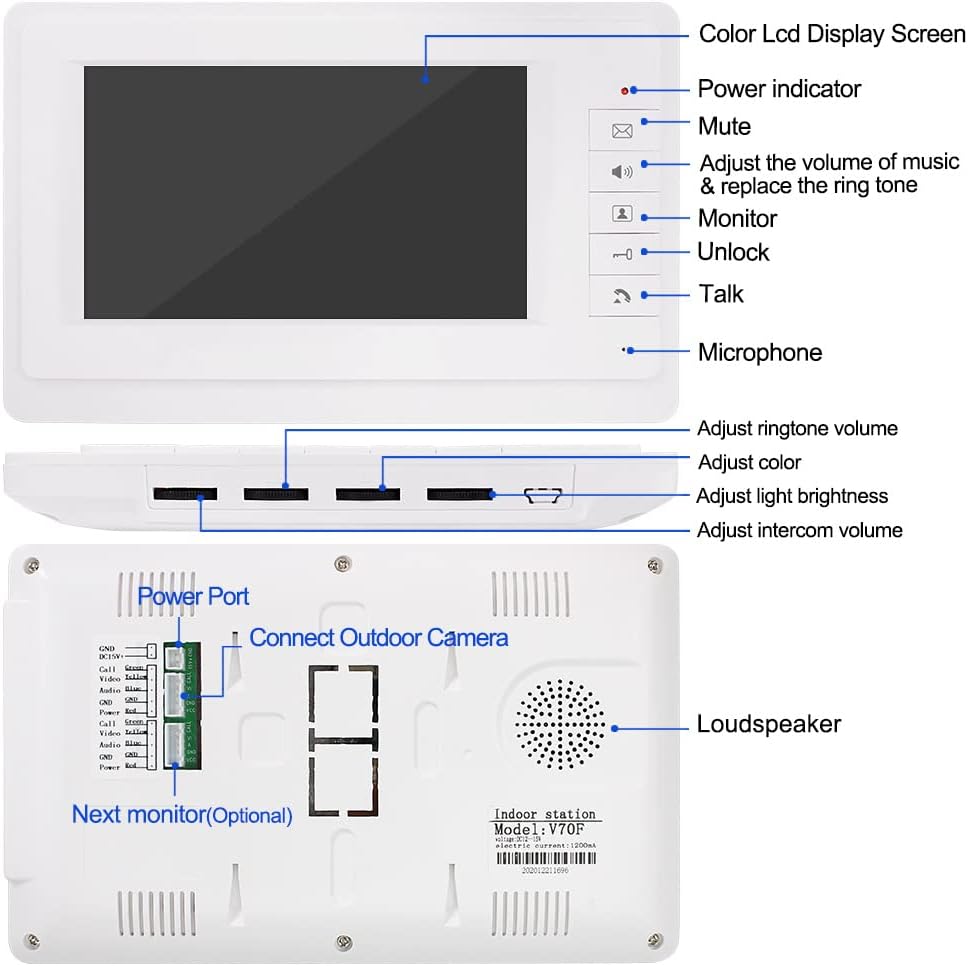
Figure 1: Indoor Monitor Front and Rear View. This diagram illustrates the front panel controls including the color LCD display, power indicator, mute, volume/ringtone adjustment, monitor button, unlock button, talk button, and microphone. The side panel shows controls for ringtone volume, color, light brightness, and intercom volume. The rear view highlights the power port, outdoor camera connection, and optional next monitor connection, along with the loudspeaker.
2.2 Outdoor Camera Components

Figure 2: Outdoor Unit Internal Wiring. This image displays the internal components of the outdoor unit, including the speaker, camera, microphone (MIC), LED light, and three call buttons. It also shows the connection points for the electric lock and the indoor units.
3. Setup and Installation
Proper installation is crucial for optimal performance. Follow these guidelines for setting up your video door phone system.
3.1 Cabling Standards
The system uses a 4-core cable for connection. Select the appropriate cable diameter based on the distance between the outdoor camera and the indoor monitor:
| Distance | Recommended Cable (RVV4) |
|---|---|
| 30m | RVV4*0.30 |
| 50m | RVV4*0.50 |
| 100m | RVV4*1.0 |
3.2 Outdoor Unit Installation

Figure 3: Outdoor Unit Installation Guide. This diagram illustrates the recommended standard height for the door station installation (145cm-160cm from the ground, 50cm from the wall) and depicts an embedded installation method.

Figure 4: Outdoor Unit Dimensions and Wiring Diagram. This image provides the physical dimensions of the outdoor unit (276mm height, 112mm width, 45mm depth) and a detailed wiring diagram for connecting the electric door lock and multiple indoor monitors.
Ensure all connections are secure and properly insulated to prevent electrical issues and ensure reliable operation.
4. Operating Instructions
4.1 Two-Way Intercom Function
When a visitor presses a call button on the outdoor unit, the corresponding indoor monitor will ring. You can then initiate a two-way conversation with the visitor.

Figure 5: Two-Way Intercom in Use. This image shows a visitor at the outdoor unit pressing a call button and a resident responding via the indoor monitor, illustrating the two-way communication feature.
4.2 Door Unlocking
If an electric lock is connected, you can unlock the door directly from the indoor monitor by pressing the "Unlock" button. The outdoor camera also supports unlocking via RFID cards.
4.3 Do Not Disturb Mode
The indoor monitor supports a "Do Not Disturb" mode, which can be activated to silence incoming calls.

Figure 6: Do Not Disturb Mode. This image depicts the indoor monitor screen with a "Do Not Disturb" symbol, indicating the feature is active.
4.4 Adjusting Ring Volume
You can adjust the ring volume of the indoor monitor. Refer to the video below for a demonstration.
Video 1: Adjusting Indoor Monitor Volume. This video demonstrates how to adjust the ring volume on the indoor monitor.
5. Maintenance
To ensure the longevity and optimal performance of your OBO HANDS V70F system, follow these maintenance tips:
- Cleaning: Regularly wipe the indoor monitor screen and outdoor camera lens with a soft, dry cloth. Avoid abrasive cleaners or solvents.
- Outdoor Unit Protection: The outdoor unit is designed with a waterproof cover. Ensure it remains free from debris and is securely mounted to maintain its weather resistance.
- Cable Inspection: Periodically check all wiring connections for any signs of wear, damage, or loose connections.
6. Troubleshooting
If you encounter issues with your system, please refer to the following common troubleshooting steps:
- No Power to Monitor: Check the power connection to the indoor monitor. Ensure the power adapter is securely plugged into both the monitor and a working power outlet.
- No Video/Audio from Outdoor Unit: Verify that the 4-core cable connecting the outdoor unit to the indoor monitor is properly connected at both ends. Inspect the cable for any visible damage.
- Door Unlock Not Working: Confirm that the electric lock is correctly wired to the outdoor unit and that the power supply for the lock is functional.
- Poor Video Quality: Ensure the outdoor camera lens is clean and free from obstructions. Check for strong interference sources nearby.
For persistent issues, please contact customer support.
7. Specifications
| Feature | Detail |
|---|---|
| Model Number | V70F |
| Brand | OBO HANDS |
| Connectivity Technology | Wired |
| Indoor/Outdoor Usage | Indoor, Outdoor |
| Special Feature | Night Vision |
| Video Capture Resolution | 480p |
| Field Of View | 90 Degrees |
| Material | Plastic |
| Item Weight | 6.11 pounds (2.78 Kilograms) |
| Package Dimensions | 14.88 x 10.87 x 5.28 inches |
| International Protection Rating | IP65 |
| Wattage | 5 watts |
| Upper Temperature Rating | 60 Degrees Celsius |
| Date First Available | March 24, 2019 |
8. Warranty and Support
OBO HANDS products undergo rigorous quality testing to ensure reliability and durability.
For any questions, concerns, or technical assistance, please contact our support team:
- WhatsApp Support: +86 177 2255 8183 (Available Mon-Sun 24/7)