Introduction
The NAD C 588 turntable is engineered to deliver exceptional audio fidelity for vinyl enthusiasts. It combines precision mechanics with high-quality components to ensure accurate playback and a rich, detailed sound experience. This manual provides essential information for setting up, operating, and maintaining your C 588 turntable.
Important Safety Information
- Read all instructions before operating the turntable.
- Keep the turntable away from water or moisture.
- Do not block ventilation openings.
- Use only attachments/accessories specified by the manufacturer.
- Unplug the turntable during lightning storms or when unused for long periods.
- Refer all servicing to qualified service personnel.
- Proposition 65 Warning: This product may contain chemicals known to the State of California to cause cancer and birth defects or other reproductive harm.
What's in the Box
Carefully unpack all components and ensure the following items are present:
- NAD C 588 Turntable Unit
- Dust Cover
- Platter (Glass)
- Drive Belt
- Felt Mat
- Counterweight
- Anti-skate Weight
- RCA Audio Cable
- Power Adapter
- Ortofon 2M Red Cartridge (pre-installed)
- User Manual (this document)
Setup
1. Unpacking and Placement
Remove the turntable and all accessories from the packaging. Place the turntable on a stable, level surface, away from direct sunlight, heat sources, and excessive vibration. Ensure adequate ventilation around the unit.

Image: The NAD C 588 turntable with its clear dust cover closed, showcasing its sleek black finish and compact design. This view highlights the unit's overall aesthetic when not in use.
2. Platter and Belt Installation
- Carefully place the glass platter onto the spindle.
- Locate the drive belt. Gently stretch the belt around the inner rim of the platter and then around the motor pulley. Ensure the belt is not twisted.
- Place the felt mat on top of the glass platter.
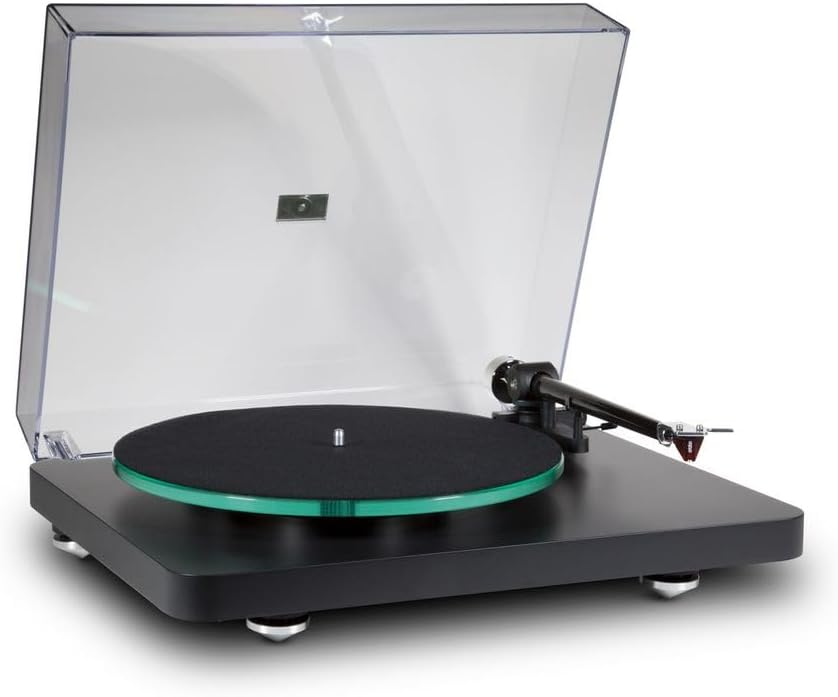
Image: The NAD C 588 turntable with its dust cover open, revealing the glass platter, felt mat, carbon fiber tonearm, and the pre-installed Ortofon 2M Red cartridge. This image provides a clear view of the turntable's main components ready for operation.
3. Tonearm Setup
The C 588 features a carbon fiber tonearm designed for precise tracking.
- Counterweight: Slide the counterweight onto the rear of the tonearm. Adjust it until the tonearm floats horizontally. Then, rotate the counterweight to set the recommended tracking force for the Ortofon 2M Red cartridge (typically 1.8 grams). Refer to the cartridge manufacturer's specifications for exact values.
- Anti-skate: Attach the anti-skate weight to the small loop on the tonearm support and guide the thread over the anti-skate wire support. The anti-skate force should generally match the tracking force.
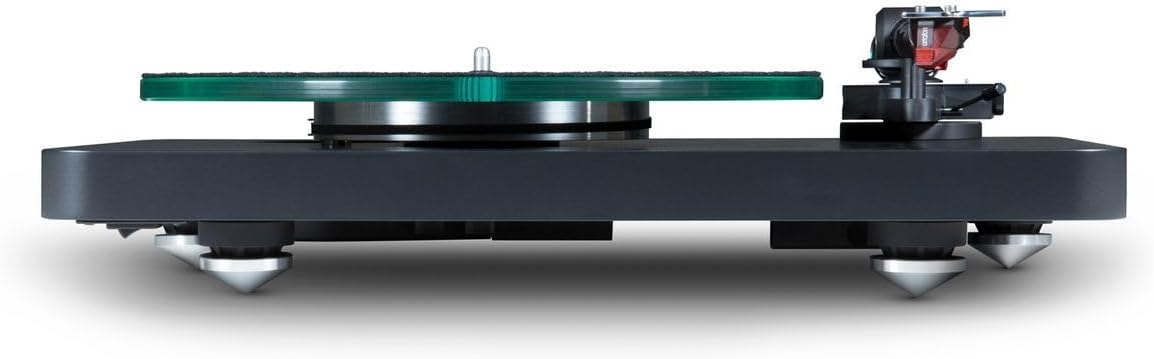
Image: A side profile view of the NAD C 588 turntable, highlighting the thickness of the MDF base, the glass platter, and the carbon fiber tonearm with the Ortofon 2M Red cartridge. This perspective emphasizes the robust construction and key components.
4. Cartridge Installation (Pre-installed)
Your NAD C 588 comes with the Ortofon 2M Red cartridge pre-installed and aligned. No further installation is typically required. Ensure the stylus guard is removed before playing records.
5. Connections
- Connect the RCA audio cables from the turntable's output jacks (L/R) to the PHONO input of your amplifier or phono preamplifier.
- Connect the ground wire from the turntable to the ground terminal on your amplifier/preamplifier.
- Connect the power adapter to the DC input on the turntable and then to a wall outlet.

Image: The rear view of the NAD C 588 turntable, clearly showing the RCA output jacks (Left and Right), the ground terminal, and the DC power input. This image is crucial for understanding how to connect the turntable to an audio system.
Operating Instructions
1. Power On/Off
The turntable powers on automatically when connected to the power adapter. There is no separate power switch on the unit itself. To turn off, disconnect the power adapter.
2. Speed Selection
The NAD C 588 supports 33 1/3 RPM and 45 RPM playback speeds. A speed selector switch is located on the turntable base. Select the appropriate speed for your record.
3. Playing a Record
- Place a record on the platter, ensuring it is centered.
- Select the correct playback speed (33 or 45 RPM).
- Gently lift the tonearm using the cueing lever.
- Position the tonearm over the desired starting groove of the record.
- Slowly lower the cueing lever to allow the stylus to descend onto the record.
4. Stopping Playback
- At the end of a record, or when you wish to stop playback, gently lift the tonearm using the cueing lever.
- Return the tonearm to its rest and secure it with the tonearm clip.
- Remove the record from the platter.
Maintenance
1. Cleaning
- Dust Cover: Wipe with a soft, damp cloth. Avoid abrasive cleaners.
- Platter and Base: Use a soft, dry, lint-free cloth. For stubborn marks, a slightly damp cloth can be used, followed by immediate drying.
- Stylus: Use a dedicated stylus cleaning brush, brushing gently from back to front. Clean regularly to prevent debris buildup.
2. Belt Replacement
The drive belt may need replacement after several years of use or if you notice inconsistent speed. Contact NAD support or an authorized dealer for a replacement belt and instructions.
Troubleshooting
| Problem | Possible Cause | Solution |
|---|---|---|
| No sound or low volume | Incorrect connections; Amplifier input not selected; Stylus guard still on; Cartridge wiring issue. | Check RCA and ground connections; Ensure amplifier is set to PHONO input; Remove stylus guard; Verify cartridge wires are securely attached. |
| Distorted sound | Incorrect tracking force; Dirty stylus; Damaged stylus; Record is dirty or damaged. | Re-adjust tracking force; Clean stylus; Inspect stylus for damage (replace if necessary); Clean record. |
| Speed fluctuations (wow/flutter) | Belt stretched or worn; Motor pulley dirty; Platter not seated correctly. | Replace drive belt; Clean motor pulley; Re-seat platter. |
| Humming noise | Ground wire not connected; Interference from other electronics; Turntable too close to amplifier. | Ensure ground wire is securely connected; Move turntable away from other electronics; Try a different power outlet. |
Specifications
| Feature | Detail |
|---|---|
| Model Name | NAD C 588 |
| Product Dimensions | 4.92 x 17.13 x 13.39 inches (12.5 x 43.5 x 34 cm) |
| Item Weight | 15.4 pounds (7 Kilograms) |
| Drive System | Belt-Drive |
| Speeds | 33 1/3 RPM, 45 RPM (Electronic Speed Control) |
| Tonearm | Carbon Fiber Tonearm with Decoupled Counterweight and Magnetic Anti-skate Compensation |
| Cartridge | Ortofon 2M Red (pre-installed) |
| Base Material | Massive MDF Base (Engineered Wood) |
| Isolation | Vibration Damping Feet |
| Dust Cover | Thick Non-Resonant Dust Cover |
| Color | Black |
| Compatible Devices | Desktop, Headphone, Laptop, Personal Computer, Speaker |
Warranty and Support
NAD products are designed for reliability and performance. For warranty information, please refer to the warranty card included with your product or visit the official NAD website. For technical support, troubleshooting assistance, or service inquiries, please contact NAD customer support or your authorized dealer.
NAD Official Website: https://nadelectronics.com/


