1. Introduction
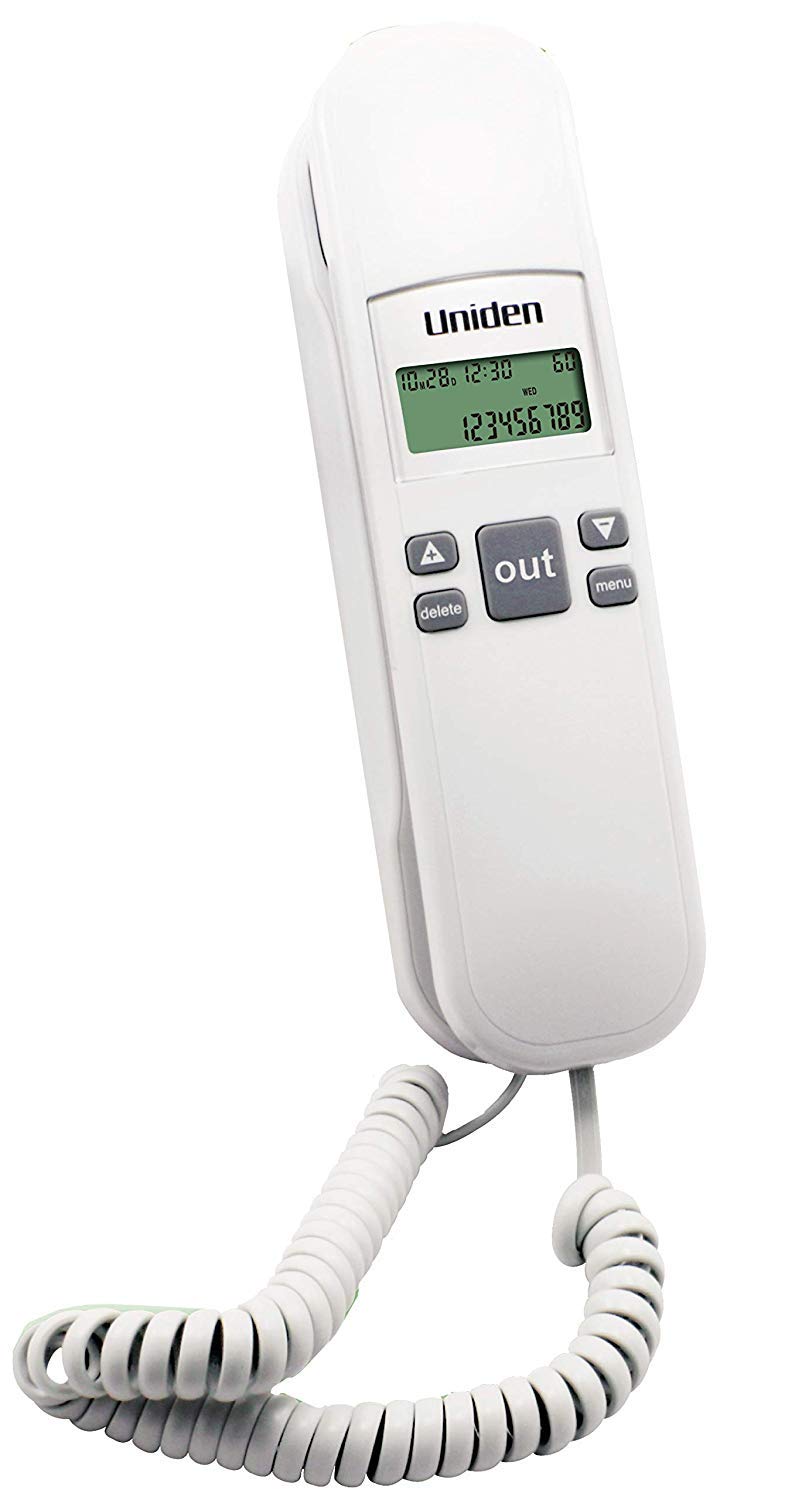
This manual provides detailed instructions for the installation, operation, and maintenance of your Uniden AS 7103 Corded Landline Phone. Please read this manual thoroughly before using your new phone to ensure proper functionality and to take full advantage of its features.
Key Features:
- FSK / DTMF Caller ID
- 59 Caller ID Memory Record
- 10 Speed Dial Memory
- Redial and Dial Back Function
- Flash Function
- Flash Time Selectable (100 / 300 / 600 / 1000ms)
- Tone / Pulse Selectable Dialing Mode
- Ringer On / Off Control
- Wall Mountable Design
- Operates without external battery power
2. Package Contents
Please check the package for the following items:
- Base Unit
- Handset
- Line Cord
- Coil Cord (for handset)
- User Manual

3. Setup and Installation
3.1 Connecting the Phone
- Connect one end of the coil cord to the handset and the other end to the handset jack on the base unit.
- Connect one end of the line cord to the LINE jack on the base unit.
- Plug the other end of the line cord into a standard telephone wall jack.
- The phone is now ready for use. This model operates without the need for external batteries.
3.2 Wall Mounting (Optional)
The Uniden AS 7103 can be conveniently mounted on a wall. Follow these steps:
- Locate the wall mounting holes on the back of the phone base.
- Install two screws (not provided) into the wall, spaced appropriately to match the mounting holes. Ensure the screws are securely fastened and protrude slightly.
- Align the phone's mounting holes with the screws and slide the phone downwards to secure it.
- Ensure all cords are neatly routed to prevent tangling.
4. Operating Instructions
4.1 Making and Receiving Calls
- To Make a Call: Lift the handset, wait for a dial tone, then dial the desired number.
- To Receive a Call: When the phone rings, lift the handset to answer.
- To End a Call: Place the handset back on the base unit.
4.2 Caller ID (FSK / DTMF)
The phone displays the caller's number (and name, if available and subscribed to service) before you answer. The AS 7103 supports both FSK and DTMF caller ID formats.
- Viewing Caller ID Records: Use the UP and DOWN arrow buttons to scroll through the 59 caller ID memory records.
- Dial Back: While viewing a caller ID record, press the REDIAL/DIAL BACK button to call the displayed number.
- Deleting Records: Press the DELETE button to remove the currently displayed caller ID record.
4.3 Speed Dial Memory (10 Entries)
Store frequently called numbers for quick dialing.
- To Store a Number:
- Lift the handset.
- Press the STORE button (if available, otherwise consult specific button labels).
- Dial the phone number you wish to store.
- Press the STORE button again.
- Press a memory location button (e.g., M1-M10 or a single digit 0-9 if applicable) to save the number.
- To Dial a Stored Number:
- Lift the handset.
- Press the memory location button (e.g., M1-M10 or the assigned digit). The number will be dialed automatically.
Note: Specific button labels for speed dial storage may vary. Refer to the phone's keypad for "STORE" or "MEM" buttons, and dedicated memory keys if present.
4.4 Redial Function
To redial the last number called:
- Lift the handset.
- Press the REDIAL button. The last dialed number will be automatically called.
4.5 Flash Function
The Flash function is used for accessing network services such as call waiting or transferring calls. The flash time is selectable to ensure compatibility with various telephone systems.
- To Use Flash: During a call, press the FLASH button.
- To Select Flash Time: This setting is typically adjusted via a menu or a dedicated switch on the phone base. Available options are 100ms, 300ms, 600ms, and 1000ms. Consult the phone's menu system or physical switches for adjustment.
4.6 Tone / Pulse Dialing Mode
The phone supports both Tone (DTMF) and Pulse dialing modes. Most modern telephone systems use Tone dialing. If you experience issues dialing, you may need to switch this setting.
- To Select Dialing Mode: This is usually controlled by a switch on the side or bottom of the phone base, labeled "T" for Tone and "P" for Pulse.
4.7 Ringer On / Off Control
You can turn the phone's ringer on or off as needed.
- To Control Ringer: Locate the RINGER ON/OFF switch on the side or bottom of the phone base and set it to your desired position.
5. Maintenance and Care
- Cleaning: Wipe the phone with a soft, damp cloth. Do not use abrasive cleaners or solvents.
- Avoid Liquids: Keep the phone away from water and other liquids.
- Temperature: Do not expose the phone to extreme temperatures or direct sunlight.
- Storage: If storing the phone for an extended period, ensure it is clean and dry.
6. Troubleshooting
If you encounter any issues with your Uniden AS 7103 phone, please refer to the following common problems and solutions:
| Problem | Possible Cause | Solution |
|---|---|---|
| No dial tone. | Line cord not connected properly or telephone line issue. | Ensure the line cord is securely plugged into both the phone and the wall jack. Test with another phone if possible to verify the telephone line is active. |
| Cannot make or receive calls. | Incorrect dialing mode (Tone/Pulse) or line issue. | Check the Tone/Pulse switch on the phone base. Ensure it is set to 'T' for Tone dialing. Verify the telephone line is working. |
| Caller ID not displaying. | Caller ID service not subscribed or line interference. | Contact your telephone service provider to confirm Caller ID service is active. Ensure the phone is connected directly to the wall jack, avoiding extensions or splitters if possible. |
| Phone does not ring. | Ringer is turned off. | Check the RINGER ON/OFF switch on the phone base and ensure it is set to 'ON'. |
7. Specifications
| Feature | Detail |
|---|---|
| Model | AS7103 |
| Type | Corded Landline Phone |
| Caller ID | FSK / DTMF compatible |
| Caller ID Memory | 59 records |
| Speed Dial Memory | 10 entries |
| Flash Time Selectable | 100 / 300 / 600 / 1000ms |
| Dialing Mode | Tone / Pulse selectable |
| Power Source | Line powered (works without battery) |
| Mounting | Desk or Wall Mountable |
| Dimensions (LxWxH) | Approximately 21 x 8.3 x 7 cm |
| Weight | Approximately 350 g |

8. Warranty and Support
8.1 Warranty Information
Your Uniden AS 7103 Corded Landline Phone comes with a 1-Year Limited Warranty from the date of purchase. This warranty covers manufacturing defects under normal use. Please retain your purchase receipt as proof of purchase for warranty claims. The warranty does not cover damage caused by misuse, accidents, unauthorized repairs, or natural disasters.
8.2 Customer Support
For technical assistance, warranty service, or further inquiries, please contact Uniden customer support. Refer to the Uniden official website or your product packaging for the most current contact information, including phone numbers and email addresses specific to your region.
You can often find support resources, FAQs, and product registration on the official Uniden website: www.uniden.com


