1. Introduction
The DTAPE Laser Tape Measure 2-in-1 combines the functionality of a traditional tape measure with a modern laser rangefinder, offering versatility for various measurement tasks. This device is designed for ease of use and accuracy in both indoor and outdoor environments.
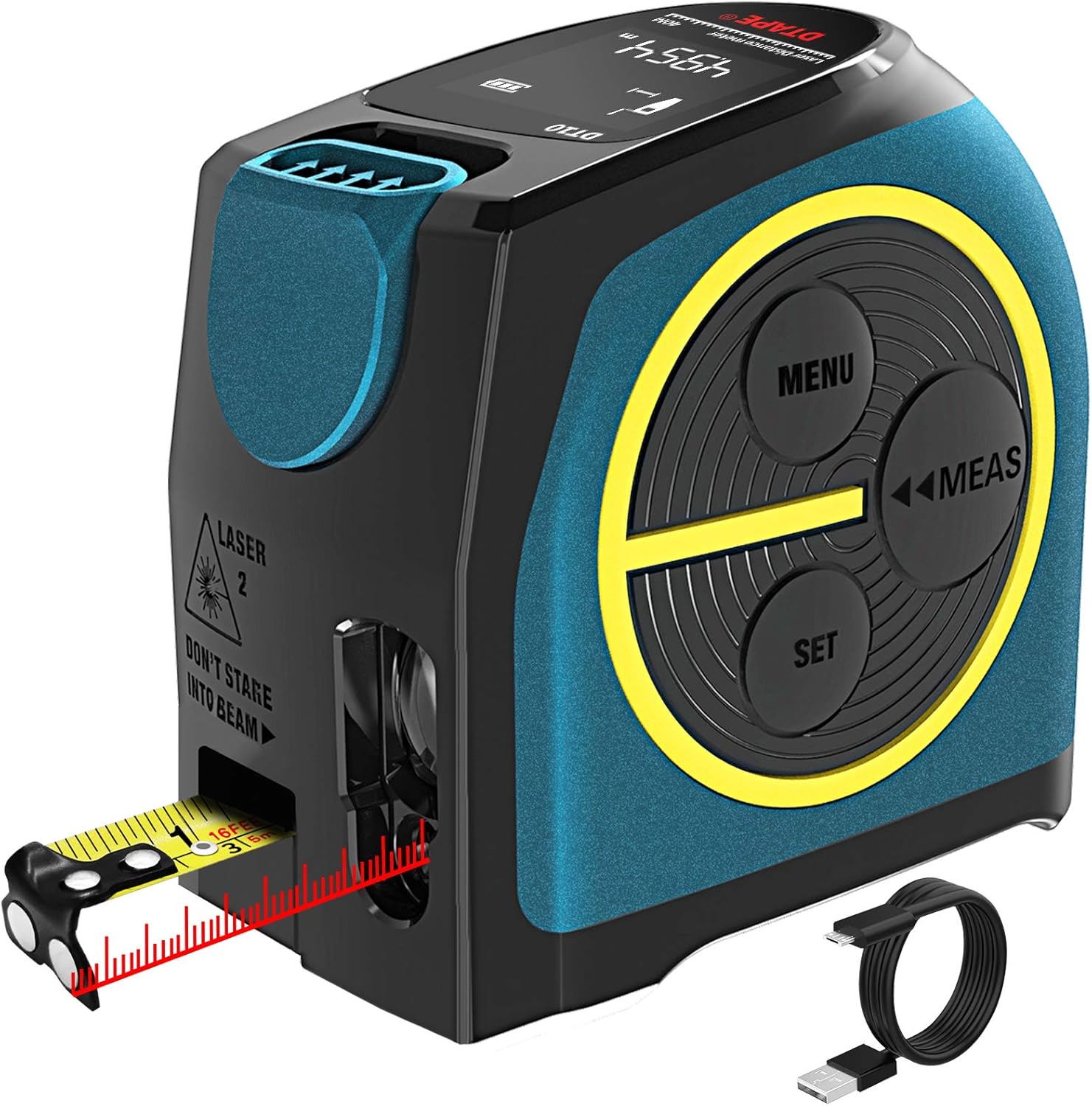
2. Product Overview
Familiarize yourself with the components and controls of your DTAPE Laser Tape Measure.

- Display Screen: Shows power status, measurement standard, and measurement data.
- Menu Key: Short press to switch measurement modes (single distance, area, volume, Pythagorean).
- Measuring Key: Short press to measure once; long press to start continuous measurement.
- Set Key: Short press to switch measurement reference (front or rear); long press to switch measurement units (m, ft, in).
- Brake Lock: Controls the tape recycling speed. Press to slow down, release to stop.
- Laser Receiving Port: Receives the reflected laser beam for distance calculation.
- Laser Emission Port: Emits the laser beam for distance measurement.
- Type-C Charging Port: For recharging the internal lithium battery.
- OFF / ON Button: Long press to turn the device on/off; short press to return to the previous step.
- Magnetic Hook: Located at the end of the tape measure, allows attachment to metal surfaces for stable measurement.
3. Setup
3.1 Charging the Device
The DTAPE Laser Tape Measure is powered by a high-quality lithium battery. Before first use, or when the battery indicator shows low power, charge the device using the provided USB Type-C cable. A full charge provides approximately 5 hours of continuous use. The device is USB rechargeable, promoting environmental sustainability by reducing battery waste.
3.2 Initial Power On
To power on the device, long press the OFF / ON Button. The display screen will illuminate, indicating the device is ready for use.
4. Operating Instructions
4.1 Laser Measurement
The laser measurement function allows for quick and accurate distance measurements up to 131 feet (40 meters).
4.1.1 Measurement Modes
Press the Menu Key to cycle through different measurement modes:
- Single Distance Measurement: Measures the direct distance from the device to a target. Short press the Measuring Key.
- Continuous Measurement: Provides real-time distance readings, displaying maximum and minimum values as you move the device. Long press the Measuring Key.
- Area Measurement: Calculates the area of a surface. Follow on-screen prompts to measure length and width.
- Volume Measurement: Calculates the volume of a space. Follow on-screen prompts to measure length, width, and height.
- Pythagorean Measurement: Calculates indirect distances using the Pythagorean theorem (e.g., height of a wall). Follow on-screen prompts to measure the required sides of a right triangle.


4.1.2 Measurement Reference
Short press the Set Key to switch the measurement reference point. You can choose between measuring from the front of the device (ideal for measuring from edges) or from the rear of the device (ideal for measuring from walls or large surfaces).
4.2 Tape Measure Usage
The integrated tape measure extends up to 16 feet (5 meters) and features a durable nylon coating.
- Extending the Tape: Pull the tape measure out to the desired length. It will automatically lock in place.
- Retracting the Tape: Press the Brake Lock button to control the retraction speed. Release the button to stop the tape.
- Magnetic Hook: The end hook of the tape measure is magnetic, allowing it to securely attach to metal surfaces for more stable and accurate measurements.


4.3 Switching Measurement Units
Long press the Set Key to cycle through the available measurement units: meters (m), inches (in), and feet (ft). The selected unit will be displayed on the screen.

4.4 Understanding the Display
The high-end black and white reverse display screen provides clear visibility of all readings, even in varying light conditions. The display shows:
- Current measurement data.
- Selected measurement mode icon.
- Measurement reference point (front or rear).
- Battery level indicator.
- Historical measurement data (if applicable).
5. Maintenance
To ensure the longevity and accuracy of your DTAPE Laser Tape Measure, follow these maintenance guidelines:
- Cleaning: Wipe the device with a soft, damp cloth. Do not use abrasive cleaners or solvents. Ensure the laser emission and receiving ports are clean and free of dust.
- Storage: Store the device in a cool, dry place away from direct sunlight and extreme temperatures.
- Water and Dust Resistance: The device has an IP54 rating, meaning it is protected against dust ingress and splashing water from any direction. While it is waterproof, avoid submerging the device in water.

6. Troubleshooting
If you encounter issues with your DTAPE Laser Tape Measure, refer to the following common problems and solutions:
| Problem | Possible Cause | Solution |
|---|---|---|
| Laser measurement inaccurate or not working. | Low battery; obstructed laser path; strong ambient light (especially outdoors). | Ensure device is fully charged. Clear any obstructions. For outdoor use, try to measure in shaded areas or use a target plate if available. |
| Display is dim or not visible. | Low battery; extreme temperatures. | Recharge the device. Operate the device within its specified temperature range. |
| Tape measure retraction is slow or stuck. | Debris in the mechanism; brake lock engaged. | Gently clean the tape entry point. Ensure the brake lock is not partially engaged. |
| Device does not turn on. | Battery completely drained. | Connect to charger and allow sufficient time for charging before attempting to power on again. |
7. Specifications
| Feature | Specification |
|---|---|
| Model Number | DT10 |
| Laser Measurement Range | 131 feet (40 meters) |
| Tape Measure Length | 16 feet (5 meters) |
| Tape Width | 19 mm (0.75 in) |
| Battery Type | Lithium Ion (rechargeable via USB Type-C) |
| Battery Life (continuous use) | Up to 5 hours |
| Water & Dust Resistance | IP54 |
| Display Type | Black and White Reverse LCD |
| Material | Acrylonitrile Butadiene Styrene |
| Item Weight | 280 Grams |
| Dimensions | 16.61 x 11.81 x 6.4 cm (approx.) |
8. Warranty and Support
For warranty information or technical support regarding your DTAPE Laser Tape Measure 2-in-1, please refer to the product packaging or contact DTAPE customer service directly. Keep your purchase receipt as proof of purchase.


