
1. Introduction
This manual provides essential information for the safe and efficient operation of your Renogy 3000W Pure Sine Wave Inverter. This device converts 12V DC power from your battery bank into 230V AC power, suitable for a wide range of household appliances and sensitive electronics. It features a pure sine wave output, ensuring compatibility and protection for your devices, along with an integrated priority switch for seamless power management.
Please read this manual thoroughly before installation and use. Keep it for future reference.
2. Safety Instructions
- Electrical Safety: Installation and wiring must be performed by qualified personnel in accordance with all applicable electrical codes.
- Ventilation: Ensure adequate ventilation around the inverter to prevent overheating. Do not block cooling vents.
- Environment: Install the inverter in a dry, cool, and well-ventilated area, away from flammable materials, moisture, and direct sunlight.
- Grounding: The inverter must be properly grounded.
- Battery Connection: Connect the inverter directly to a 12V DC battery bank. Ensure correct polarity (+ to + and - to -). Reverse polarity can cause severe damage.
- Load Capacity: Do not exceed the inverter's continuous power rating of 3000W or peak power rating of 6000W. Overloading can damage the inverter and connected appliances.
- Maintenance: Disconnect all power sources before performing any maintenance or cleaning.
3. Product Overview
3.1 Key Features
- Pure Sine Wave Output: Provides clean and stable AC power, safe for sensitive electronics.
- 3000W Continuous Power: Capable of powering a wide range of household appliances.
- 6000W Peak Power: Handles high surge loads for motor-driven appliances.
- Integrated Priority Switch: Automatically switches between shore power (grid) and inverter power.
- Multiple Protections: Includes overload, over-temperature, low/over voltage, short circuit, and internal backup DC fuse protection.
- Wired Remote Control: For convenient power management from a distance.
- High Conversion Efficiency: Over 90% efficiency for minimal power loss.
3.2 Component Identification

Image 3.2.1: Front and Rear Panels of the Renogy 3000W Inverter. The front panel features AC input, two 230V AC outputs, a power switch (ON/OFF/REMOTE), a remote connection port, a green power indicator, and a red fault indicator. The rear panel shows the DC12V positive and negative terminals, and two cooling fans.
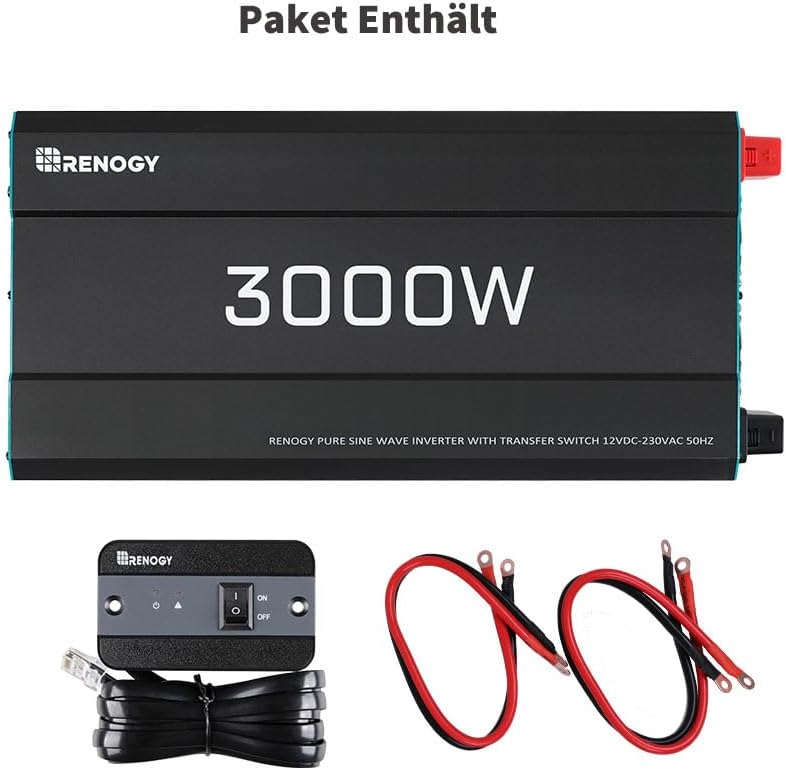
Image 3.2.2: Package Contents. This image displays the Renogy 3000W inverter unit, a wired remote control with a 3-meter cable, and a pair of 60cm 25mm² battery cables (red for positive, black for negative).
4. Setup
4.1 Choosing a Location
- Mount the inverter on a flat, non-flammable surface.
- Ensure the location is dry, cool, and well-ventilated. Avoid areas with direct sunlight, heat sources, or excessive dust.
- Allow at least 15 cm (6 inches) of clear space around the inverter for proper airflow.
4.2 Wiring Instructions
- Prepare Cables: Use the provided 25mm² battery cables or appropriately sized cables for your installation. Ensure cable lengths are minimized to reduce voltage drop.
- Connect to Battery: Connect the positive (+) battery cable (red) to the positive (+) terminal on the inverter. Connect the negative (-) battery cable (black) to the negative (-) terminal on the inverter. Ensure correct polarity.
- Connect to Inverter: Securely fasten the other ends of the battery cables to your 12V DC battery bank terminals.
- Grounding: Connect the inverter's grounding terminal to a reliable earth ground.
- AC Input (Optional): If using the priority switch feature, connect a 230V AC shore power source to the AC Input port on the inverter.
- AC Output: Plug your 230V AC appliances into the AC Output sockets on the inverter.
- Remote Control: Plug the wired remote control into the 'REMOTE' port on the inverter's front panel.
Important: Always ensure all connections are tight and secure to prevent loose connections, which can cause overheating or arcing.
5. Operating Instructions
5.1 Powering On/Off
- Local Control: Set the inverter's main switch to 'ON' to power on, or 'OFF' to power off. The green indicator light will illuminate when powered on.
- Remote Control: Set the inverter's main switch to 'REMOTE'. Use the switch on the wired remote control to turn the inverter 'ON' or 'OFF'.
5.2 Priority Switch Function
The integrated priority switch automatically manages power sources:
- When an external 230V AC source (e.g., shore power) is connected to the AC Input, the inverter will prioritize this source, passing it through to the AC Output sockets.
- If the external AC source is disconnected or fails, the inverter will automatically switch to drawing power from the 12V DC battery bank and converting it to 230V AC.
- When the external AC source is restored, the inverter will automatically switch back to prioritizing the external AC source.
5.3 Status Indicators
- Green LED: Indicates normal operation (power is on).
- Red LED: Indicates a fault condition (e.g., overload, over-temperature, low/over voltage, short circuit). Refer to the Troubleshooting section for details.

Image 5.3.1: Example Applications. The Renogy 3000W inverter can power household appliances like fans, TVs, microwaves, and refrigerators; entertainment electronics such as laptops, cameras, and drones; and power tools like drills and pumps, as well as CPAP machines. Note: The maximum operating power for this device must not exceed 3000 Watts.
6. Maintenance
- Regular Inspection: Periodically check all wiring connections for tightness and signs of corrosion.
- Cleaning: Keep the inverter's exterior clean and free of dust. Use a dry cloth. Do not use liquid cleaners.
- Ventilation: Ensure cooling vents are unobstructed. Clean any dust buildup from the fan blades if necessary, with the inverter powered off and disconnected.
- Battery Health: Ensure your battery bank is well-maintained and charged to prolong its lifespan and ensure optimal inverter performance.
7. Troubleshooting
If the red fault indicator illuminates or the inverter is not functioning as expected, refer to the following table:
| Problem | Possible Cause | Solution |
|---|---|---|
| Inverter does not turn on | No DC input power; Loose battery connections; Blown internal fuse. | Check battery voltage; Tighten all DC connections; Contact support for fuse replacement. |
| Red fault light on (Overload) | Connected load exceeds 3000W. | Reduce the total load connected to the inverter. Disconnect some appliances. |
| Red fault light on (Over-temperature) | Inverter is overheating due to poor ventilation or high ambient temperature. | Ensure adequate ventilation; Clear any obstructions from cooling fans; Allow inverter to cool down. |
| Red fault light on (Low Voltage) | Battery voltage is too low. | Recharge the battery bank. |
| Red fault light on (Over Voltage) | Input DC voltage is too high. | Verify battery voltage is within the acceptable range (12V nominal). |
| Red fault light on (Short Circuit) | Short circuit detected at AC output. | Disconnect all AC loads and check for short circuits in wiring or appliances. |

Image 7.1.1: Multi-Layered Safety Protection. This diagram highlights the inverter's built-in protections: Overload protection with automatic shutdown, Over-temperature protection with automatic shutdown, Low battery voltage protection with automatic shutdown, Over-voltage protection with automatic shutdown, Output short-circuit protection with automatic shutdown, and Internal backup DC fuse.
8. Specifications
| Feature | Specification |
|---|---|
| Model Name | R-INVT-PUH1 |
| Continuous Output Power | 3000 W |
| Peak Output Power | 6000 W |
| Input Voltage | 12 V DC |
| Output Voltage | 230 V AC |
| Output Waveform | Pure Sine Wave |
| Frequency | 50 Hz |
| Efficiency | Greater than 88% |
| Total AC Outlets | 2 |
| Dimensions (L x W x H) | 48.2 cm x 22 cm x 9.2 cm |
| Item Weight | 6.4 kg |
| Included Components | Wired Remote Control |
| Safety Certification | CE, ETL |

Image 8.1.1: Inverter Dimensions and Accessories. The inverter measures 48.2 cm in length, 22 cm in width, and 9.2 cm in height. Included accessories are a remote control (approx. 3M cable, dimensions 10x6x2.83 cm) and battery cables (60cm, 25mm²).
9. Warranty and Support
9.1 Warranty Information
The Renogy 3000W Pure Sine Wave Inverter comes with a 2-year warranty covering materials and workmanship. This warranty ensures your product is free from defects under normal use and service.
9.2 Customer Support
For any questions, technical assistance, or warranty claims, please contact Renogy customer support directly. Our support team is available to assist you with product inquiries and problem resolution.
If damage occurs during transport, please contact us immediately for replacement or partial refund options.


