
Introduction
The Classy Caps SLX772B Oxford Solar Post Cap provides ambient lighting for your outdoor posts. Manufactured from durable cast aluminum with a powder-coated satin finish and a decorative glass lens, this solar light is designed for longevity and performance. It features two high-output surface mount LEDs that emit a warm natural light, automatically illuminating at dusk and turning off at dawn. The design includes adaptors to fit various post sizes, making it a versatile lighting solution for fences, porches, or decks.
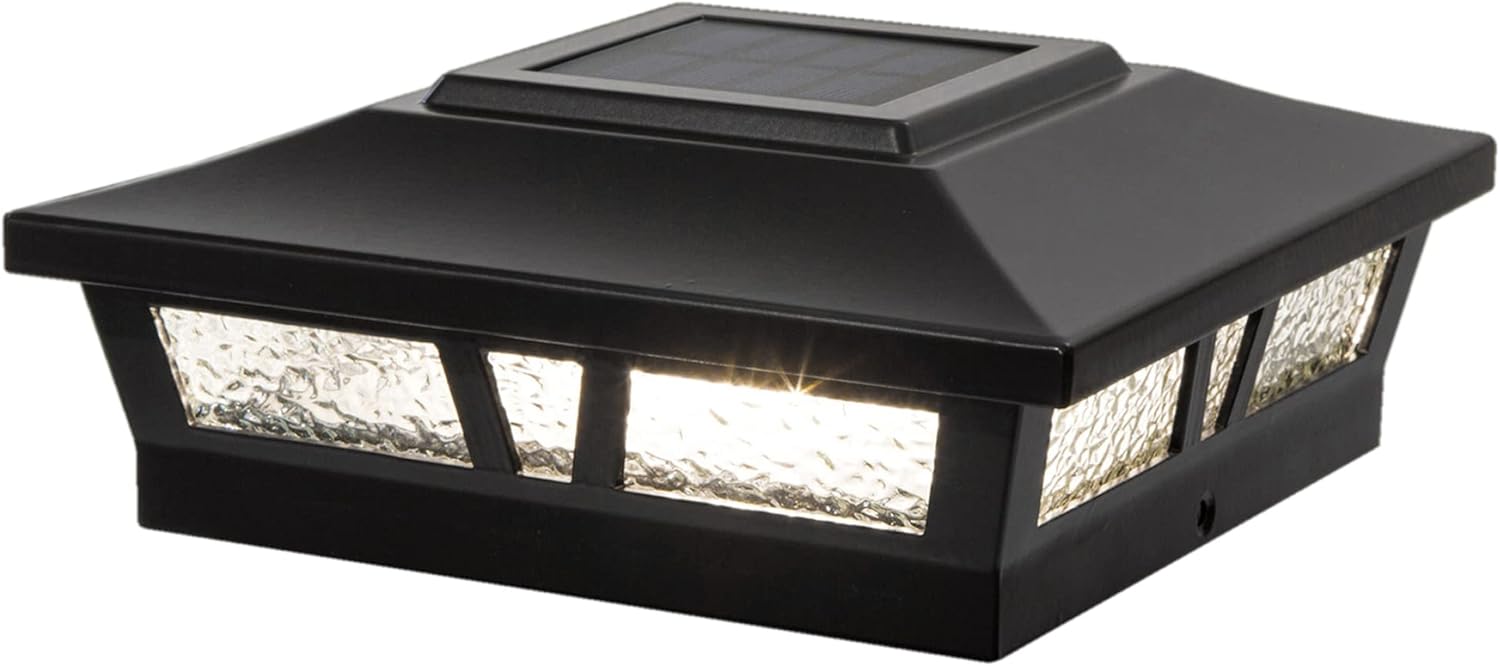
Image: The Classy Caps SLX772B Oxford Solar Post Cap, showcasing its design and illumination.
Key Features:
- High-performance solar operation, providing light for up to 12 hours on a full charge.
- Automatic dusk-to-dawn illumination with an auto-off switch.
- Equipped with 2 high-output surface mount LEDs for warm natural light (2700-3200 Kelvin).
- Constructed from heavy-duty cast aluminum with a durable powder coat finish.
- Features a real decorative glass lens.
- Includes one long-life AA Ni-MH rechargeable battery.
- Designed to fit over actual 6"x6", 5.5"x5.5", or 5"x5" posts (adaptor included).
- Quick and easy Do-It-Yourself installation.
- Light output: 10 Lumens.
Package Contents
Please verify that all components are present before beginning installation:
- 1 x Classy Caps SLX772B Oxford Solar Post Cap
- 1 x AA Ni-MH Rechargeable Battery (pre-installed or separate)
- Post Size Adaptors (for 5.5"x5.5" and 5"x5" posts)
- Mounting Screws (typically included for securing the base)
Setup and Installation
Follow these steps for proper installation of your solar post cap. Ensure the installation location receives ample direct sunlight for optimal charging.
Installation Steps:
- Battery Installation: Carefully remove the top section of the solar post cap to access the battery compartment. Insert the included AA Ni-MH rechargeable battery, ensuring correct polarity.
- Activate Switch: Locate the ON/OFF switch, usually near the battery compartment. Set the switch to the 'ON' position.
- Select Adaptor (if needed): The post cap is designed to fit over an actual 6"x6" post directly. If your post is 5.5"x5.5" or 5"x5", select the appropriate adaptor and place it onto your post.
- Mount the Post Cap: Place the solar post cap (with or without adaptor) onto the top of your post. Secure it in place using the provided mounting screws through the designated holes in the base of the cap.

Image: Step-by-step visual guide for installing the solar post cap.
Post Sizing Compatibility:
The solar post cap is designed to fit over three standard post sizes using the included adaptors:
- Actual 6" x 6" (15.2cm x 15.2cm)
- Actual 5.5" x 5.5" (14cm x 14cm)
- Actual 5" x 5" (12.7cm x 12.7cm)

Image: Post Sizing compatibility chart for the Oxford Solar Post Cap.

Image: The solar post cap securely mounted on a wooden post.
Installation Video:
Video: An official video demonstrating the features and potentially the installation of the Classy Caps SLX772B Oxford Solar Post Cap.
Operating Instructions
The Classy Caps Oxford Solar Post Cap is designed for simple, automatic operation.
- Automatic Charging: During daylight hours, the integrated solar panel on top of the cap absorbs sunlight and converts it into electrical energy, which is stored in the rechargeable AA Ni-MH battery.
- Automatic Illumination: As dusk approaches, a built-in light sensor detects the decrease in ambient light and automatically turns on the LEDs.
- Automatic Shut-off: The light will remain illuminated for up to 12 hours or until dawn, at which point the light sensor will detect increasing light levels and automatically turn off the LEDs, initiating the charging cycle again.
- Manual Override: The ON/OFF switch allows you to manually turn off the light if desired, preventing it from illuminating at night. Ensure the switch is in the 'ON' position for automatic operation.

Image: Visual representation of the solar charging process during the day and automatic illumination at night.
Maintenance
Regular maintenance ensures optimal performance and extends the lifespan of your solar post cap.
Cleaning:
- Periodically clean the solar panel and glass lens with a soft, damp cloth to remove dust, dirt, or debris. A clean solar panel ensures efficient charging.
- Avoid using abrasive cleaners or harsh chemicals, as these can scratch the surface or damage the solar panel.
Battery Replacement:
- The included AA Ni-MH rechargeable battery has a long lifespan, but its capacity will diminish over time. If the light duration significantly decreases, it may be time to replace the battery.
- To replace, carefully remove the top section of the post cap to access the battery compartment. Replace the old battery with a new, high-quality AA Ni-MH rechargeable battery. Ensure correct polarity.
- Dispose of old batteries according to local regulations.
Troubleshooting
If your solar post cap is not functioning as expected, try the following solutions:
| Problem | Possible Cause | Solution |
|---|---|---|
| Light does not turn on at night. | 1. ON/OFF switch is in 'OFF' position. 2. Insufficient sunlight for charging. 3. Battery is not properly connected or is depleted/faulty. 4. Solar panel is dirty. | 1. Ensure the switch is in the 'ON' position. 2. Relocate the light to an area with 6-8 hours of direct sunlight daily. 3. Check battery connection. Replace battery if old or not holding a charge. 4. Clean the solar panel. |
| Light is dim or only stays on for a short time. | 1. Insufficient charging due to cloudy weather or shade. 2. Battery capacity has decreased over time. | 1. Allow several sunny days for a full charge. Ensure no obstructions are shading the panel. 2. Replace the rechargeable AA Ni-MH battery. |
| Light flickers. | Loose battery connection or internal wiring issue. | Check battery connection. If problem persists, contact customer support. |
Specifications
| Feature | Detail |
|---|---|
| Model Number | SLX772B |
| Product Dimensions | 7.5 x 7.5 x 2.8 inches (19 x 19 x 7.1 cm) |
| Item Weight | 1 pound (0.45 kg) |
| Light Output | 10 Lumens |
| Color Temperature | 2700-3200 Kelvin (Warm Natural Light) |
| LEDs | 2 High output surface mount LEDs |
| Battery | 1 x AA Ni-MH Rechargeable Battery (included) |
| Material | Durable Cast Aluminum, Decorative Glass Lens |
| Post Compatibility | Fits over actual 6"x6", 5.5"x5.5", or 5"x5" posts (adaptor included) |
| Operating Time | Up to 12 hours on a full charge |

Image: Detailed dimensions of the Oxford Solar Post Cap.
Warranty Information
This Classy Caps SLX772B Oxford Solar Post Cap comes with a 1-Year Warranty from the date of purchase. This warranty covers defects in materials and workmanship under normal use. Please retain your proof of purchase for any warranty claims. The warranty does not cover damage caused by improper installation, misuse, abuse, or natural disasters.

Image: Warranty seal indicating a 1-year warranty period.
Customer Support
For further assistance, technical support, or warranty inquiries, please contact Classy Caps customer service. Refer to the product packaging or the official Classy Caps website for the most current contact information.
Online Resources: You may find additional information, FAQs, and support resources on the official Classy Caps website.


