1. Introduction
The AOPUTTRIVER AP-570T-APP is a versatile Bluetooth-enabled digital clamp meter designed for precise electrical measurements. This auto-ranging multimeter offers a wide array of functions including DC/AC Voltage & Current, Resistance, Temperature, Frequency, and Duty Cycle measurements. Its robust design and real-time data recording capabilities via a mobile application make it an essential tool for professionals and DIY enthusiasts alike.
2. Product Overview
Familiarize yourself with the components and features of your AP-570T-APP Digital Clamp Meter.
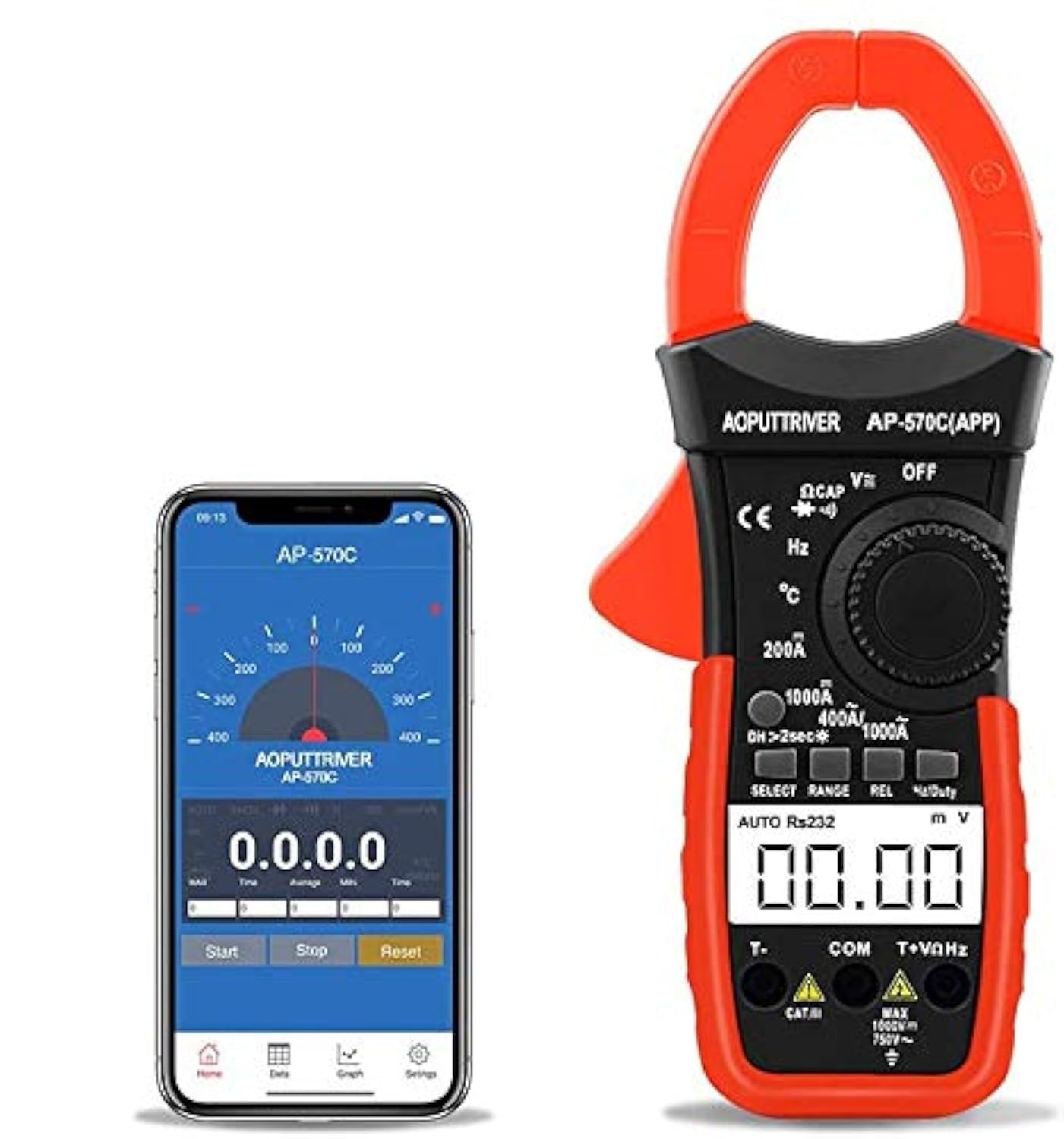
Figure 2.1: AOPUTTRIVER AP-570T-APP Digital Clamp Meter alongside its mobile application interface.

Figure 2.2: Key components of the clamp meter, including the Rotary Switch, D.HOLD/BACK LIGHT KEY, SELECT KEY, RANGE KEY, HZ/DUTY KEY, REL KEY, LCD DISPLAY, T+VΩHz INPUT JACK, T- INPUT JACK, and COM INPUT JACK.

Figure 2.3: The current clamp, designed for secure closure during measurement, and the high-definition display screen with backlight.

Figure 2.4: The 570 series clamp meter features a double integral A/D conversion chip for high precision, stable performance, and strong anti-interference ability.

Figure 2.5: Dimensions of the clamp multimeter, illustrating its compact and ergonomic size.
3. Setup and APP Connection
The AP-570T-APP features Bluetooth connectivity for real-time data recording and analysis via a mobile application. Follow these steps to set up the APP and connect your device:
- Install the APP: Scan the QR code provided in the physical manual or search for "intelligent clamp meter" on your mobile phone's app store (Android/iOS) to download and install the application.
- Enable Bluetooth: Turn on Bluetooth on your mobile phone.
- Launch APP: Open the "intelligent clamp meter" application on your phone.
- Power On Device: Turn on your AP-570T-APP Digital Clamp Meter.
- Automatic Connection: You do NOT need to manually find the product from your mobile phone's Bluetooth settings. The APP will automatically connect to the clamp meter. Push the green "start button" on the APP for data transmission.
- Troubleshooting Connection: If the connection fails, ensure your phone is not connected to other Bluetooth devices. Temporarily disconnect other devices and ensure only your phone's Bluetooth is open nearby, as it may auto-connect to other open Bluetooth devices.
- Permissions: You must grant Storage & Location permissions to the APP to save data before connecting to the AP-570C-APP clamp meter.
Video 3.1: Demonstrates the steps to install the APP and connect it to the AP-570C-APP clamp meter.
4. Operating Instructions
The AP-570T-APP offers a comprehensive range of measurement functions. Always ensure the correct function and range are selected before making any measurements.
4.1 General Measurement Functions
- 4000 Count Auto Ranging: The meter automatically selects the appropriate measurement range.
- AC/DC Voltage & Current: Measure both alternating and direct current/voltage. Note: For current, measurements below 1A may not be accurate.
- Capacitance Measurement: Determine the capacitance of components.
- Electrical Resistance: Measure the resistance of circuits or components.
- Frequency Measurement: Measure the frequency of AC signals.
- Temperature: Use the included temperature probe for temperature readings.
- Diode and On/Off Test: Test diodes and check for circuit continuity.
- Duty Cycle: Measure the duty cycle of pulsed signals.
- Low Power Display: An indicator will show when the battery is low.
- LCD Display: Clear digital display for readings.
- Relative Value: Measure relative values.
- Data Hold: Freeze the current reading on the display.
- Backlight: Illuminate the display for use in low-light conditions.
- Auto Power Off: The meter will automatically shut down after a period of inactivity to conserve battery life.
4.2 Using the Bluetooth APP for Data Recording
Once connected, the mobile APP allows for advanced data management:
- Real-time Data: View live measurement data directly on your smartphone.
- Data Recording: Record measurement data over time for analysis. The APP supports saving data in various formats (e.g., text, Excel).
- Analysis and Processing: Utilize the APP's features to analyze recorded data, including graphical representations and statistical summaries (Max/Avg/Min values).
- Remote Monitoring: Initiate tests and obtain readings from a distance, which is particularly useful for automotive testing or monitoring hard-to-reach circuits.
Video 4.1: Overview of the AP-570CAPP Clamp Meter's features and its integration with the Bluetooth APP for various measurements.

Figure 4.1: Performing a DC Current Test using the clamp meter on electrical wiring.
5. Maintenance
Proper maintenance ensures the longevity and accuracy of your clamp meter.
5.1 Battery Replacement
The AP-570T-APP uses one 9V battery (6D22 type). When the low power indicator appears on the display, it's time to replace the battery.
- Ensure the meter is turned OFF.
- Locate the battery compartment on the back of the meter.
- Use a small screwdriver to open the battery cover.
- Carefully disconnect the old 9V battery from its terminals.
- Connect a new 9V battery, ensuring correct polarity.
- Replace the battery cover and secure it with the screw.
A single 9V battery can provide enough power for up to a year of operation under normal use.
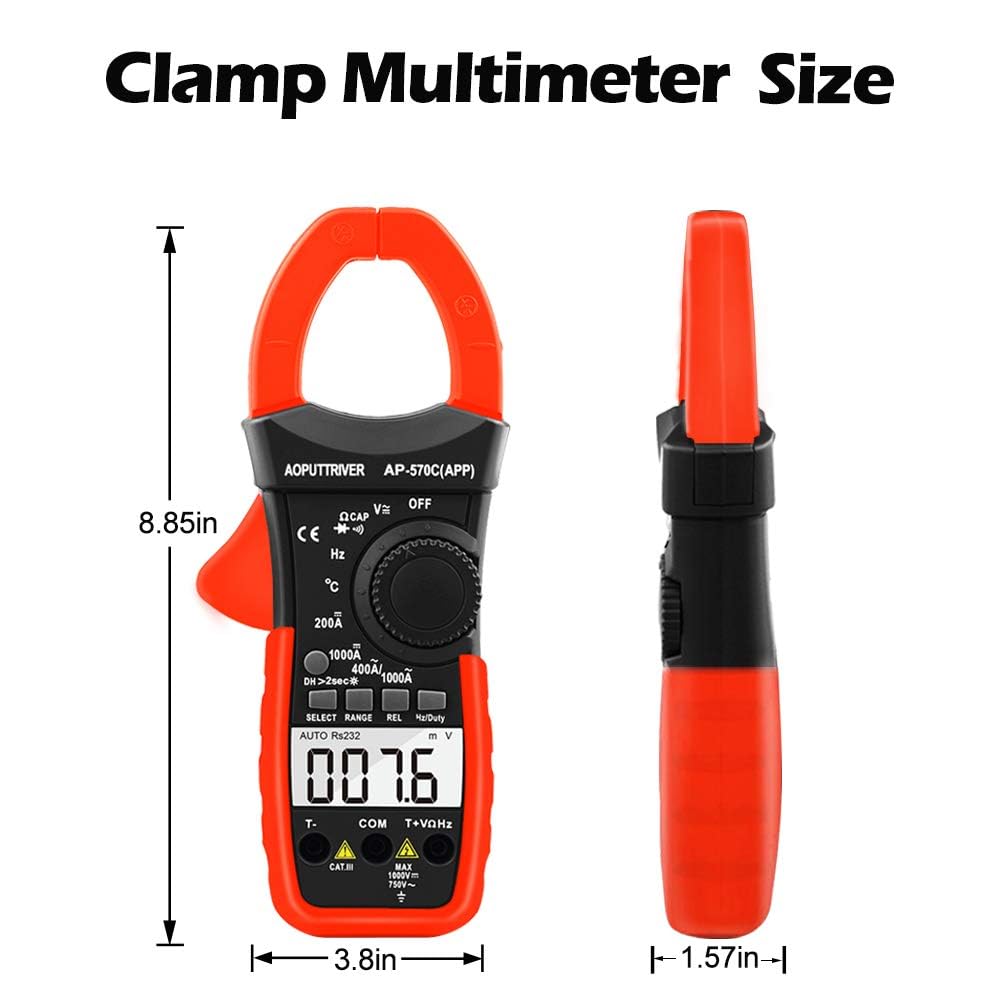
Figure 5.1: Steps for easily replacing the 9V battery in the clamp meter.
6. Troubleshooting
If you encounter issues with your AP-570T-APP, refer to the following common problems and solutions:
| Problem | Possible Cause | Solution |
|---|---|---|
| APP not connecting via Bluetooth |
|
|
| Display shows "OL" |
|
|
| Inaccurate current readings (especially low current) |
|
|
| Data log disappears or connection drops in APP |
|
|
7. Specifications
| Specification | Detail |
|---|---|
| Model Number | AP-570C-APP |
| Product Dimensions | 8.8 x 3.8 x 1.5 inches |
| Item Weight | 15.87 ounces (450 Grams) |
| Power Source | Battery Powered (1 x 9V battery included) |
| Display Counts | 4000 Counts |
| Safety Standard | IEC1010 Double Insulation/Pollution Degree 2/Over voltage Category III |
| Overload Protection | Yes, displays "OL" when over range. |
| Bluetooth Connectivity | Yes, for real-time data recording via mobile APP. |
| First Available Date | March 26, 2019 |
8. What's Included
Your AOPUTTRIVER Digital Clamp Meter package includes the following items:
- 1 x AP-570C-APP True RMS Digital Clamp Meter
- 2 x Test Leads (Pair)
- 1 x K-Type Thermocouple (Temperature Probe)
- 1 x Carrying Case
- 1 x Instruction Manual
- 1 x Small Screwdriver
- 1 x 9V (6D22) Battery
Figure 8.1: The AP-570T-APP Digital Clamp Meter and its complete set of accessories.
9. Warranty and Support
AOPUTTRIVER products are designed for reliability and performance. For detailed warranty information and technical support, please refer to the official user manual PDF or contact AOPUTTRIVER customer service.
You can access the official User Manual (PDF) here.


