
1. Product Overview
The NRS Healthcare Wheelyscooter Reflective Wheelchair and Scooter Bag (Model P42781) is designed to provide convenient storage and enhanced visibility for users of wheelchairs and mobility scooters. This versatile bag features multiple compartments, including specialized pockets for walking sticks or crutches, and reflective strips for improved safety.
Constructed from robust, tear-resistant, and showerproof PVC, the bag is built for durability. It attaches securely to the back of most mobility devices, offering a practical solution for carrying personal items.

Image 1.1: The Wheelyscooter bag securely attached to the back of a wheelchair, demonstrating its primary function and appearance.
2. Setup and Installation
- Unpack the Bag: Carefully remove the Wheelyscooter bag from its packaging. Inspect for any signs of damage.
- Positioning: Place the large black material square of the bag against the backrest of your wheelchair or mobility scooter. Ensure the reflective strips face outwards.
- Secure with Hook-and-Loop Straps: Utilize the hook-and-loop straps located on the back of the bag to firmly attach it to the backrest. Adjust the straps to achieve a snug fit, preventing the bag from swaying during movement.
- Fasten Buckles (Wheelchairs only): For wheelchairs, fasten the additional buckles to the wheelchair's push handles. This provides extra stability and support.
- Optional Crutch/Cane Pockets: If using crutches or a walking stick, ensure the long side pockets are zipped onto the main bag. These pockets are detachable for when they are not needed.

Image 2.1: The bag installed on a wheelchair, showing a walking stick secured in one of the side pockets.

Image 2.2: The bag installed on a mobility scooter, demonstrating how a walking stick can be carried.
3. Operating Instructions
- Main Compartment: The large main pocket features two zippers for easy access. Use this for larger items such as groceries, books, or personal belongings.
- Front Pocket: A zippered front pocket provides quick access to smaller items like keys, wallets, or mobile phones.
- Side Pockets for Crutches/Canes: The two 48 cm long side pockets are designed to hold crutches or walking sticks. Secure these items using the integrated drawstring at the top of each pocket.
- Reflective Strips: The reflective strips on the front of the bag enhance visibility in low-light conditions, contributing to user safety. Ensure these strips are not obstructed.
- Double Top Handle: The bag includes a double handle on top for easy carrying when detached from the mobility device.
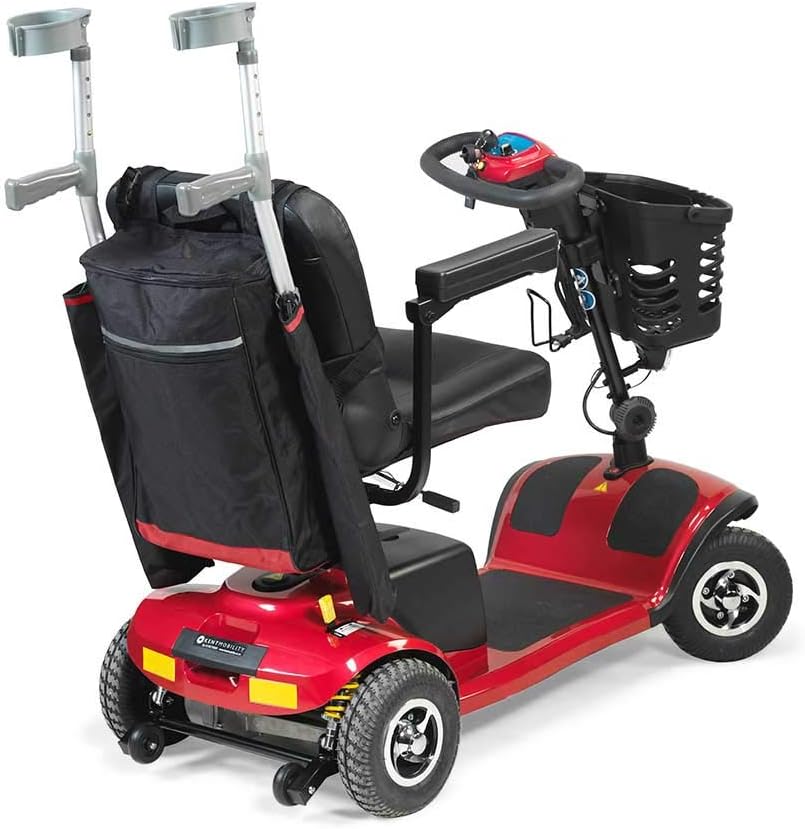
Image 3.1: The bag attached to a mobility scooter, showcasing crutches secured in the side pockets.
4. Maintenance and Care
- Cleaning: Wipe the bag clean with a damp cloth and mild detergent. Do not use abrasive cleaners or solvents.
- Drying: Allow the bag to air dry completely before storing or reattaching to your mobility device.
- Storage: Store the bag in a cool, dry place when not in use.
- Inspection: Regularly inspect the hook-and-loop straps, buckles, zippers, and fabric for any signs of wear or damage. Replace the bag if significant damage is observed to ensure continued safety and functionality.
- Showerproof: The bag is showerproof, meaning it offers protection against light rain. It is not fully submersible or waterproof for heavy downpours.
5. Troubleshooting
- Bag feels loose:
Ensure all hook-and-loop straps are securely fastened and tightened around the backrest. For wheelchairs, verify that the buckles are properly attached to the handles.
- Crutches/Cane not secure in side pockets:
Confirm that the drawstring at the top of the side pockets is pulled tight and secured around the crutch or cane. Ensure the items are fully inserted into the pockets.
- Zippers are stiff:
Apply a small amount of zipper lubricant or a graphite pencil to the zipper teeth to improve smooth operation.
- Reduced visibility of reflective strips:
Clean the reflective strips with a damp cloth to remove dirt or grime. Ensure no items are obstructing the strips when the bag is in use.
6. Specifications
| Model Number | P42781 |
| Brand | NRS Healthcare |
| Material | Robust, tear-resistant PVC |
| Color | Black and Burgundy |
| Height | 46 cm (18.1 inches) |
| Width | 32 cm (12.6 inches) |
| Depth | 10 cm (3.9 inches) |
| Weight | 620 g (1.37 lbs) |
| Features | Reflective strips, multiple pockets, two detachable side pockets for crutches/canes, double top handle, showerproof. |
| Compatibility | Most wheelchairs and mobility scooters |
7. Warranty and Support
For warranty information or product support, please refer to the official NRS Healthcare website or contact their customer service directly. Keep your purchase receipt as proof of purchase.
NRS Healthcare Contact Information:
- Website: www.nrshealthcare.com (Please check for regional websites if applicable)
- Customer Service: Refer to the website for contact numbers or email support.
This product is designed for its stated purpose. Any modifications or improper use may void the warranty and could lead to injury or damage.