
1. Introduction
Welcome to the instruction manual for your YING RAY Replacement Remote Control, model 190322011-C. This guide provides essential information for the proper setup and operation of your remote control for compatible SEA Breeze Air Conditioners. Please read this manual thoroughly before use to ensure optimal performance. This remote control is designed to display temperature exclusively in Celsius.
2. Product Overview
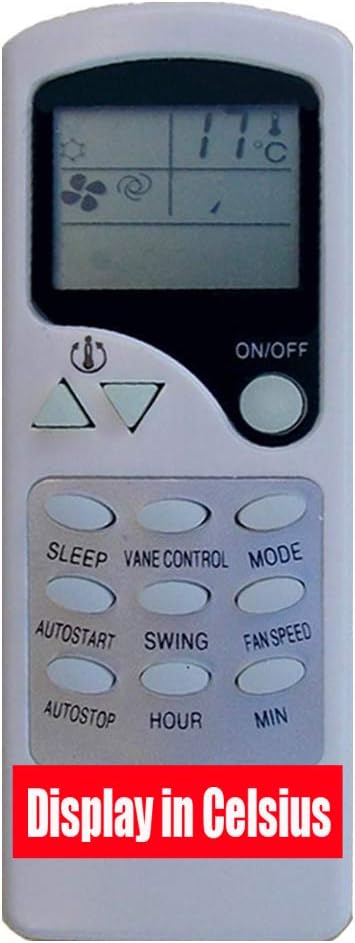
An image of the white YING RAY replacement remote control. The top features an LCD screen displaying temperature in Celsius (11°C), fan speed, and mode icons. Below the screen are temperature adjustment buttons (up/down triangles) and an 'ON/OFF' button. The lower section has oval-shaped buttons labeled 'SLEEP', 'VANE CONTROL', 'MODE', 'AUTOSTART', 'SWING', 'FAN SPEED', 'AUTOSTOP', 'HOUR', and 'MIN'. A red banner at the bottom of the image states 'Display in Celsius'.
This remote control is a direct replacement unit compatible with specific SEA Breeze Air Conditioner models, including ZHF/LW-17-1 and 24H43ZICX. It utilizes infrared technology for communication with the air conditioner and features an ergonomic design with clearly labeled button controls.
- Display: Temperature is displayed in Celsius only.
- Power Source: Requires two (2) AAA 1.5V ordinary batteries (not included).
- Connectivity: Infrared (IR).
3. Setup: Battery Installation
Follow these steps to install batteries into your remote control:
- Locate the battery compartment cover on the back of the remote control.
- Slide or lift the cover to open the battery compartment.
- Insert two (2) AAA 1.5V batteries, ensuring that the positive (+) and negative (-) terminals align correctly with the markings inside the compartment.
- Replace the battery compartment cover, ensuring it clicks securely into place.
Important: Always use new batteries and ensure correct polarity. Do not mix old and new batteries or different types of batteries. Remove batteries if the remote will not be used for an extended period to prevent leakage.
4. Operating Instructions
Familiarize yourself with the buttons and their functions:
- ON/OFF Button: Press this button to power the air conditioner on or off.
- Temperature Adjustment Buttons (Up/Down Triangles): Use these buttons to increase or decrease the desired temperature setting. The temperature is displayed in Celsius.
- MODE Button: Press repeatedly to cycle through the available operating modes, such as Cool, Heat, Fan, Dry, or Auto.
- FAN SPEED Button: Press to adjust the fan speed. Options typically include Low, Medium, High, and Auto.
- VANE CONTROL Button: Adjusts the horizontal direction of the airflow.
- SWING Button: Activates or deactivates the automatic vertical swing function of the air conditioner's louvers.
- SLEEP Button: Engages the sleep mode, which typically adjusts temperature and fan speed over time for enhanced comfort during sleep.
- AUTOSTART Button: Used to set a timer for the air conditioner to automatically turn on at a specified time.
- AUTOSTOP Button: Used to set a timer for the air conditioner to automatically turn off at a specified time.
- HOUR / MIN Buttons: Used in conjunction with AUTOSTART and AUTOSTOP buttons to set the desired hour and minute for timer functions.
5. Maintenance
To ensure the longevity and proper functioning of your remote control, follow these maintenance guidelines:
- Cleaning: Wipe the remote control regularly with a soft, dry cloth. Do not use liquid cleaners or abrasive materials.
- Storage: Store the remote in a cool, dry place, away from direct sunlight, high temperatures, and excessive moisture.
- Battery Care: If the remote will not be used for an extended period (e.g., one month or more), remove the batteries to prevent potential leakage and damage to the remote control.
6. Troubleshooting
If you encounter issues with your remote control, refer to the following common troubleshooting steps:
- Remote Not Responding:
- Check if the batteries are inserted with correct polarity (+/-).
- Replace the batteries with a fresh pair of AAA 1.5V batteries.
- Ensure there are no physical obstructions between the remote control and the air conditioner's infrared receiver.
- Confirm the remote is pointed directly at the air conditioner's receiver.
- Display Issues:
- If the display is dim, flickering, or blank, replace the batteries.
- Note that this remote control is designed to display temperature in Celsius only. Fahrenheit display is not supported.
7. Specifications
| Brand | YING RAY |
| Model Number | 190322011-C |
| Connectivity Technology | Infrared |
| Controller Type | Button Control |
| Special Feature | Ergonomic |
| Battery Type | 2 x AAA 1.5V (not included) |
| Display Unit | Celsius Only |
| Manufacturer | ZHUHAI YINGRAY TRADING CO., LTD. |
8. Warranty and Support
For information regarding product warranty, technical support, or service inquiries, please refer to the documentation provided at the time of purchase or contact your retailer. YING RAY is committed to providing reliable replacement products.