
Suz S201
Suz S201 Table Tennis Robot Instruction Manual
Model: S201
1. Introduction
The Suz S201 Table Tennis Robot is an automatic ball machine designed to enhance your table tennis training. It offers various spin patterns, ball frequencies, and oscillation settings to simulate different playing conditions. This manual provides essential information for the proper setup, operation, and maintenance of your S201 robot.
Safety Warning: Adult supervision is required for children using the Suz S201. A child might be hit by balls and get hurt if the ball frequency is accidentally set too high.
2. Setup and Installation
Follow these steps to correctly set up your Suz S201 Table Tennis Robot:
- Unpack the Robot: Carefully remove all components from the packaging.
- Positioning: The robot can only be placed on table tennis tables less than 2.5 inches thick. Ensure your table meets this requirement.
- Spread Out Ball Collecting Net: Extend the ball collecting net around the robot.
- Connect Net Supports: There are three iron supports at the rear of the robot. Pull out the first and third supports and connect them to two iron tubes to form the supporting structure for the net.
- Secure Base: Separate the two iron supports at the base and clip them onto the table.
- Attach Side Nets: Put on the side nets to complete the ball collection system.
- Clip Remote Control: Clip the control box to the side of the table for easy access.
- Connect Power Cord: Plug the power cord into the port behind the control box (not the back of the machine).

Image: Visual guide for the installation process of the Suz S201 robot, showing steps from unpacking to securing the net and base.

Image: Illustrates clipping the remote control to the table and connecting the power cord to the control box.
3. Operating Instructions
The Suz S201 features a control box to manage various settings. Ensure at least 20 balls are available below the feeding tube for proper operation.
Control Box Functions:
- 1. Oscillation: Adjusts the left and right oscillation speed of the robot head. A higher number increases speed. Number 0 is a fixed point.
- 2. Ball Frequency: Adjusts the serving rate (balls per minute). A higher number means more frequent balls.
- 3. Topspin/Backspin: Adjusts ball speed and strength, influencing the ball's landing spot. Topspin and underspin (backspin) settings are combined to increase serve strength. If topspin is higher than backspin, the serve will be topspin. If backspin is higher than topspin, the serve will be backspin. For example, for topspin, try settings like topspin 2 and backspin 1, or 3-1, 4-1, 5-2. For backspin, try settings like topspin 2 and backspin 3, or 1-4.
- 4. Start/Pause: Initiates or stops the robot's operation.
- 5. One-Key Topspin: Quickly sets the robot to serve topspin balls.
- 6. One-Key Backspin: Quickly sets the robot to serve backspin balls.
- 7. Direct Service: Quickly sets the robot to serve balls with no spin.
- 8. Irregular Service: Quickly sets the robot to serve balls irregularly.
- 9. Unload Ball: Automatically unloads balls.

Image: Detailed view of the Suz S201 control panel, illustrating buttons for oscillation, ball frequency, topspin, backspin, and various service modes.
Adjusting Robot Head for Serve Trajectory:
You can adjust the robot head's elevation to achieve direct or indirect serves. Loosen the copper knob when adjusting the robot head. Do not adjust while the robot is operating.
- Direct Serve: For a ball that bounces once on the table before you hit it, set topspin to 6 and backspin to 2 or 3 on the control box.
- Indirect Serve: For a ball that bounces twice on the table before you hit it, set topspin to 4 and backspin to 3 on the control box.

Image: Visual representation of how adjusting the robot head's elevation affects the ball's trajectory, showing options for high drop, attacking the ball, and two-jump balls.
Spin Patterns:
The Suz S201 robot can serve 9 kinds of spin balls and one non-spin ball. The head can oscillate horizontally to vary the spin direction.
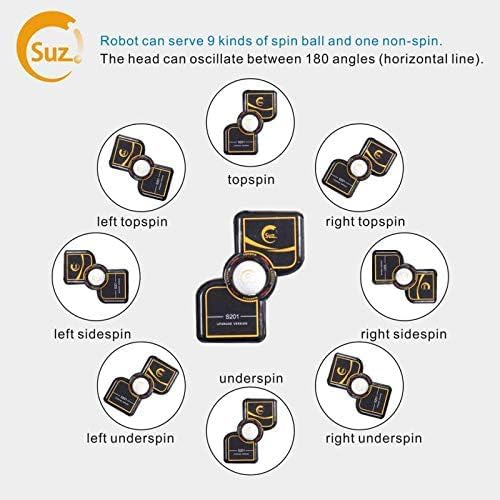
Image: Illustrates the nine different spin types the robot can produce, including topspin, backspin (underspin), and various side spins (left/right topspin, left/right sidespin, left/right underspin).
4. Maintenance
Proper maintenance ensures the longevity and optimal performance of your Suz S201 robot:
- Cleaning: If the robot will not be used for an extended period, clean it thoroughly and store it in its original box or a protective bag to prevent dust accumulation.
- Ball Condition: Regularly inspect the table tennis balls for dirt or damage. Dirty balls can affect the robot's performance and potentially cause wear.
5. Troubleshooting
If you encounter issues with your Suz S201 robot, refer to the following common solutions:
- Machine Not Serving Properly: Ensure at least 20 balls are available below the feeding tube. Verify that the ball frequency on the control box is set to at least 1 or 2. Tighten the net slightly and adjust its tilt to ensure balls return to the feeding tube effectively.
- Oscillation Not Working: Turn the Oscillation setting to "+" 9. Gently assist the robot head by moving it left and right with your hand to help initiate the oscillation mechanism.
- Minimum Frequency Too Fast: If the lowest frequency setting is still too fast for your training needs, you may purchase a 9V, 5.5*2.1 mm power adapter (instead of the standard 12V-3A adapter) from a local store. This can reduce the minimum ball frequency.
6. Specifications
| Feature | Specification |
|---|---|
| Brand | Suz |
| Model | S201 |
| Color | Black |
| Material | Plastic |
| Product Dimensions (L x W x H) | 34.65" x 16.14" x 15.75" |
| Item Weight | 9.8 Kilograms |
| Rated Voltage | 100V-240V |
| Rated Power | 50W |
| Ball Frequency | 35-80 balls per minute |
| Ball Speed | 4-40 m/s |
| Spin Patterns | No spin, topspin, backspin, side spin (9 types) |
| Ball Trajectory | Fixed or random |
| Assembly Required | Yes |
| Recommended Table Thickness | Less than 2.5 inches |
7. Warranty and Support
The manufacturer provides replacement parts for any damage caused by normal wear and tear within one year from the purchase date of Suz table tennis robots.
For any assistance or inquiries, please email the manufacturer. The manufacturer's email address can be found in the original product manual.
Ask a question about this manual
Ask about setup, troubleshooting, compatibility, parts, safety, or missing instructions. Manuals+ will review the question and use this page’s manual context to help answer it.