
1. Introduction
Thank you for choosing the Murray 18V Lithium-Ion Grass Trimmer IQ18GTK. This manual provides essential information for the safe operation, assembly, maintenance, and troubleshooting of your new grass trimmer. Please read this manual thoroughly before first use and keep it for future reference.
Package Contents:
- Murray 18V Lithium-Ion Grass Trimmer
- Briggs & Stratton 18V 2.5Ah Lithium-Ion Battery
- Battery Charger
- Spool of Trimmer Line
- Protective Guard
- Auxiliary Handle
- User Manual

Image 1.1: The Murray 18V Lithium-Ion Grass Trimmer, including the 2.5Ah battery and charger.
2. Safety Instructions
Always observe basic safety precautions to reduce the risk of fire, electric shock, and personal injury when using this product.
General Safety Warnings:
- Wear Personal Protective Equipment (PPE): Always wear eye protection (safety glasses or goggles), long pants, sturdy footwear, and hearing protection when operating the trimmer.
- Keep Clear of Debris: Be aware of flying debris. Ensure bystanders, children, and pets are at a safe distance (at least 15 meters/50 feet) from the operating area.
- Inspect Work Area: Before starting, clear the area of any objects that could be thrown by the trimmer line, such as rocks, broken glass, or wire.
- Avoid Contact with Skin: Do not touch the trimmer line or cutting head while the tool is running.
- Secure Grip: Always hold the trimmer firmly with both hands during operation.
- Use in Good Conditions: Operate the trimmer only in daylight or good artificial light. Avoid using it in wet grass or rain.
- Battery Safety: Use only the specified battery and charger. Do not expose the battery to water or extreme temperatures.
- Maintenance: Disconnect the battery before performing any maintenance, cleaning, or when changing the trimmer line.
3. Assembly
Follow these steps to assemble your grass trimmer before first use.
3.1 Attaching the Protective Guard
- Align the protective guard with the trimmer head.
- Secure the guard using the provided screws. Ensure it is firmly attached to prevent injury from flying debris.

Image 3.1: View of the trimmer head, showing the protective guard and line spool.
3.2 Installing the Auxiliary Handle
- Slide the auxiliary handle onto the main shaft.
- Adjust the handle to a comfortable working position and tighten the locking knob.

Image 3.2: The auxiliary handle attached to the trimmer shaft, showing the adjustment knob.
3.3 Charging and Installing the Battery
- Before first use, fully charge the 18V Lithium-Ion battery using the provided charger. Refer to the charger's manual for specific charging instructions.
- Once charged, slide the battery into the battery compartment on the trimmer handle until it clicks into place.
- To remove the battery, press the release button and slide the battery out.
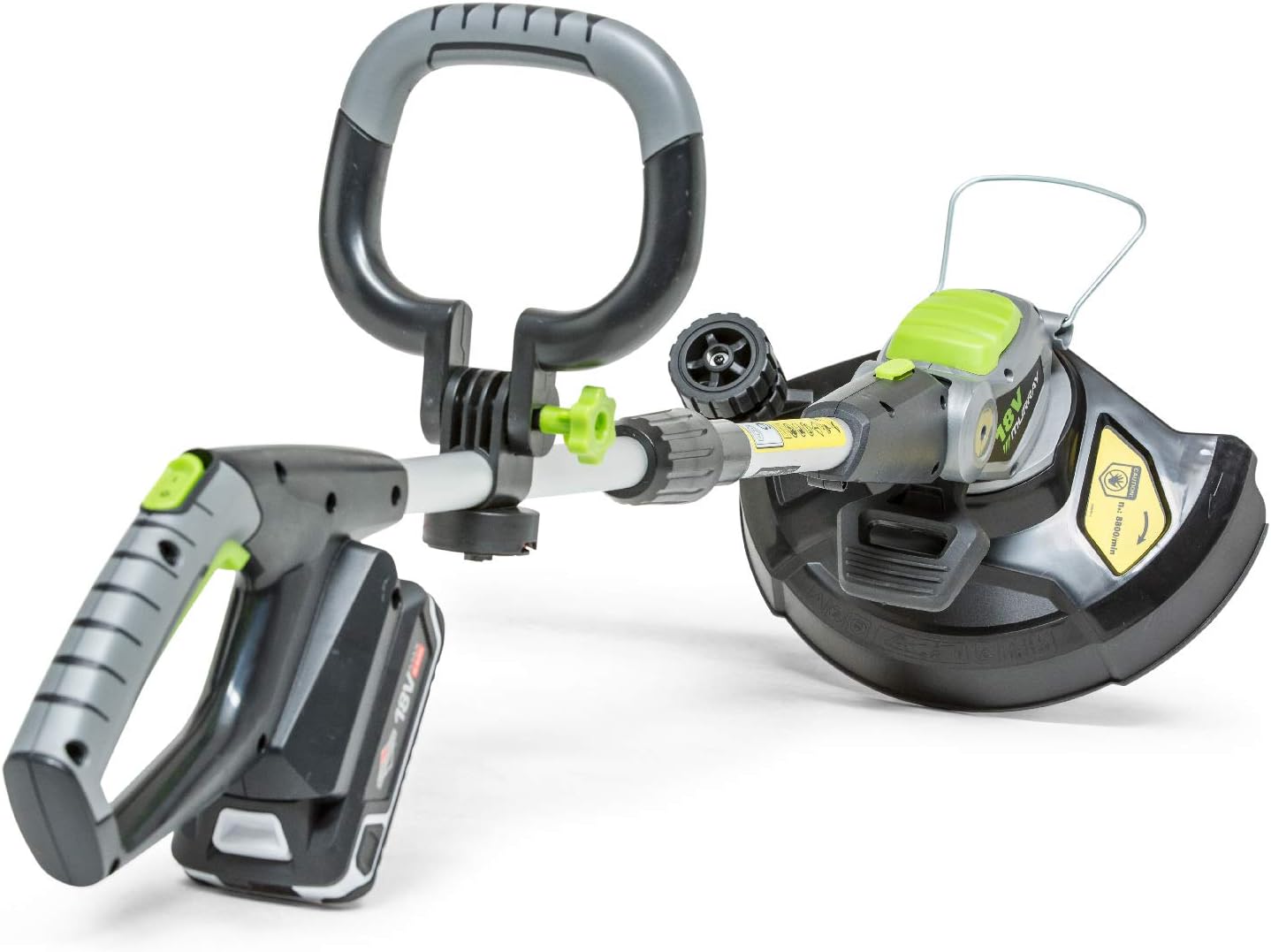
Image 3.3: The Murray 18V Grass Trimmer with the 18V Lithium-Ion battery correctly inserted into the handle.
4. Operation
This section details how to safely operate your Murray grass trimmer.
4.1 Starting and Stopping
- To start the trimmer, ensure the battery is fully inserted. Press and hold the safety lock-off button, then squeeze the trigger switch.
- To stop the trimmer, release the trigger switch.

Image 4.1: The main handle of the trimmer, showing the green safety button and the trigger switch for operation.
4.2 Trimming and Edging
- Grass Trimming: Hold the trimmer with the cutting head parallel to the ground. Move the trimmer slowly and steadily across the area to be cut.
- Edging Function: The trimmer head pivots to easily switch from trimming to edging. Rotate the head 90 degrees for precise edging along pathways and flowerbeds.

Image 4.2: The trimmer head pivoted for edging, demonstrating its versatility.
4.3 Adjusting Shaft Length
The trimmer features an adjustable shaft length for user comfort. Loosen the shaft locking collar, extend or retract the shaft to the desired length, and then tighten the collar securely.
4.4 Automatic Line Feed
This trimmer is equipped with an automatic line feed system. When the line becomes too short, it will automatically extend during operation. Avoid intentionally bumping the head to feed line, as this can wear down the mechanism.
5. Maintenance
Regular maintenance ensures optimal performance and extends the life of your trimmer. Always disconnect the battery before performing any maintenance.
5.1 Cleaning
- After each use, clean the trimmer housing and protective guard with a damp cloth.
- Remove any grass clippings or debris from the cutting head and ventilation slots.
- Do not use solvents or abrasive cleaners.
5.2 Trimmer Line Replacement
When the trimmer line is depleted, replace the spool with a new one. Refer to the product's specifications for the correct line diameter. Instructions for spool replacement are typically found on the spool packaging or can be obtained from customer support.
5.3 Battery Care and Storage
- Store the battery in a cool, dry place, away from direct sunlight and extreme temperatures.
- For long-term storage, charge the battery to approximately 50% capacity.
- Do not store the battery connected to the trimmer or charger.
6. Troubleshooting
If you encounter issues with your trimmer, consult the following table before contacting customer support.
| Problem | Possible Cause | Solution |
|---|---|---|
| Trimmer does not start | Battery not inserted correctly or discharged. Safety lock-off not engaged. | Ensure battery is fully inserted and charged. Press safety lock-off button before squeezing trigger. |
| Trimmer line not feeding | Line tangled or depleted. Debris in the feed mechanism. | Remove battery, inspect and clear any tangles or debris. Replace line spool if empty. |
| Reduced cutting performance | Trimmer line too short or worn. | Allow automatic line feed to extend the line. Replace line spool if necessary. |
7. Technical Specifications
| Feature | Specification |
|---|---|
| Model Number | IQ18GTK (1697120) |
| Brand | Murray |
| Power Source | 18V Lithium-Ion Battery |
| Battery Included | 1 x 2.5Ah Lithium-Ion |
| Product Dimensions (L x W x H) | 89 x 24 x 12.7 cm |
| Item Weight | 2.1 Kilograms |
| Cutting Width | 30 Centimeters |
| Speed | 9000 rpm |
| Manufacturer | Briggs and Stratton |
| Country of Origin | China |
8. Warranty Information
The Murray 18V Lithium-Ion Grass Trimmer is covered by the following warranty:
- Product Warranty: 5 years for non-professional use.
- Battery and Charger Warranty: 3 years.
Please refer to the full warranty terms and conditions provided with your product or on the manufacturer's website for detailed application of the warranty.
9. Customer Support
For technical assistance, spare parts, or warranty claims, please contact your local Murray dealer or visit the official Briggs & Stratton website. When contacting support, please have your product model number (IQ18GTK or 1697120) and serial number ready.

