
1. Introduction
Thank you for purchasing the ECOXGEAR Ecotrek GDI-EXTRK210 Portable Bluetooth Speaker. This manual provides essential information for setting up, operating, and maintaining your speaker to ensure optimal performance and longevity. The Ecotrek is designed for rugged outdoor use, featuring waterproof and dustproof capabilities, long battery life, and powerful audio output.
2. Product Overview
2.1 Components
The ECOXGEAR Ecotrek GDI-EXTRK210 includes the following main components:
- Main Speaker Unit with integrated handle
- Control Panel with LED display and backlit buttons
- Front Speaker Grille covering 2.5-inch tweeters, 5.25-inch full-range speakers, and dual 5.25-inch passive subwoofers
- Integrated USB charging port
- Auxiliary input port
- Microphone input port
- Integrated Cup Holders (2) on top panel
- AC Power Cable for charging and continuous operation
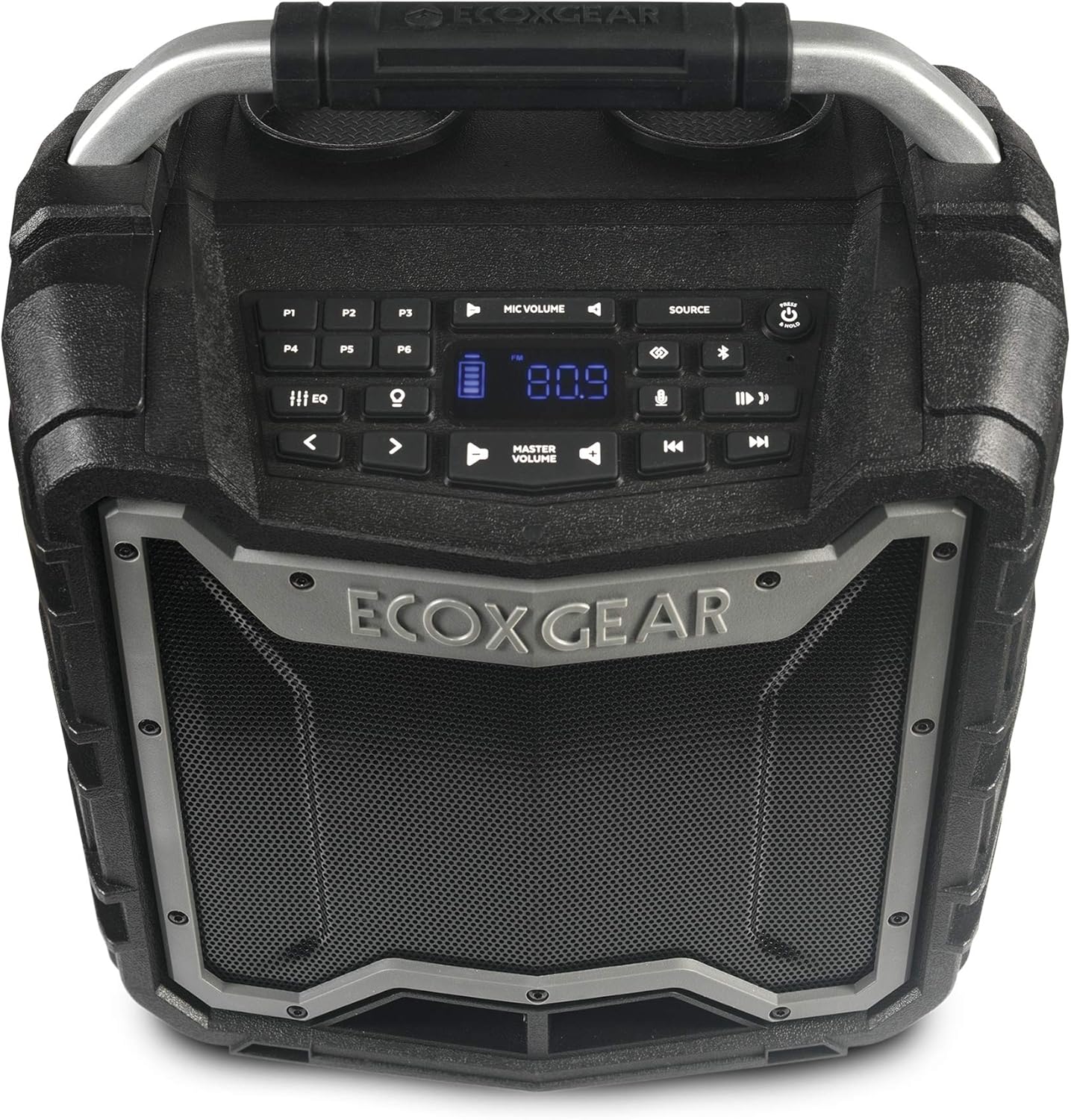
Figure 1: Top view of the ECOXGEAR Ecotrek speaker, highlighting the control panel and sturdy handle.

Figure 2: The Ecotrek features two integrated cup holders for convenience.
2.2 Key Features
- 100% Waterproof & Dustproof (IP67): Designed to withstand rain, dirt, snow, and can float in water.
- Powerful Audio Output: 100 watts of peak power with 2.5-inch tweeters, 5.25-inch full-range speakers, and dual 5.25-inch passive subwoofers for balanced stereo sound.
- Extended Battery Life: Over 10 hours at full volume, up to 50 hours at low volume. Recharges in 7-8 hours.
- EcoConnect: Pair two Ecotrek units wirelessly for true stereo sound within 30 feet.
- Multiple Audio Sources: Bluetooth 4.2 (up to 30m range), AM/FM radio with 6 presets, and auxiliary wired connection.
- Integrated USB Charging: 5V, 2.1A USB output port to charge compatible devices.
- EcoTalk Button: Connects to Siri or Google OK for voice control.
- Customizable Sound: 6 preset EQ modes to adjust audio output.
- Visibility: Backlit buttons and large LED display for night viewing.
- External Microphone Jack: For PA function or Karaoke (microphone sold separately).
- Durable Construction: Robust design for outdoor environments, including shockproof capabilities.

Figure 3: The ECOXGEAR Ecotrek is IP67 rated, making it fully waterproof and dustproof.

Figure 4: The Ecotrek offers over 50 hours of play time on a single charge at lower volumes.

Figure 5: The Ecotrek is built with a shockproof design for enhanced durability.
3. Setup
3.1 Initial Charging
Before first use, fully charge your Ecotrek speaker. Connect the supplied AC power cable to the speaker's power input and plug it into a standard wall outlet. The battery indicator on the LED display will show charging progress. A full charge typically takes 7-8 hours.
3.2 Power On/Off
To power on the speaker, press and hold the Power button () located on the control panel until the LED display illuminates. To power off, press and hold the same button until the display turns off.
3.3 Bluetooth Pairing
- Ensure the Ecotrek speaker is powered on.
- Press the SOURCE button until "Bluetooth" mode is selected. The Bluetooth icon on the display will flash, indicating it's in pairing mode.
- On your mobile device (smartphone, tablet, etc.), enable Bluetooth and search for available devices.
- Select "ECOXGEAR Ecotrek" from the list of devices.
- Once connected, the Bluetooth icon on the speaker's display will stop flashing and remain solid.
3.4 EcoConnect Pairing (True Wireless Stereo)
To pair two Ecotrek speakers for true wireless stereo sound:
- Ensure both Ecotrek speakers are powered on and in Bluetooth mode.
- On the first speaker (which will be the Left channel), press and hold the EcoConnect button (often indicated by a chain link or double speaker icon) until you hear a confirmation tone.
- On the second speaker (which will be the Right channel), press and hold the EcoConnect button until you hear a confirmation tone.
- The speakers will automatically search and connect to each other. Once connected, one speaker will act as the Left channel and the other as the Right channel.
- Now, connect your mobile device to the Left channel speaker via Bluetooth as described in Section 3.3.

Figure 6: EcoConnect allows two Ecotrek speakers to be paired for a wider stereo soundstage.
4. Operating Instructions
4.1 Audio Source Selection
Press the SOURCE button repeatedly to cycle through available audio sources: Bluetooth, AM Radio, FM Radio, and Auxiliary Input.
4.2 Volume Control
- Master Volume: Use the MASTER VOLUME buttons ( and ) on the control panel to adjust the overall speaker volume.
- Microphone Volume: If an external microphone is connected, use the MIC VOLUME buttons to adjust its level independently.
4.3 Radio Operation (AM/FM)
When in AM or FM radio mode:
- Use the Tune Up and Tune Down buttons to manually adjust the frequency.
- Press and hold the Tune Up or Tune Down buttons to auto-scan for the next available station.
- Preset Stations (P1-P6): To save a station, tune to the desired frequency, then press and hold one of the P1-P6 buttons until you hear a confirmation beep. To recall a preset, simply press the corresponding P1-P6 button.

Figure 7: The Ecotrek features AM/FM radio with 6 programmable presets for easy access to your favorite stations.
4.4 Equalizer (EQ) Modes
The Ecotrek offers 6 preset EQ modes to optimize sound for different music genres or listening preferences. Press the EQ button repeatedly to cycle through the available modes (e.g., Classic, Rock, Pop, Jazz, Flat, Bass Boost).
4.5 Using as a Power Bank
The integrated 5V, 2.1A USB output port allows you to charge your USB-compatible devices (smartphones, tablets, etc.) directly from the Ecotrek speaker. Simply connect your device's USB charging cable to the speaker's USB port.
4.6 EcoTalk Button (Voice Assistant)
Press the EcoTalk button (often indicated by a microphone icon) to activate your smartphone's voice assistant (Siri or Google OK). This allows for hands-free control of music playback and other functions.
4.7 PA / Karaoke Function
Connect an external microphone (sold separately) to the dedicated microphone input jack on the speaker. Adjust the microphone volume using the MIC VOLUME controls. This feature is ideal for public address or karaoke use.
5. Maintenance
5.1 Cleaning
Due to its IP67 waterproof and dustproof rating, the Ecotrek speaker is easy to clean. You can rinse it with fresh water to remove dirt, sand, or salt. Avoid using harsh chemicals or abrasive cleaners. Ensure all port covers are securely closed before rinsing.
5.2 Battery Care
The Ecotrek uses a sealed lead-acid battery. For optimal battery life, it is recommended to fully charge the speaker after each use and avoid completely draining the battery frequently. If storing the speaker for an extended period, ensure it is fully charged and recharge it every few months to maintain battery health.
6. Troubleshooting
| Problem | Possible Cause | Solution |
|---|---|---|
| Speaker does not power on. | Battery is depleted. | Connect the speaker to AC power and allow it to charge for several hours. |
| No sound from speaker. | Volume is too low or muted; incorrect audio source selected; device not connected. | Increase master volume. Ensure correct source (Bluetooth, FM, Aux) is selected. Re-pair Bluetooth device or check auxiliary cable connection. |
| Bluetooth device won't pair. | Speaker not in pairing mode; device too far; interference. | Ensure speaker is in Bluetooth pairing mode (flashing icon). Move device closer to speaker (within 30m). Turn off other Bluetooth devices nearby. |
| EcoConnect pairing fails. | Speakers too far apart; one speaker already connected to a device. | Ensure both speakers are within 30 feet of each other. Disconnect any Bluetooth devices from both speakers before attempting EcoConnect pairing. |
| Poor radio reception. | Weak signal; environmental interference. | Relocate the speaker to an area with better reception. Extend the antenna if available (not explicitly mentioned but common for radios). |
7. Specifications
| Feature | Detail |
|---|---|
| Model Name | ECOTREK (GDI-EXTRK210) |
| Power Output | 100 Watts (Peak) |
| Speaker Configuration | 2 x 2.5" Tweeters, 2 x 5.25" Full-Range, 2 x 5.25" Passive Subwoofers |
| Connectivity | Bluetooth 4.2, Auxiliary Input, AM/FM Radio |
| Bluetooth Range | Up to 30 meters (100 feet) |
| Waterproof/Dustproof Rating | IP67 (Submersible up to 1 meter for 30 minutes) |
| Battery Type | Sealed Lead-Acid (7 Amp Hours) |
| Battery Life | 10+ hours (full volume), up to 50 hours (low volume) |
| Charging Time | 7-8 hours |
| USB Output | 5V, 2.1A |
| Dimensions (L x W x H) | 25.9 x 39.1 x 42.4 cm (10.2 x 15.4 x 16.7 inches) |
| Weight | 19.2 lbs (8.7 kg) |
| Material | Plastic |
8. Warranty and Support
8.1 Warranty Information
The ECOXGEAR Ecotrek GDI-EXTRK210 comes with a 3-year warranty covering parts and labor. This warranty ensures your product is free from defects in material and workmanship under normal use. Please retain your proof of purchase for warranty claims.
8.2 Customer Support
For technical assistance, troubleshooting not covered in this manual, or warranty inquiries, please contact ECOXGEAR customer service. Refer to the official ECOXGEAR website or product packaging for the most current contact information.
Note: ECOXGEAR is committed to providing excellent customer service and support for their products.


