1. Introduction
Thank you for purchasing the Asiproper HXSJ V500 USB Gaming Mouse. This manual provides detailed instructions on how to set up, operate, and maintain your new gaming mouse. Please read this manual thoroughly before use to ensure optimal performance and longevity of the product.
2. Safety Information
- Do not expose the mouse to liquids or excessive moisture.
- Avoid dropping or subjecting the mouse to strong impacts.
- Do not attempt to disassemble or modify the mouse. This will void the warranty.
- Keep the mouse away from extreme temperatures.
- Clean the mouse with a soft, dry cloth only.
3. Package Contents
Please check the box for the following items:
- 1 x Asiproper HXSJ V500 USB Gaming Mouse
- 1 x User Manual (this document)
4. Product Overview
The HXSJ V500 is a wired gaming mouse designed for PC users, featuring a pink color scheme, cool lighting effects, and a symmetrical design for comfortable use by both left and right-handed users. It includes 6 programmable buttons and a high-precision optical sensor.

Figure 4.1: Top-down view of the Asiproper HXSJ V500 gaming mouse, showcasing its pink color and symmetrical design.

Figure 4.2: Angled view of the HXSJ V500 mouse positioned next to a keyboard, highlighting its ergonomic shape and side buttons.
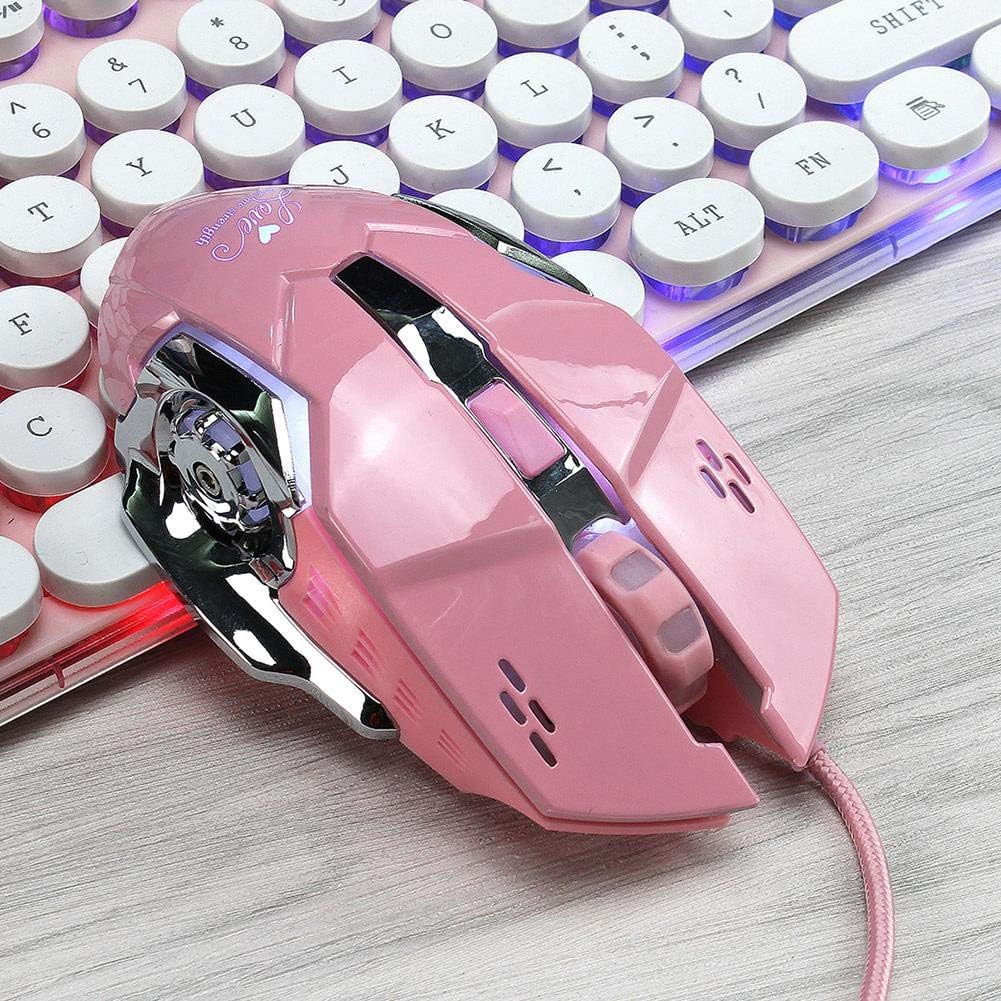
Figure 4.3: A different angled perspective of the HXSJ V500 mouse, showing its overall design and how it fits with a typical keyboard setup.

Figure 4.4: The HXSJ V500 mouse on a pink desk setup, demonstrating its aesthetic appeal alongside other peripherals.
Button Layout:
- Left Click Button
- Right Click Button
- Scroll Wheel / Middle Click Button
- DPI Adjustment Button
- Forward Side Button
- Backward Side Button
5. Setup
The HXSJ V500 mouse is a plug-and-play device, requiring no additional drivers for basic functionality.
- Locate an available USB 2.0 port on your computer.
- Plug the USB connector of the HXSJ V500 mouse into the USB port.
- Your operating system will automatically detect and install the necessary drivers. This process may take a few moments.
- Once installed, the mouse is ready for use.
System Requirements:
- Windows 98 / Me / 2000 / XP / Vista / Windows 7 / Win8 / 10
- Mac OS
6. Operating Instructions
6.1 DPI Adjustment
The HXSJ V500 features a four-stage optical motor, allowing you to switch between different DPI (Dots Per Inch) sensitivities to match your preference and task. The default DPI settings are 800, 1200, 2400, and 3200 DPI.
- Press the DPI Adjustment Button (Button 4 as per Product Overview) located behind the scroll wheel to cycle through the available DPI settings.
- Each press will change the sensitivity, indicated by a change in the mouse's lighting.
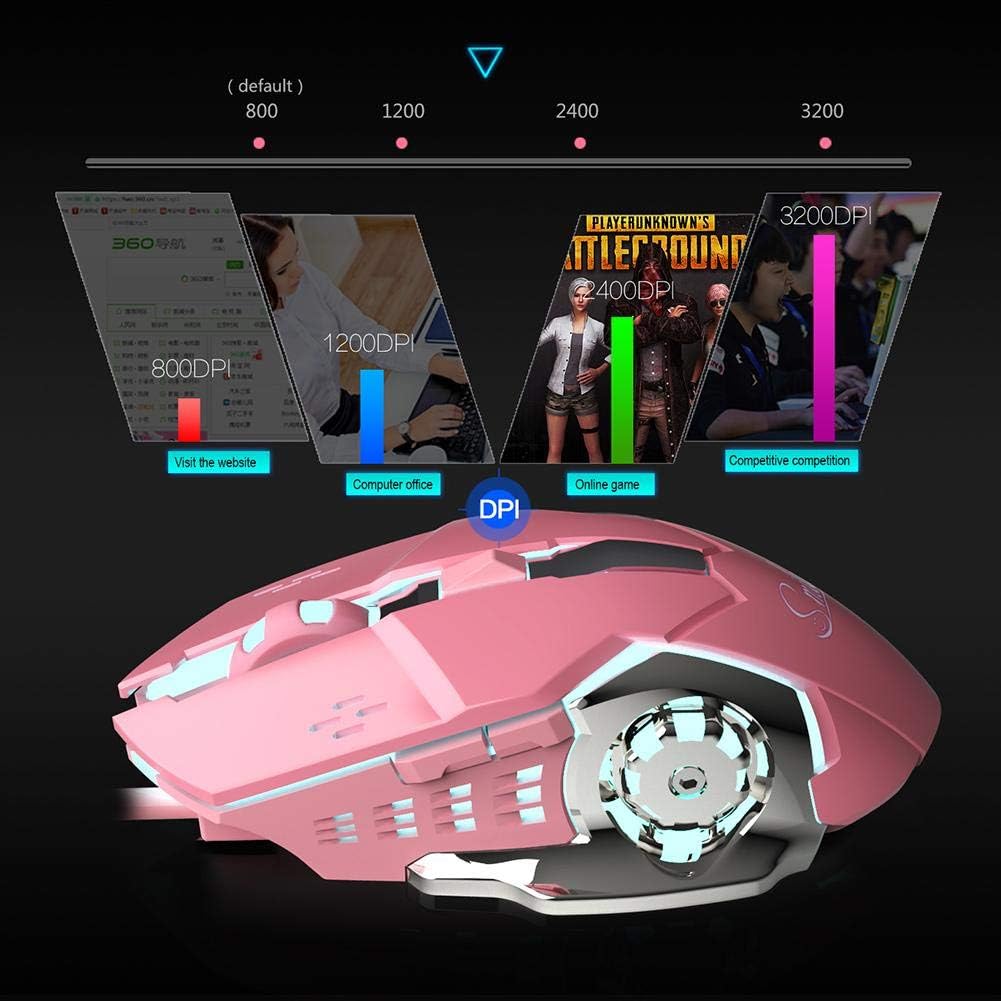
Figure 6.1: Visual representation of the four DPI settings and their typical use cases, from 800 DPI for browsing to 3200 DPI for competitive gaming.
6.2 Lighting Effects
The mouse features cool lighting effects. The side button and DPI button lights can be turned off simultaneously if desired.
- Specific instructions for turning off the lights are typically handled by pressing a combination of buttons or through software (if available). Refer to the manufacturer's website for advanced lighting control software if basic button combinations do not suffice.
6.3 Side Buttons
The forward and backward side buttons (Buttons 5 and 6) are commonly used for navigation in web browsers and file explorers. Their functionality may be customized through operating system settings or third-party mouse software.
7. Maintenance
Proper maintenance ensures the longevity and performance of your mouse.
- Cleaning: Use a soft, lint-free cloth to wipe the surface of the mouse. For stubborn dirt, slightly dampen the cloth with water or a mild, non-abrasive cleaner. Do not spray cleaners directly onto the mouse.
- Sensor Care: Keep the optical sensor on the bottom of the mouse clean and free from dust or debris to ensure accurate tracking.
- Cable Management: Avoid sharp bends or kinks in the braided USB cable to prevent damage.
8. Troubleshooting
| Problem | Possible Cause | Solution |
|---|---|---|
| Mouse not responding | Loose USB connection, faulty USB port, driver issue. | Try plugging the mouse into a different USB port. Restart your computer. Check Device Manager for driver issues. |
| Cursor movement is erratic or jumpy | Dirty optical sensor, unsuitable surface, software interference. | Clean the optical sensor. Use the mouse on a clean, non-reflective mouse pad. Close other applications that might interfere. |
| DPI button not changing sensitivity | Button malfunction, software conflict. | Ensure the mouse is properly connected. Try restarting your computer. If the issue persists, contact customer support. |
| Lights are not working | Lighting feature turned off, power issue. | Check if the lighting has been manually turned off (e.g., via a button combination). Ensure the mouse is receiving sufficient power from the USB port. |
9. Specifications
| Brand Name | HXSJ (Asiproper) |
| Product Model | X500 (V500) |
| Product Type | Wired Gaming Mouse |
| Colour | Pink |
| Light Effects | Switchable (Cool light) |
| Working Method | Optical (Light Barrier) |
| Interface | USB 2.0 |
| Cable Length | 1.4m Braided Wire |
| Number of Buttons | 6 |
| DPI Settings | 800 / 1200 / 2400 / 3200 DPI (Four-stage optical motor) |
| Maximum Speed | 150 IPS |
| Button Life | 5 million times |
| Rated Voltage/Current | 5 V, 100 mA |
| Ergonomics | Support (Symmetrical design) |
| Product Weight | 136 g |
| Product Dimensions (L x W x H) | 13 x 8 x 3.8 cm (5.12 x 3.15 x 1.50 inches) |
10. Warranty and Support
For warranty information and technical support, please refer to the retailer where you purchased the product or visit the official Asiproper/HXSJ website. Keep your proof of purchase for warranty claims.
For further assistance, you may contact customer support through the provided channels on the product packaging or the brand's official online presence.


