
1. Introduction
This user manual provides comprehensive instructions for the setup, operation, and maintenance of your new ZdalaMit EN3139S replacement remote control. This remote is designed to be compatible with various Sharp TV models, offering a direct replacement experience without the need for complex programming. Please read this manual thoroughly to ensure optimal use of your remote control.
2. Product Overview
The ZdalaMit EN3139S is a pre-programmed replacement remote control for Sharp 4K UHD HDR Smart TVs. It replicates the functionality of your original remote, providing access to all essential TV functions and dedicated app buttons.
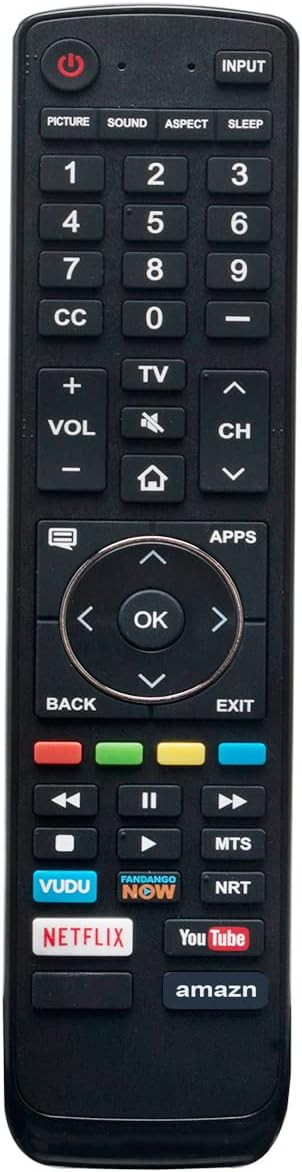
Figure 1: Front view of the ZdalaMit EN3139S replacement remote control, showing all buttons including power, input, number pad, volume, channel, navigation, and dedicated app buttons for VUDU, Netflix, YouTube, and Amazon.

Figure 2: Angled view of the remote control, highlighting its ergonomic design and button layout.

Figure 3: The remote control displaying its approximate dimensions: 8.6 inches in length and 2.0 inches in width.

Figure 4: A hand holding the remote control, demonstrating its use with a Sharp TV in a living room setting, indicating signal transmission.
3. Setup
3.1 Battery Installation
The remote control requires two (2) AAA alkaline batteries for operation. Batteries are not included with the remote.
- Locate the battery compartment on the back of the remote control.
- Slide open the battery compartment cover.
- Insert two new AAA batteries, ensuring the positive (+) and negative (-) terminals match the diagrams inside the compartment.
- Close the battery compartment cover securely.
Once batteries are installed, the remote is ready for use without any additional programming or pairing.
4. Operating Instructions
The ZdalaMit EN3139S remote control is designed for immediate use with compatible Sharp TV models. No programming or pairing is required. Simply point the remote at your TV and press the desired button.
4.1 Basic Functions
- Power (●): Turns the TV on or off.
- INPUT: Cycles through available input sources (HDMI, AV, etc.).
- Number Buttons (0-9): Directly select channels.
- VOL (+/-): Adjusts the volume level.
- CH (▲/▼): Changes channels up or down.
- Mute (🔇): Mutes or unmutes the TV audio.
- Navigation Pad (◀ ▲ ▶ ▼) & OK: Navigates menus and confirms selections.
- BACK: Returns to the previous menu or screen.
- EXIT: Exits the current menu or application.
- APPS: Accesses the smart TV applications menu.
- Dedicated App Buttons: Direct access to VUDU, PANDANGO NOW, Netflix, YouTube, and Amazon applications.
5. Maintenance
To ensure the longevity and proper functioning of your remote control, follow these maintenance guidelines:
- Cleaning: Wipe the remote with a soft, dry cloth. Avoid using liquid cleaners or abrasive materials.
- Battery Replacement: Replace batteries when the remote's response becomes sluggish or stops working. Always replace both batteries at the same time with new ones.
- Storage: If the remote will not be used for an extended period, remove the batteries to prevent leakage and potential damage. Store in a cool, dry place.
- Avoid Damage: Do not drop the remote, expose it to extreme temperatures, or immerse it in water.
6. Troubleshooting
If you encounter issues with your remote control, please refer to the following common solutions:
- Remote not responding: Ensure the batteries are inserted correctly with the correct polarity (+/-). Replace old batteries with new AAA alkaline batteries.
- TV not turning on/off: Check if there is a clear line of sight between the remote and the TV's infrared sensor. Remove any obstructions.
- Specific buttons not working: Clean the remote's surface and ensure no debris is lodged around the buttons. If the issue persists, try replacing the batteries.
- Remote works but TV functions are erratic: In some rare cases, a TV reset may resolve communication issues. Refer to your Sharp TV's user manual for instructions on how to perform a factory reset, if necessary.
7. Specifications
| Feature | Detail |
|---|---|
| Model Number | EN3139S (Internal: GSS2193) |
| Brand | ZdalaMit |
| Compatible Devices | Sharp Televisions (various models including LC-55P6000U, LC-65P6000U, LC-50P7000U, LC-55P7000U, LC-65P7000U, LC-50P8000U, LC-55P8000U, LC-65P8000U, LC-43N7002U, LC-50N7002U, LC-55N7002U, LC-50N8002U) |
| Power Supply | 2 x 1.5V AAA Alkaline Batteries |
| Product Dimensions | 7 x 2 x 0.6 inches (approximately 17.8 x 5.1 x 1.5 cm) |
| Item Weight | 1.76 ounces (approximately 50 grams) |
| Special Feature | Pre-programmed, no setup required |
8. Customer Support
For any questions, concerns, or assistance regarding your ZdalaMit EN3139S replacement remote control, please do not hesitate to contact our customer support. We are committed to providing helpful and timely solutions.
Please refer to your purchase documentation or the seller's contact information for specific support channels.