
WEN 56380i
Contents
WEN 3800-Watt Inverter Generator User Manual
Model: 56380i
Introduction
This manual provides essential information for the safe and efficient operation, maintenance, and troubleshooting of your WEN 3800-Watt Inverter Generator. Designed to deliver clean, stable power, this portable generator is ideal for various applications, from camping and tailgating to providing backup power during outages. Please read this manual thoroughly before operating the generator to ensure proper use and to maximize its lifespan.
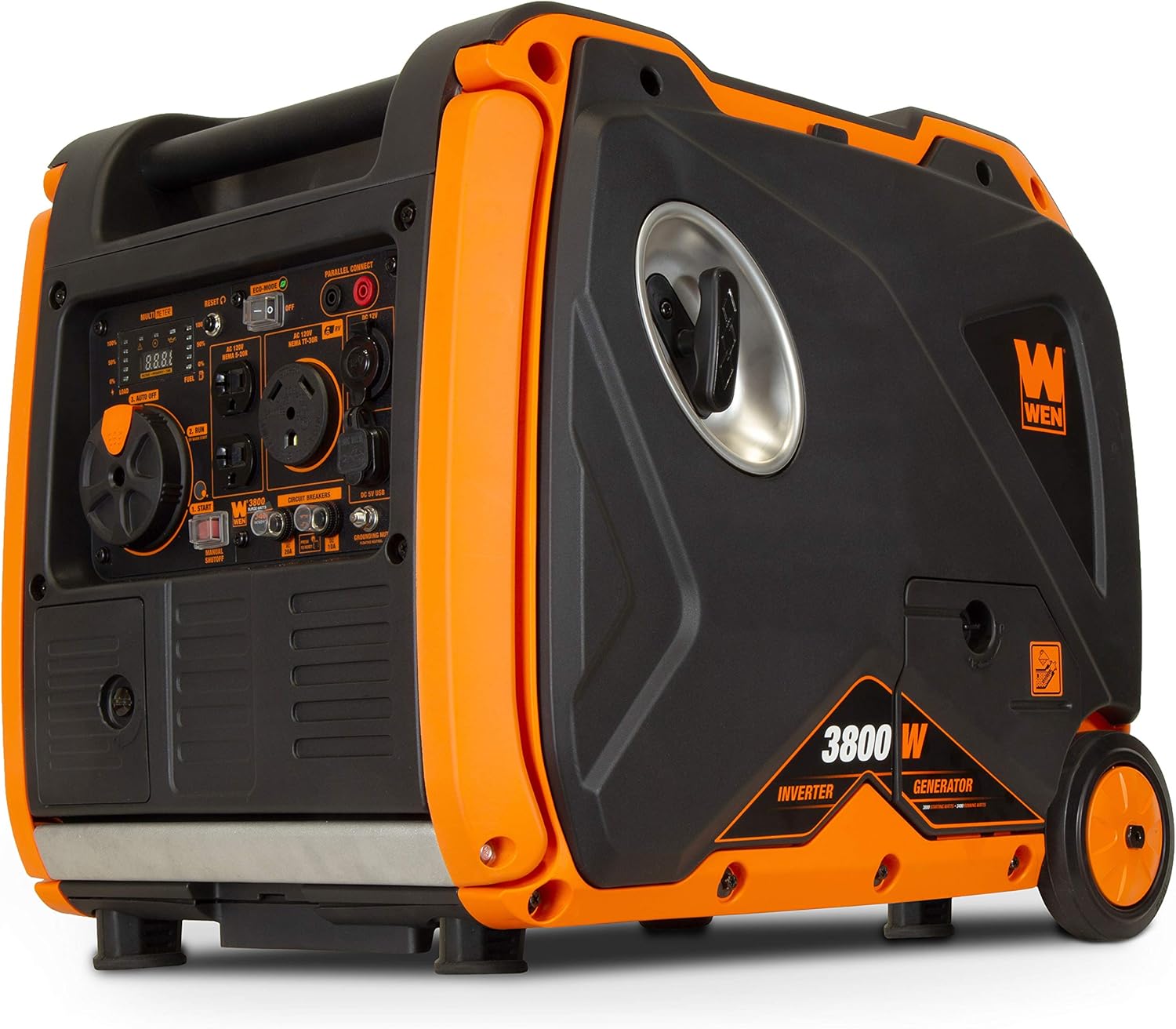
Image: The WEN 3800-Watt Inverter Generator, showcasing its compact and portable design with a black and orange casing.
Safety Information
WARNING: Improper operation or maintenance of this product could result in serious injury or death. Always follow all safety precautions and instructions.
- Operate the generator outdoors in a well-ventilated area to prevent carbon monoxide poisoning.
- Keep children and pets away from the generator during operation.
- Do not operate in rain or wet conditions.
- Ensure proper grounding before use.
- Turn off the engine and allow it to cool before refueling.
- Store fuel in an approved container in a well-ventilated area away from ignition sources.
Components Overview
Familiarize yourself with the main components of your WEN Inverter Generator:
- Control Panel: Houses outlets, digital display, and control knob.
- Fuel Tank: 2.2-gallon capacity for gasoline.
- Engine: 212cc 4-stroke OHV engine.
- Wheels and Handle: For easy portability.
- Oil Access Cover: For convenient oil changes.
- Spark Arrestor: Allows for legal use in national parks and campgrounds.

Image: A detailed view of the WEN Inverter Generator's control panel, showing various outlets, the digital display, and the main control knob.
Setup
- Unpacking: Carefully remove the generator from its packaging and inspect for any damage.
- Add Engine Oil: Before first use, add the recommended amount of 10W-30 engine oil (not included) through the oil fill opening. Refer to the oil capacity in the specifications section.
- Add Fuel: Fill the fuel tank with fresh, unleaded gasoline. Do not overfill.
- Connect Battery (Electric Start Models): Ensure the battery is properly connected for electric start functionality.
- Grounding: Connect a grounding wire to the generator's grounding terminal and to a suitable ground source.
Operating Instructions
Starting the Generator:
- Ensure all electrical loads are disconnected from the generator.
- Turn the fuel valve to the "ON" position.
- Move the choke lever to the "CHOKE" position (if engine is cold).
- Press the electric start button or pull the recoil starter handle firmly until the engine starts.
- Once the engine starts, slowly move the choke lever to the "RUN" position.
Connecting Electrical Devices:
- Plug in your devices to the appropriate receptacles (two 3-prong 120V standard household, one AC 120V 30A NEMA TT-30R RV, one 12V DC, two 5V USB ports).
- Monitor the digital fuel and load display to ensure you do not overload the generator.
- Engage the Eco-Mode switch to maximize fuel economy. This feature automatically adjusts engine speed based on load.
Stopping the Generator:
- Disconnect all electrical loads.
- Turn the fuel valve to the "OFF" position. The generator will use up remaining fuel in the carburetor before shutting down, which helps prevent blockages.
- Once the engine stops, turn the main power switch to "OFF".
Maintenance
Regular maintenance is crucial for the longevity and optimal performance of your generator.
| Maintenance Item | Frequency | Procedure |
|---|---|---|
| Check Engine Oil | Before each use | Ensure oil level is between the min and max marks. Add if necessary. |
| Change Engine Oil | First 20 hours, then every 50 hours or annually | Drain old oil and refill with fresh 10W-30 oil. The oil access cover makes this easy. |
| Clean Air Filter | Every 50 hours or annually (more often in dusty conditions) | Remove and clean the air filter element. Replace if damaged. |
| Check Spark Plug | Every 100 hours or annually | Inspect for wear and proper gap. Clean or replace as needed. |
| Inspect Fuel Filter | Annually | Check for debris and replace if clogged. |

Image: Close-up view of the WEN Inverter Generator's oil access cover, designed for easy oil changes.
Troubleshooting
If you encounter issues with your generator, refer to the common problems and solutions below:
- Engine Does Not Start:
- Check fuel level.
- Ensure engine oil level is sufficient (low-oil shutdown).
- Verify spark plug connection and condition.
- Confirm fuel valve is in the "ON" position.
- No Power Output:
- Check circuit breakers on the control panel. Reset if tripped.
- Ensure the generator is not overloaded. Reduce connected devices.
- Verify all connections are secure.
- Engine Runs Rough or Stalls:
- Check for stale fuel; drain and refill with fresh gasoline if necessary.
- Clean or replace the air filter.
- Inspect the spark plug.
For issues not covered here, please contact WEN customer support.
Specifications
| Feature | Detail |
|---|---|
| Model | 56380i |
| Engine Type | 212cc 4-stroke OHV |
| Starting Wattage | 3800 Watts |
| Running Wattage | 3400 Watts |
| Fuel Type | Gasoline |
| Fuel Tank Volume | 2.2 Gallons |
| Runtime (Half-Load) | Up to 8.5 hours |
| Noise Level (Quarter Load) | 57 Decibels |
| Voltage | 120 Volts |
| Product Dimensions (L x W x H) | 23.2" x 18" x 20.1" |
| Item Weight | 99.2 Pounds |
| Outlets | (2) 120V AC, (1) 120V 30A NEMA TT-30R RV, (1) 12V DC, (2) 5V USB |
| Special Features | Electric Start, Fuel Shut-Off, Eco-Mode, Digital Display, Pure Sine Wave Output |

Image: The WEN 3800-Watt Inverter Generator with its key dimensions (length, width, height) indicated.
Warranty and Support
Your WEN 3800-Watt Inverter Generator comes backed by a 2-year warranty. This warranty covers defects in material and workmanship under normal use and service.
For warranty claims, technical assistance, or to locate authorized service technicians, please contact WEN customer support:
- Customer Helpline: Refer to the contact information provided with your product packaging or visit the official WEN website.
- Online Resources: Additional support and FAQs may be available on the WEN website.
Please retain your proof of purchase for warranty purposes.
Documents and downloads
Ask a question about this manual
Ask about setup, troubleshooting, compatibility, parts, safety, or missing instructions. Manuals+ will review the question and use this page’s manual context to help answer it.