Introduction
This manual provides comprehensive instructions for the setup, operation, and maintenance of your HUAYU RM-L1316 Universal Remote Control. This remote is designed to control various LED, LCD, HD, Smart, and Plasma televisions, offering convenient access to common functions and dedicated buttons for popular streaming services like Netflix and YouTube.
Please read this manual carefully before using the remote control to ensure proper functionality and to maximize your user experience.
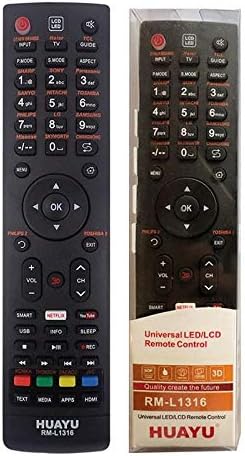
Image: Front view of the HUAYU RM-L1316 Universal Remote Control, displaying its full button layout including power, number keys, navigation, volume, channel, and dedicated buttons for Smart TV functions, Netflix, and YouTube.
Setup
1. Battery Installation
The HUAYU RM-L1316 remote control requires two AAA batteries (not included) for operation. Follow these steps to install them:
- Locate the battery compartment cover on the back of the remote control.
- Press down on the tab and slide the cover off.
- Insert two AAA batteries, ensuring the positive (+) and negative (-) terminals match the diagrams inside the compartment.
- Slide the battery compartment cover back into place until it clicks securely.

Image: Angled side view of the HUAYU RM-L1316 remote control, showing its ergonomic design and the location of the battery compartment on the rear.
2. Programming the Remote Control
The RM-L1316 is a universal remote control designed to work with a wide range of TV brands. It typically requires no complex programming for most modern TVs. For initial setup, point the remote at your TV and test basic functions like Power, Volume, and Channel. If the remote does not respond, you may need to use the auto-search function or manually enter a code.
Auto-Search Method (Common for Universal Remotes):
- Ensure your TV is turned on.
- Press and hold the SET button (or a similar button, refer to specific instructions if provided with packaging) until the indicator light stays on.
- Point the remote at the TV and repeatedly press the POWER button (or CH+) until the TV turns off.
- Once the TV turns off, immediately press the SET button again to save the code. The indicator light should turn off.
- Test all functions. If some functions do not work, repeat the auto-search process.
Note: Specific programming instructions may vary slightly. If the auto-search method is unsuccessful, consult the original packaging or the manufacturer's website for a list of TV codes and manual entry procedures.
Operating Instructions
The HUAYU RM-L1316 remote control features a standard layout for easy navigation and control of your television. Below is a general guide to its buttons and their functions:
- Power Button (●): Turns the TV on or off.
- Input/Source: Selects video input sources (HDMI, AV, Component, etc.).
- Number Buttons (0-9): Directly select channels or input numerical values.
- Volume Up/Down (VOL +/-): Adjusts the audio volume.
- Channel Up/Down (CH +/-): Changes TV channels.
- Mute: Mutes or unmutes the TV audio.
- Navigation Pad (Up, Down, Left, Right, OK): Used to navigate menus and confirm selections.
- Menu/Home: Accesses the TV's main menu or smart home screen.
- Exit: Exits the current menu or application.
- Back/Return: Goes back to the previous screen or menu.
- Smart/Apps: Direct access to the TV's smart features or application list.
- Netflix: Dedicated button to launch the Netflix application.
- YouTube: Dedicated button to launch the YouTube application.
- Media Playback Controls: Play, Pause, Stop, Fast Forward, Rewind, Skip.
- Color Buttons (Red, Green, Yellow, Blue): Functionality varies by TV model and application, often used for interactive features.
Note: The functionality of some buttons may depend on your specific TV model and its operating system.
Maintenance
Cleaning the Remote Control
To maintain the remote control's appearance and functionality, follow these cleaning guidelines:
- Wipe the surface with a soft, dry cloth.
- For stubborn dirt, slightly dampen the cloth with water or a mild, non-abrasive cleaner.
- Avoid using harsh chemicals, solvents, or abrasive cleaning pads, as these can damage the remote's finish or internal components.
- Ensure no liquid enters the remote control, especially around buttons or the battery compartment.
Battery Replacement
Replace the batteries when the remote control's response becomes sluggish or stops working. Always replace both batteries at the same time with new AAA batteries. Do not mix old and new batteries, or different types of batteries.
Dispose of used batteries according to local regulations.
Troubleshooting
If you encounter issues with your HUAYU RM-L1316 Universal Remote Control, refer to the following common problems and solutions:
| Problem | Possible Cause | Solution |
|---|---|---|
| Remote is not working at all. | Dead or incorrectly installed batteries. Remote not programmed correctly. Obstruction between remote and TV. |
|
| Some buttons do not work. | Remote not fully compatible with TV model. Programming error. |
|
| Short operating range. | Weak batteries. Obstruction. Interference. |
|
Specifications
- Brand: Huayu
- Model Name/Number: RM-L1316
- Color: Black
- Compatible Devices: Television (LED, LCD, HD, Smart, Plasma TVs)
- Connectivity Technology: Infrared
- Controller Type: Button Control
- Maximum Range: 10 Meters
- Item Weight: 15 Grams
- Package Dimensions: 17.9 x 7.1 x 2.4 cm
Warranty and Support
Warranty Information
Specific warranty details for the HUAYU RM-L1316 Universal Remote Control are typically provided with the product packaging or by the retailer at the time of purchase. Please retain your proof of purchase for any warranty claims. For detailed warranty terms and conditions, refer to the documentation included with your remote or contact your point of purchase.
Customer Support
For further assistance, troubleshooting not covered in this manual, or inquiries regarding your HUAYU RM-L1316 Universal Remote Control, please contact the retailer from whom you purchased the product. You may also visit the official Huayu website for potential support resources or contact information.


