1. Product Overview
The LG Nano 8 Series 75SM8670PUA is a 75-inch 4K UHD Smart LED NanoCell Television from the 2019 model year. This television is designed to deliver a high-quality viewing experience with advanced picture and sound technologies.
Key features include Nano Accuracy for lifelike visuals and Nano Color for a broad spectrum of colors. The television is powered by LG's α7 Gen 2 Intelligent Processor, which enhances content. Local Dimming control is integrated to optimize light levels. Audio and visual experiences are further enhanced with Dolby Vision and Dolby Atmos compatibility. This LG AI TV incorporates LG ThinQ AI and offers built-in voice control capabilities through Google Assistant and Alexa for entertainment and smart home integration.
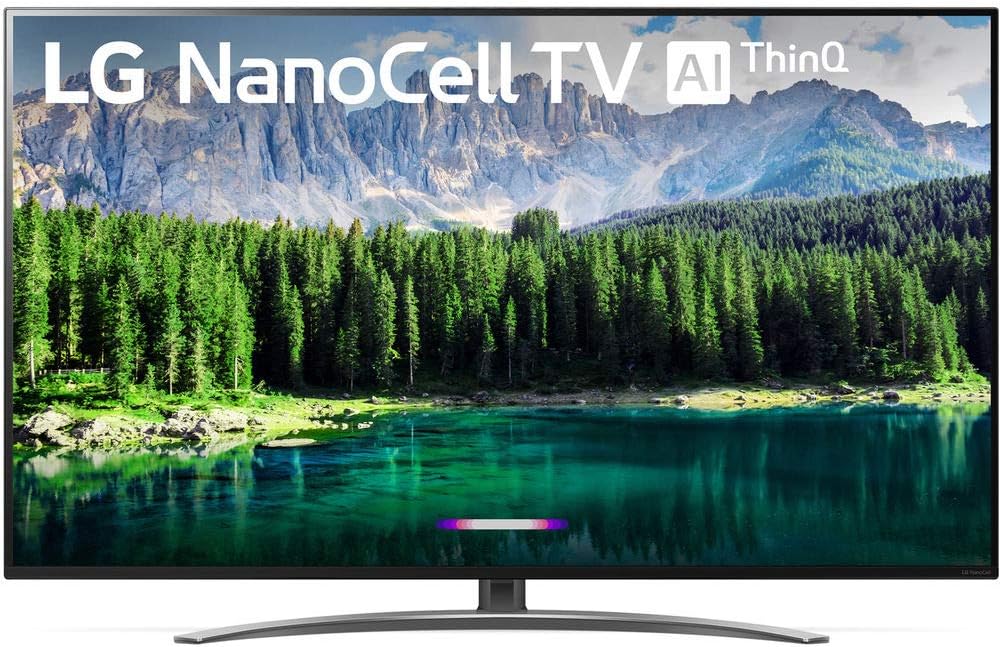
Figure 1.1: Front view of the LG Nano 8 Series 75SM8670PUA TV.
2. What's in the Box
Upon unpacking your LG Nano 8 Series 75SM8670PUA TV, please ensure all the following components are present:
- LG Nano 8 Series 75SM8670PUA TV Unit
- Magic Remote Control
- AAA Batteries (2 for remote control)
- Power Cable
- Quick Start Guide
- E-Manual (accessible via TV interface)
3. Setup
3.1 Unpacking and Placement
Due to the size and weight of the 75-inch television (approximately 85.5 pounds), it is recommended that two or more people handle the unpacking and placement. Carefully remove the TV from its packaging, following the instructions provided in the Quick Start Guide to avoid damage.
Ensure the TV is placed on a stable, level surface or securely mounted to a wall. For stand installation, attach the stand according to the Quick Start Guide. For wall mounting, the TV supports VESA mounting with dimensions of 600 x 400 mm.

Figure 3.1: Dimensions of the LG Nano 8 Series 75SM8670PUA TV (without stand: 66.3" W x 38.3" H x 2.6" D; with stand: 66.3" W x 41.1" H x 14.6" D).
3.2 Connecting External Devices
The TV offers various connectivity options for external devices:
- HDMI Inputs (HDCP 2.2): 4 ports (2 rear, 2 side) for connecting devices like Blu-ray players, gaming consoles, or set-top boxes. HDMI 2 supports Audio Return Channel (ARC).
- USB Ports (v 2.0): 3 ports (1 rear, 2 side) for connecting USB storage devices or other compatible peripherals.
- RF Connection Input (Antenna/Cable): 1 rear port for connecting an antenna or cable TV signal.
- Ethernet Port: For wired network connection.
3.3 Initial Power On and Network Setup
After connecting the power cable and any desired external devices, press the power button on the remote control or the TV. Follow the on-screen prompts to complete the initial setup, which includes language selection, network connection (Wi-Fi or Ethernet), and channel scanning.
4. Operating the TV
4.1 Magic Remote Control
The included Magic Remote allows for intuitive control of the TV. It features a motion-sensing pointer, scroll wheel, and voice command capabilities. Point the remote at the screen to activate the pointer, and use the scroll wheel for navigation. Voice commands can be used to search for content, change settings, or control smart home devices.
4.2 Smart TV Features (webOS and AI ThinQ)
The LG Nano 8 Series TV runs on the webOS smart TV platform, providing access to a variety of streaming services and applications. LG ThinQ AI integrates artificial intelligence to enhance user interaction and smart home connectivity. Built-in Google Assistant and Alexa allow for voice control of the TV and compatible smart devices.

Figure 4.1: Users interacting with the LG Nano 8 Series TV's smart features.
4.3 Picture and Sound Settings
Access the TV's settings menu to customize picture and sound options. The α7 Gen 2 Intelligent Processor optimizes content for 4K resolution. Adjust settings related to Nano Accuracy, Nano Color, and Local Dimming to fine-tune visual performance. For audio, the 2.2 Channel Speaker System and Dolby Atmos compatibility provide an immersive sound experience. Explore various sound modes to suit different content types.
5. Maintenance
To ensure the longevity and optimal performance of your LG TV, follow these maintenance guidelines:
- Cleaning the Screen: Gently wipe the screen with a soft, dry microfiber cloth. For stubborn marks, lightly dampen the cloth with water or a specialized screen cleaner, then wipe dry. Avoid harsh chemicals or abrasive materials.
- Cleaning the Frame: Use a soft, dry cloth to clean the TV frame and stand.
- Software Updates: Periodically check for and install software updates through the TV's settings menu. Updates can improve performance, add new features, and enhance security.
- Ventilation: Ensure adequate airflow around the TV by keeping vents clear of obstructions.
6. Troubleshooting
If you encounter issues with your LG TV, consider the following common troubleshooting steps:
- No Power: Check if the power cable is securely connected to both the TV and the power outlet. Ensure the outlet is functional.
- No Picture/Sound: Verify that the correct input source is selected. Check all cable connections to external devices.
- Remote Control Not Working: Replace the batteries in the Magic Remote. Ensure there are no obstructions between the remote and the TV.
- Network Connection Issues: Restart your router and modem. Re-establish the Wi-Fi connection in the TV's network settings. For wired connections, check the Ethernet cable.
- Picture Quality Issues: Adjust picture settings (brightness, contrast, color) in the TV menu. Ensure the content source is high quality.
- Software Glitches: Perform a soft reset by unplugging the TV from the power outlet for a few minutes, then plugging it back in.
For persistent issues, consult the E-Manual accessible on your TV or contact LG customer support.
7. Specifications
| Feature | Specification |
|---|---|
| Brand | LG |
| Model Number | 75SM8670PUA |
| Screen Size | 75 Inches (191 cm visible diagonal) |
| Display Technology | LED NanoCell |
| Resolution | 4K UHD (3840 x 2160) |
| Refresh Rate | 120 Hz |
| Product Dimensions (with stand) | 14.6"D x 66.3"W x 41.1"H |
| Product Dimensions (without stand) | 2.6"D x 66.3"W x 38.3"H |
| Item Weight | 85.5 Pounds |
| Aspect Ratio | 1.77:1 |
| HDMI Inputs | 4 (HDCP 2.2, 2 rear, 2 side; HDMI 2 with ARC) |
| USB Ports | 3 (v 2.0, 1 rear, 2 side) |
| Connectivity Technology | Bluetooth, Ethernet, HDMI, USB, Wireless |
| VESA Mounting | 600 x 400 mm |
| Audio | 2.2 Channel Speaker System, Dolby Atmos compatible |
| Processor | α7 Gen 2 Intelligent Processor |
| Smart Features | webOS, LG ThinQ AI, Google Assistant, Alexa built-in |
8. Warranty and Support
For information regarding the product warranty, please refer to the warranty card included with your purchase or the E-Manual accessible through the TV's interface. For technical assistance, troubleshooting beyond this manual, or service inquiries, please contact LG customer support. Contact details can typically be found on the LG official website or in your product documentation.