1. Introduction
Thank you for choosing the VINABTY EUR7659Y70 Replacement Remote Control. This manual provides essential instructions for setting up, operating, and maintaining your new remote control. Please read this manual thoroughly to ensure proper use and to maximize the performance of your device.
This remote is designed as a direct replacement for various Panasonic DVD/VCR Recorder models, offering seamless compatibility and functionality.
2. Product Overview
The VINABTY EUR7659Y70 is a replacement remote control specifically engineered to function with a range of Panasonic DVD and VCR recorder units. It replicates the functionality of the original remote, allowing you to control your device's playback, recording, and menu navigation features.
Compatible Panasonic Models include:
- DMR-ES35V, DMR-ES45, DMR-ES46, DMR-ES45VS, DMR-ES45V, DMR-ES46V, DMR-ES46VS, DMR-ES36V
- DMRES45, DMRES46, DMRES35, DMRES45V, DMRES35V, DMRES36V, DMRES45VS, DMRES46V, DMRES46VS
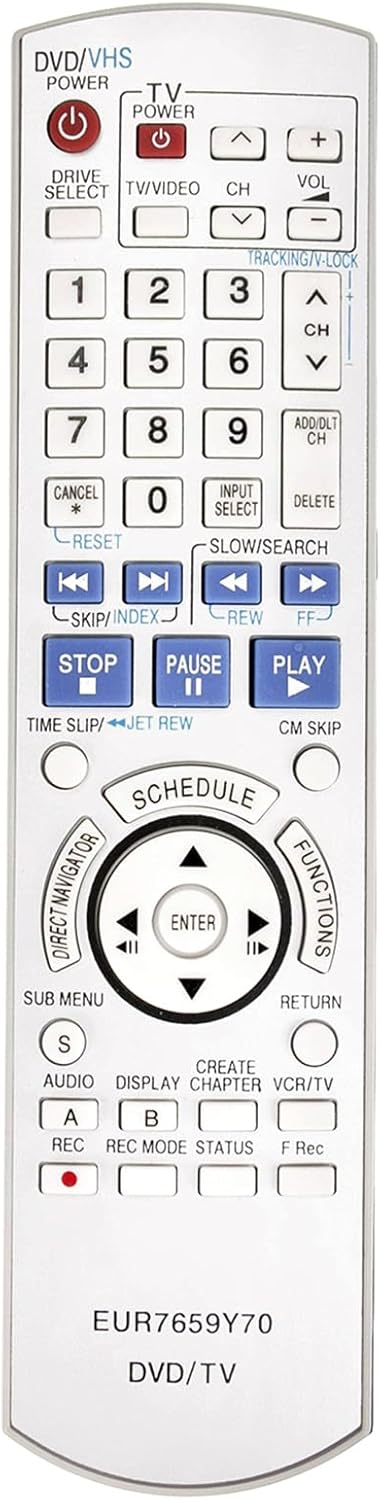
Figure 1: Front view of the VINABTY EUR7659Y70 Replacement Remote Control, showing all buttons and their labels.
3. Setup
3.1 Battery Installation
- Locate the battery compartment on the back of the remote control.
- Slide open the battery compartment cover.
- Insert two new AAA batteries (not included), ensuring the positive (+) and negative (-) terminals match the diagrams inside the compartment.
- Close the battery compartment cover securely.
3.2 Pairing the Remote Control
For some Panasonic DVD/VCR Recorder models, it may be necessary to pair the replacement remote control with your device. Follow these steps if the remote does not respond immediately after battery installation:
- Ensure your Panasonic DVD/VCR Recorder is powered on.
- On the remote control, locate the ENTER key.
- Simultaneously press and hold down the ENTER key and the number key corresponding to the displayed "Set" or "RC" code on your VCR/DVD unit. This code is typically shown on the unit's display when it's in pairing mode or when a remote is not detected.
- Hold both keys down for approximately 3 to 5 seconds.
- Release the keys. The remote should now be paired with your device. Test functionality by pressing various buttons.
If pairing is unsuccessful, repeat the steps, ensuring correct battery insertion and proper alignment with the device's sensor.
4. Operating Instructions
The VINABTY EUR7659Y70 remote control provides full functionality for your compatible Panasonic DVD/VCR Recorder. Refer to Figure 1 for the layout of the buttons. Below are general functions:
- POWER (DVD/VHS, TV): Turns the respective device on or off.
- TV/VIDEO: Switches between TV and video input modes.
- CH (+/-): Changes channels.
- VOL (+/-): Adjusts volume.
- Number Keys (0-9): Direct channel selection or inputting numerical values.
- PLAY, STOP, PAUSE, REW, FF, SKIP/INDEX: Control media playback.
- REC (A, B): Initiates recording. Consult your device's manual for specific recording procedures.
- ENTER / Directional Pad: Navigates menus and confirms selections.
- SUB MENU, RETURN, FUNCTIONS: Access various menu options and settings.
For detailed operation of specific features of your Panasonic DVD/VCR Recorder, please consult the original instruction manual provided with your Panasonic device.
5. Maintenance
5.1 Cleaning
To clean the remote control, gently wipe its surface with a soft, dry cloth. For stubborn dirt, slightly dampen the cloth with water or a mild, non-abrasive cleaner. Avoid using harsh chemicals, solvents, or abrasive materials, as these can damage the remote's finish or internal components.
5.2 Battery Care
- Replace batteries when the remote's response becomes sluggish or inconsistent.
- Always replace both batteries at the same time with new ones of the same type (AAA).
- Do not mix old and new batteries, or different types of batteries.
- If the remote control will not be used for an extended period, remove the batteries to prevent leakage and potential damage.
- Dispose of used batteries according to local regulations.
6. Troubleshooting
If you experience issues with your VINABTY EUR7659Y70 remote control, please refer to the following common solutions:
- Remote is unresponsive:
- Check if the batteries are inserted correctly with the correct polarity (+/-).
- Replace old batteries with new ones.
- Ensure there are no obstructions between the remote control and the Panasonic device's infrared sensor.
- Make sure you are within the effective operating range and pointing the remote directly at the device.
- Specific functions do not work:
- Verify that your Panasonic device model is listed as compatible in Section 2.
- Re-attempt the pairing process as described in Section 3.2.
- Some advanced functions might require specific settings on your Panasonic device; consult its original manual.
- Remote works intermittently:
- This often indicates low battery power. Replace the batteries.
- Ensure the remote's infrared emitter is clean and unobstructed.
7. Specifications
| Model Number | EUR7659Y70 |
| Brand | VINABTY |
| Product Dimensions | 9 x 2 x 0.5 inches |
| Item Weight | 3 ounces |
| Compatible Devices | Panasonic DVD/VCR Recorders (specific models listed in Section 2) |
| Power Source | 2 x AAA Batteries (not included) |
8. Warranty and Support
This VINABTY replacement remote control is designed to provide reliable performance. For any issues or questions regarding the remote control, please contact the seller directly through your purchase platform. Please note that specific warranty terms may vary by retailer.
For operational details of your Panasonic DVD/VCR Recorder, refer to the original manufacturer's manual for that device.
