
1. Introduction
This manual provides detailed instructions for the OPPO Reno 10x Zoom smartphone, model CPH1919. It covers essential information regarding device setup, operation, maintenance, and troubleshooting to ensure optimal use of your device. Please read this manual thoroughly before using your phone.
2. Product Overview
The OPPO Reno 10x Zoom is a high-performance smartphone featuring advanced camera capabilities and a powerful processor. It is designed for a seamless user experience with its large AMOLED display and efficient battery management.

Figure 2.1: Front view of the OPPO Reno 10x Zoom, showcasing its full-screen display and in-display fingerprint sensor.

Figure 2.2: Diagram highlighting key features including the triple rear camera, 10x hybrid zoom, hidden fingerprint unlock, Shark Fin Rising Camera, Ultra Night Mode, Qualcomm Snapdragon 855, AMOLED screen, Corning Gorilla Glass 6, 4065mAh battery, VOOC Flash Charge 3.0, Hyper Boost 2.0, Dolby Atmos, 8GB RAM, and 256GB ROM.
3. What's in the Box
Upon unboxing your OPPO Reno 10x Zoom, verify that all the following items are included:
- Handset (OPPO Reno 10x Zoom)
- Adapter (for charging)
- Headset
- USB-C Charge Cable
- SIM Card Tray Ejecter
- Protective Case
- Important Information Booklet with Warranty Card
- Quick Start Guide
4. Device Layout and Components
Familiarize yourself with the physical layout of your device:
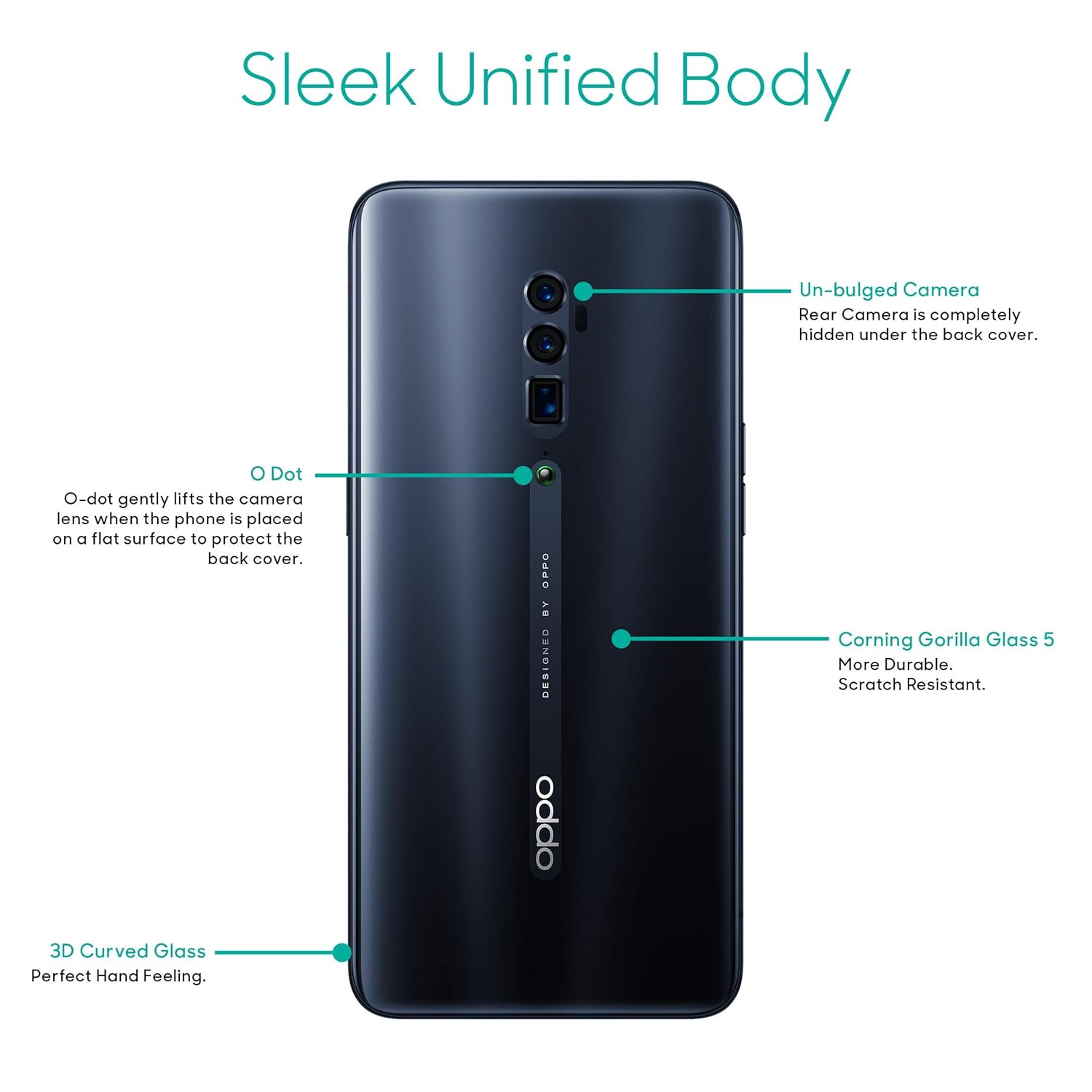
Figure 4.1: Rear view of the OPPO Reno 10x Zoom, showing the un-bulged camera system, the O-Dot ceramic point, Corning Gorilla Glass 5, and the 3D curved glass design.

Figure 4.2: Side view of the OPPO Reno 10x Zoom, illustrating the slim profile and button placement.
Key Components:
- Display: 6.65-inch AMOLED capacitive touchscreen.
- Shark Fin Rising Camera: Houses the front camera and other sensors, retracts when not in use.
- Rear Camera System: Triple camera setup (48MP + 8MP + 13MP) for versatile photography.
- O-Dot: A small ceramic point on the back that gently lifts the phone when placed on a flat surface to protect the camera lenses.
- Power Button: Located on the right side.
- Volume Buttons: Located on the left side.
- USB-C Port: For charging and data transfer, located at the bottom.
- SIM Card Tray: Located on the side, requires the ejecter tool for access.
5. Getting Started
5.1. SIM Card Installation
- Locate the SIM card tray on the side of your device.
- Insert the SIM ejecter tool into the small hole on the tray and press gently until the tray pops out.
- Place your Nano-SIM cards into the designated slots on the tray. Ensure the gold contacts face downwards. The device supports dual SIM with dual standby (4G+4G).
- Carefully reinsert the tray into the phone until it is flush with the device's side.
5.2. Powering On/Off
- To Power On: Press and hold the Power button on the right side until the OPPO logo appears.
- To Power Off: Press and hold the Power button, then select 'Power Off' from the options displayed on the screen.
- To Restart: Press and hold the Power button, then select 'Restart' from the options.
5.3. Initial Setup
The first time you power on your device, you will be guided through an initial setup process. Follow the on-screen prompts to:
- Select your language and region.
- Connect to a Wi-Fi network.
- Accept terms and conditions.
- Set up your Google account.
- Configure screen lock (PIN, pattern, password, fingerprint, face unlock).
5.4. Charging the Device
Connect the USB-C charge cable to the phone's USB-C port and the other end to the provided adapter. Plug the adapter into a power outlet. The device features a 4065mAH lithium-polymer battery and supports VOOC Flash Charge 3.0 for rapid charging.
6. Basic Operations
6.1. Display and Navigation
The 6.65-inch AMOLED display offers vibrant colors and deep blacks with a resolution of 2340 x 1080 pixels. Navigation is primarily touch-based. The device also features a hidden in-display fingerprint unlock for secure access.
6.2. Operating System
The OPPO Reno 10x Zoom runs on Android v9 Pie with ColorOS 6.0. This operating system provides a customized user interface and various features for enhanced usability and performance.
6.3. Connectivity
The device supports various connectivity options:
- Wi-Fi: For internet access.
- Bluetooth: For connecting to wireless accessories.
- 4G LTE: For mobile data connectivity.
- GPS: For location services and navigation.
6.4. Audio
Experience immersive audio with dual stereo speakers and Dolby Atmos support, providing enhanced sound quality for media consumption.
7. Camera Features
The OPPO Reno 10x Zoom is equipped with a versatile camera system for capturing high-quality photos and videos.

Figure 7.1: Front view of the OPPO Reno 10x Zoom with the Shark Fin Rising Camera module extended, revealing the front-facing camera.

Figure 7.2: Rear view of the OPPO Reno 10x Zoom, showing the triple camera setup and the extended Shark Fin Rising Camera module from a different angle.
7.1. Rear Camera
- Triple Camera System: Consists of a 48MP main sensor, an 8MP wide-angle lens, and a 13MP telephoto lens.
- 10x Hybrid Zoom: Allows for significant optical and digital zoom capabilities.
- Photography Modes: Includes Photo, Video, Expert, Time-lapse, Pano, Night, and Portrait modes.
- Ultra Night Mode: Enhances low-light photography.
7.2. Front Camera
- 16MP Sensor: For high-resolution selfies and video calls.
- Shark Fin Rising Mechanism: The front camera is housed in a motorized pop-up module that deploys when needed.
8. Performance and Battery
8.1. Processor and Memory
The device is powered by a 2.8GHz Qualcomm Snapdragon 855 octa-core processor, ensuring smooth performance for demanding applications and multitasking. It comes with 8GB of RAM and 256GB of internal storage, expandable up to 256GB via microSD card.
8.2. Battery Life
The 4065mAH lithium-polymer battery provides approximately 40 hours of talk time and up to 331 hours of standby time. VOOC Flash Charge 3.0 technology allows for quick recharging.
8.3. Gaming Optimization
Hyper Boost 2.0 is integrated to optimize gaming performance, providing a smoother and more responsive experience.
9. Maintenance and Care
- Cleaning: Use a soft, lint-free cloth to clean the screen and body. Avoid abrasive materials or harsh chemicals.
- Environmental Conditions: Avoid exposing the device to extreme temperatures, direct sunlight, or excessive moisture.
- Software Updates: Regularly check for and install system updates to ensure optimal performance and security.
- Storage: Do not store the device near magnetic fields.
- Protection: Use the provided protective case to guard against physical damage.
10. Troubleshooting
This section addresses common issues you might encounter with your OPPO Reno 10x Zoom.
10.1. Device Not Turning On
- Ensure the battery is charged. Connect the device to the charger for at least 15 minutes.
- Press and hold the Power button for an extended period (10-15 seconds) to force a restart.
10.2. Charging Issues
- Verify that the charger and USB-C cable are securely connected to both the phone and the power outlet.
- Try using a different charger and cable to rule out faulty accessories.
- Ensure the charging port is clean and free of debris.
10.3. Network Connectivity Problems
- Check if your SIM card is properly inserted and activated.
- Restart the device.
- Toggle Airplane Mode on and off.
- Go to Settings > Wi-Fi or Settings > Mobile Network to ensure they are enabled and configured correctly.
10.4. Apps Crashing or Freezing
- Close and reopen the problematic app.
- Clear the app's cache and data (Settings > App Management > [App Name] > Storage Usage).
- Ensure the app is updated to its latest version.
- If the issue persists, consider uninstalling and reinstalling the app.
10.5. Factory Reset
If you encounter persistent software issues, a factory reset may resolve them. Warning: This will erase all data on your phone. Back up important data before proceeding. To perform a factory reset, go to Settings > Additional Settings > Back up and Reset > Erase all data (factory reset).
11. Technical Specifications
Below are the detailed technical specifications for the OPPO Reno 10x Zoom (Model: CPH1919):
| Feature | Specification |
|---|---|
| Operating System | Android 9.0 Pie (ColorOS 6.0) |
| Processor | 2.8 GHz Qualcomm Snapdragon 855 Octa-Core |
| RAM | 8 GB |
| Internal Storage | 256 GB (expandable up to 256GB) |
| Display | 6.65-inch AMOLED, 2340 x 1080 pixels, 387 ppi, 16M colors, 430 nits (Typical) |
| Rear Camera | 48MP + 8MP + 13MP (Triple Camera) |
| Front Camera | 16MP (Shark Fin Rising Camera) |
| Battery | 4065mAH Lithium-Polymer |
| Talk Time | Up to 40 hours |
| Standby Time | Up to 331 hours |
| Connectivity | Bluetooth, Wi-Fi, GPS, 4G LTE |
| Dimensions | 16.2 x 0.9 x 7.7 cm |
| Weight | 215 g |
| SIM Type | Dual SIM (Nano-SIM) |
| Special Features | Dual SIM, GPS, Music Player, Video Player, Magnetic Induction, Light sensor, Proximity Sensor, G-sensor/Acceleration sensor, E-mail |
12. Warranty and Support
12.1. Warranty Information
The OPPO Reno 10x Zoom comes with a 1-year manufacturer warranty for the device from the date of purchase. In-box accessories, including batteries, are covered by a 6-month manufacturer warranty.
12.2. Manufacturer Contact
For support, service, or warranty claims, please contact OPPO Mobiles India Pvt. Ltd. at:
5th FLOOR, Tower B, BUILDING, N-8, DLF Cyber City, DLF Phase 2, Gurugram, Haryana 122002Customer Service Tel: 18001032777
Please refer to the 'Important Information Booklet with Warranty Card' included in your product box for complete warranty terms and conditions.


