
CarLights360 TY-Fits-MB2520101-CL360A2
Instruction Manual
CarLights360 Mercedes-Benz C280 Turn Signal/Parking Light Assembly
Model: TY-Fits-MB2520101-CL360A2
Introduction
This manual provides comprehensive instructions for the installation, operation, and maintenance of your CarLights360 Driver Side Turn Signal/Parking Light Assembly, designed for Mercedes-Benz C280 models from 1994 to 2000. This product is a direct replacement aftermarket part, engineered to meet or exceed OEM specifications and DOT certification standards.
Please read this manual thoroughly before installation and operation to ensure proper function and safety.
Safety Information
- Always disconnect the vehicle's battery before performing any electrical work to prevent electrical shock or damage.
- Wear appropriate personal protective equipment, including safety glasses and gloves, during installation.
- Ensure the vehicle is securely parked on a level surface with the parking brake engaged.
- If you are unsure about any step of the installation process, consult a qualified automotive technician.
- Keep all components and tools away from children.
Product Overview
The CarLights360 Turn Signal/Parking Light Assembly is a complete unit designed for the driver's side of compatible Mercedes-Benz C-Class vehicles. It includes the lens, housing, bulbs, and socket, providing both turn signal and parking light functions.
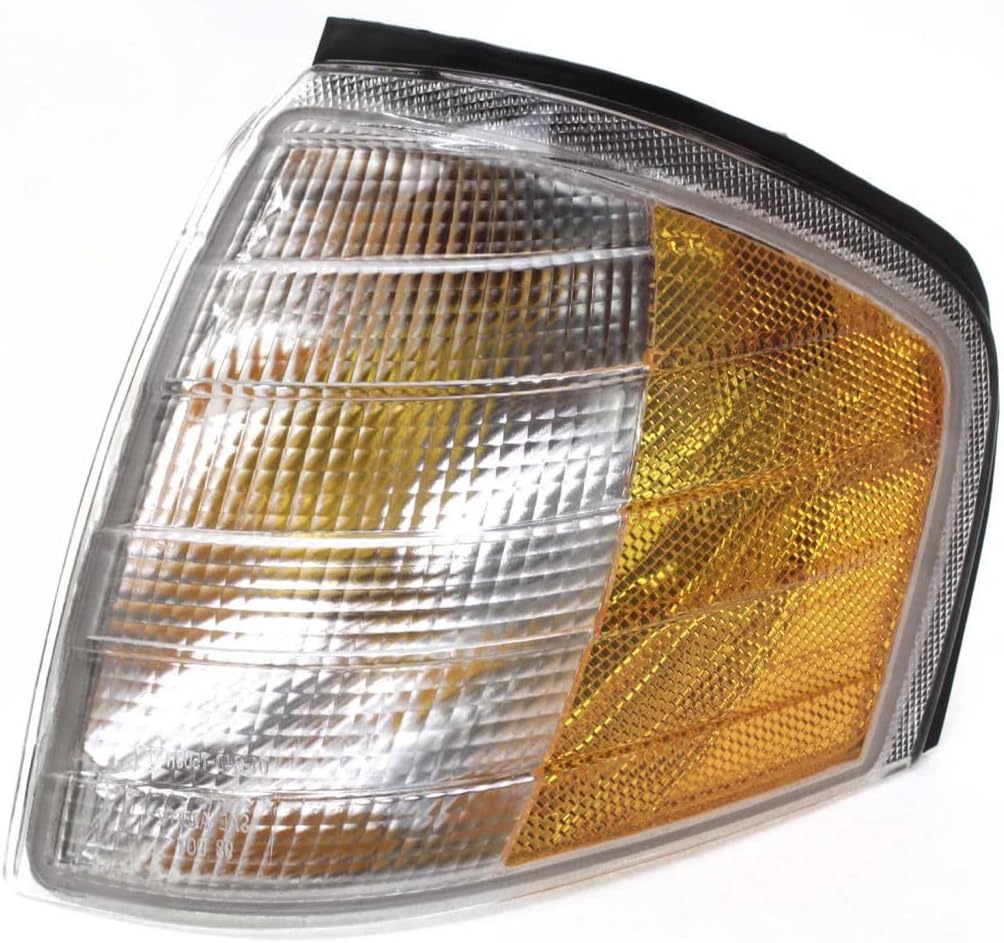
Figure 1: Front view of the turn signal and parking light assembly, showing the clear and amber lens sections.

Figure 2: Angled view of the assembly, highlighting the integrated bulbs and electrical connector at the rear.

Figure 3: Rear view of the light assembly, showing the mounting points and the bulb socket connection.

Figure 4: Diagram clarifying the "Driver Side" (Left Hand - LH) and "Passenger Side" (Right Hand - RH) orientation for automotive parts, viewed from the rear of the vehicle.
Compatibility
This assembly is compatible with the following Mercedes-Benz C-Class models:
- Mercedes-Benz C220: 1994-1996
- Mercedes-Benz C230: 1997-2000
- Mercedes-Benz C280: 1994-2000
- Mercedes-Benz C36 AMG: 1995-1997
- Mercedes-Benz C43 AMG: 1998-2000
Please verify the OEM part number (202 826 11 43) or Partslink number (MB2520101) matches your existing part to ensure proper fitment.
Installation Instructions
Note: Professional installation is recommended for automotive lighting components. Refer to your vehicle's specific service manual for detailed instructions on removing the existing light assembly and accessing the mounting points.
Required Tools (Typical)
- Screwdriver set (Phillips and flathead)
- Socket wrench set (if applicable)
- Trim removal tools (plastic pry tools)
- Clean cloth
Installation Steps
- Preparation: Park the vehicle on a level surface and engage the parking brake. Turn off the ignition and remove the key. Disconnect the negative terminal of the vehicle's battery to prevent electrical hazards.
- Access Existing Assembly: Depending on your vehicle model, you may need to remove surrounding trim pieces or fender liners to gain access to the light assembly. Carefully unfasten any screws, clips, or bolts securing the old light.
- Disconnect Wiring: Gently disconnect the electrical connector(s) from the rear of the existing light assembly. Be careful not to pull on the wires directly.
- Remove Old Assembly: Once all fasteners and wiring are disconnected, carefully remove the old turn signal/parking light assembly from its mounting location.
- Inspect and Clean: Before installing the new assembly, inspect the mounting area for any debris, corrosion, or damage. Clean the area thoroughly with a clean cloth if necessary.
- Install New Assembly: Position the new CarLights360 assembly into the opening. Ensure it aligns correctly with the mounting points.
- Connect Wiring: Reconnect the electrical connector(s) to the new light assembly. Ensure a secure and snug connection.
- Secure Assembly: Fasten the new light assembly using the original screws, clips, or bolts. Ensure it is securely mounted and does not wobble.
- Reassemble Trim: Reinstall any trim pieces or fender liners that were removed during the process.
- Test Functionality: Reconnect the vehicle's battery. Turn on the ignition and test the turn signal and parking light functions to ensure they operate correctly. Verify both left and right turn signals, as well as the parking lights, are functioning as expected.
Operating Instructions
This light assembly integrates two primary functions:
- Turn Signal: Activated by the vehicle's turn signal stalk. When engaged, the amber section of the light will flash to indicate a turn or lane change.
- Parking Light: Activated when the vehicle's parking lights or headlights are turned on. The clear section of the light will illuminate to provide forward visibility and mark the vehicle's presence.
No specific user interaction is required for the operation of this light assembly beyond the standard vehicle controls for lighting.
Maintenance
The CarLights360 Turn Signal/Parking Light Assembly is designed for durability and minimal maintenance. The bulbs are included and pre-installed. Regular maintenance involves:
- Cleaning: Periodically clean the outer lens with a soft cloth and mild automotive soap to remove dirt, dust, and road grime. Avoid abrasive cleaners or harsh chemicals that could damage the lens material.
- Inspection: Regularly inspect the light assembly for any signs of damage, cracks, or loose connections. Ensure the light is securely mounted.
- Bulb Replacement: While the assembly comes with bulbs, if a bulb fails over time, it can be replaced. Refer to your vehicle's service manual for specific bulb types and replacement procedures. Ensure the replacement bulb matches the original specifications.
Troubleshooting
| Problem | Possible Cause | Solution |
|---|---|---|
| Light does not illuminate. |
|
|
| Light flickers or is dim. |
|
|
| Moisture inside the lens. |
|
|
Specifications
| Brand | CarLights360 |
| Model Number | TY-Fits-MB2520101-CL360A2 |
| OEM Part Number | 202 826 11 43 |
| Partslink Number | MB2520101 |
| Auto Part Position | Left (Driver Side) |
| Specific Uses For Product | Turn Signal Lights, Parking Lights |
| Lens Color | Clear / Amber |
| Lens Material | Polycarbonate |
| Special Feature | Waterproof |
| Safety Rating | DOT Certified |
| Item Dimensions (L x W x H) | 8.82 x 7.39 x 3.81 inches |
| Item Weight | 13.1 ounces |
| UPC | 749235738011 |
Warranty and Support
Warranty Information
This CarLights360 product is manufactured to high-quality standards. For specific warranty details, including coverage period and terms, please refer to the warranty information provided with your purchase or contact CarLights360 directly. The product is designed for exact fitment and is DOT Certified, ensuring stringent quality standards are met.
Please note that a 30-day return policy is typically offered by the seller for this product, allowing for refunds or replacements under specified conditions.
Customer Support
For technical assistance, installation questions, or warranty claims, please contact the manufacturer, CarLights360, or the seller, KarParts360, through their official channels. You may find contact information on their respective websites or through your purchase platform.
When contacting support, please have your product model number (TY-Fits-MB2520101-CL360A2) and purchase details readily available.
Related Documents - TY-Fits-MB2520101-CL360A2
 |
Panasonic Professional Display Optional Accessories Compatibility Chart Compatibility chart for Panasonic professional display optional accessories, including mounting options, function boards, and software for various display series as of January 2021. |
 |
Panasonic PressIT Wireless Presentation System Operating Instructions Comprehensive operating instructions and functional manual for the Panasonic PressIT Wireless Presentation System, covering installation, connection, and configuration for models including TY-WPS1, TY-WPB1, and TY-SB01WP. |
 |
Dams Tilly Meeting Booth Assembly Instructions & Product Guide Detailed assembly instructions and product information for the Dams Tilly Meeting Booth, including model numbers TY-B2L, TY-B4L, TY-B2H, TY-B4H, and associated parts. Learn how to assemble your Tilly booth safely and efficiently. |
 |
Panasonic PressIT Wireless Presentation System Operating Instructions Comprehensive operating instructions and basic guide for the Panasonic PressIT Wireless Presentation System. Includes setup, pairing, installation, and safety guidelines for models TY-WPS1W, TY-WP2B1W, TY-WP2BC1W, TY-WPSC1W, TY-WPB1W, and TY-WPBC1W. |
 |
2025 Pro Displays Quick Reference Guide Quick reference guide for Panasonic professional displays, PressIT wireless presentation systems, and PressIT360 camera speakerphones. Includes model specifications and key features. |
 |
Panasonic Wireless Presentation System Operating Instructions (TY-WPS2 Series) Operating instructions and basic guide for the Panasonic Wireless Presentation System (PressIT), including models TY-WPS2, TY-WPB2, TY-WPR2, TY-WPSC2, and TY-WPBC2. Covers setup, connection, and safety. |
Ask a question about this manual
Ask about setup, troubleshooting, compatibility, parts, safety, or missing instructions. Manuals+ will review the question and use this page’s manual context to help answer it.