
1. Introduction
This manual provides essential information for the proper installation, maintenance, and understanding of the Vision Wheels C111B Black Wheel Center Cap. Please read these instructions thoroughly before proceeding with installation or use to ensure correct application and longevity of the product.
The Vision Wheels C111B is a black wheel center cap designed for specific wheel applications. It features a bolt-on installation type and is intended for wheels with an 8x6.5 bolt pattern, provided the existing center cap matches the C111B part number.
2. Important Compatibility Information
Critical Note: The center cap on your wheels MUST have the part number C111B on the back in order for this product to fit your wheels correctly. Verify the part number on your existing center cap before attempting installation.
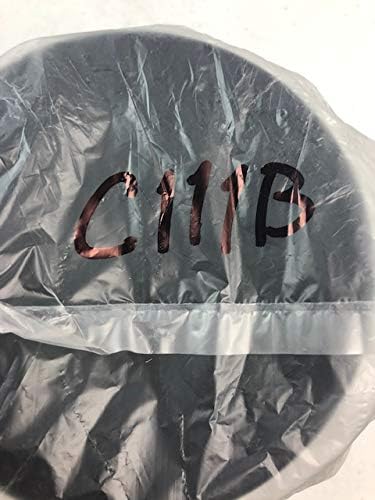
Image 2.1: The Vision Wheels C111B center cap, showing the part number C111B, which is crucial for compatibility verification. Ensure your existing cap has this number.
3. Setup and Installation
The Vision Wheels C111B center cap is designed for bolt-on installation. Follow these general steps for proper fitment:
- Preparation: Ensure the wheel hub area where the center cap will be installed is clean and free of dirt, debris, or rust.
- Verify Compatibility: Double-check that the part number on the back of your existing center cap matches C111B. This is essential for a correct fit.
- Alignment: Carefully align the new C111B center cap with the mounting points on your wheel.
- Installation: As this is a bolt-on type, secure the center cap using the appropriate fasteners (not included, typically reused from the original cap or specific to the wheel). Ensure all bolts are tightened securely but do not overtighten to avoid damage.
- Final Check: After installation, gently tug on the center cap to ensure it is firmly seated and does not wobble.

Image 3.1: Front view of the Vision Wheels C111B Black Wheel Center Cap, ready for installation.
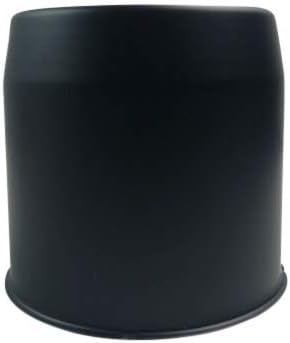
Image 3.2: Side view of the Vision Wheels C111B Black Wheel Center Cap, illustrating its form factor for proper fitment.
4. Maintenance
To maintain the appearance and integrity of your Vision Wheels C111B Black Wheel Center Cap, follow these simple maintenance guidelines:
- Regular Cleaning: Clean the center cap regularly with mild soap and water. Avoid harsh chemicals, abrasive cleaners, or stiff brushes, as these can damage the finish.
- Drying: After washing, dry the center cap thoroughly with a soft cloth to prevent water spots and corrosion.
- Inspection: Periodically inspect the center cap for any signs of damage, looseness, or wear. Address any issues promptly to prevent further problems.
5. Troubleshooting
- Cap Does Not Fit: If the center cap does not fit properly, the most common reason is incorrect compatibility. Re-verify that the part number on your existing wheel center cap matches C111B. This product is designed for specific Vision Wheels applications.
- Cap Feels Loose: Ensure all bolts (if applicable for bolt-on installation) are securely tightened. If the cap is still loose and the part number is correct, inspect the mounting points on the wheel for any damage or wear.
6. Specifications
| Brand | Vision |
| Model Number | C111B |
| Size | 6.5 inches |
| Color | Black |
| Exterior Finish | Black, Chrome |
| Installation Type | Bolt-On |
| Automotive Fit Type | Vehicle Specific Fit |
| Number of Items | 1 |
| OEM Part Number | C111B |
| UPC | 759321760468 |
| Item Weight | 1.6 ounces |
| Package Dimensions | 4 x 4 x 1 inches |
| Date First Available | March 13, 2019 |
7. Warranty and Support
Specific warranty information for the Vision Wheels C111B Black Wheel Center Cap is not provided in this manual. For details regarding warranty coverage, returns, or technical support, please contact Vision Wheels directly or the authorized retailer from whom the product was purchased.
Always refer to the official Vision Wheels website or product packaging for the most current support and warranty information.


