
Introduction
The iJoy Soul Light Bluetooth Speaker is a versatile audio device combining high-definition stereo sound with a dynamic LED light display. Designed for portability and ease of use, it features Bluetooth connectivity, a built-in microphone for hands-free calls, and multiple playback options including AUX, USB, and SD card. This manual provides detailed instructions for setting up, operating, and maintaining your speaker to ensure optimal performance.
Package Contents
- iJoy Soul Light Bluetooth Speaker
- Micro USB Charging Cable
- Auxiliary Audio Cable (3.5mm)
- User Manual (this document)
Product Overview
Familiarize yourself with the various parts of your iJoy Soul Light Bluetooth Speaker.
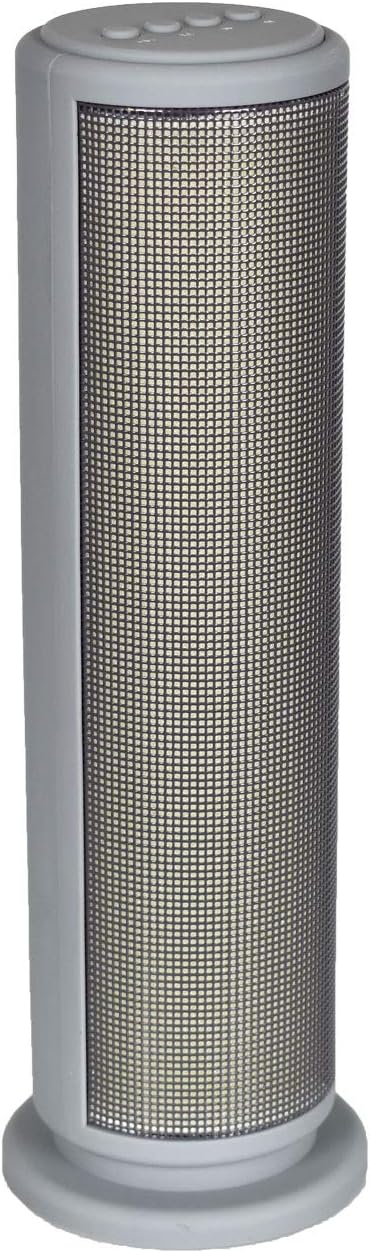
Figure 1: Front View
This image displays the front of the iJoy Soul Light speaker, highlighting its tall, cylindrical design and the large, mesh-covered LED light panel that illuminates during operation.

Figure 2: Rear View with Ports
This image shows the back of the speaker, detailing the connectivity panel at the top. From left to right, it includes a micro USB charging port, a TF (microSD) card slot, a USB-A port for flash drives, and a 3.5mm auxiliary audio input jack.

Figure 3: Top Control Panel
This image provides a close-up of the speaker's top panel, featuring four circular control buttons. These buttons are used for managing light modes, switching input modes (Bluetooth, AUX, USB, TF), and navigating audio tracks.
Button Functions:
- 1. Light Mode Button (Sun/Play icon): Short press to cycle through LED light modes. Long press to turn LED lights on/off.
- 2. Mode Button (M): Short press to switch between input modes (Bluetooth, AUX, USB, TF Card).
- 3. Next Track / Volume Up Button (Right Arrow): Short press for next track. Long press to increase volume.
- 4. Previous Track / Volume Down Button (Left Arrow): Short press for previous track. Long press to decrease volume.
- Power Button (Not visible in top view, typically on back/side): Long press to power on/off. Short press to play/pause in Bluetooth mode, or answer/end calls.
Setup
Charging the Speaker
- Connect the micro USB end of the charging cable to the micro USB port on the back of the speaker.
- Connect the standard USB end of the charging cable to a USB power adapter (not included) or a computer's USB port.
- The LED indicator will illuminate during charging and turn off when fully charged.
- A full charge typically takes 2-3 hours and provides up to 10 hours of playback time.
Powering On/Off
- To power on, press and hold the Power button (usually located near the charging port) for approximately 3 seconds until you hear an audible prompt.
- To power off, press and hold the Power button again for approximately 3 seconds until you hear an audible prompt.
Operating Instructions
Bluetooth Pairing
- Ensure the speaker is powered on and in Bluetooth mode. If not, short press the "M" (Mode) button until you hear the Bluetooth pairing prompt.
- Enable Bluetooth on your smartphone, tablet, or other Bluetooth-enabled device.
- Search for available Bluetooth devices. You should see "IJOY SOUL LIGHT" or similar in the list.
- Select "IJOY SOUL LIGHT" to connect. Once paired, you will hear a confirmation sound.
- The speaker will automatically connect to the last paired device when powered on, if the device is within range.
Audio Playback
- Bluetooth Mode: After successful pairing, play audio from your connected device. Use the speaker's track buttons (left/right arrows) for navigation and long press for volume control. Short press the Power button to play/pause.
- AUX Mode: Insert the 3.5mm auxiliary audio cable into the AUX port on the speaker and the other end into your audio source. Press the "M" button to switch to AUX mode.
- USB Drive Playback: Insert a USB flash drive (FAT32 format) containing MP3 audio files into the USB-A port. The speaker will automatically switch to USB mode and begin playing.
- TF Card Playback: Insert a TF (microSD) card (FAT32 format) containing MP3 audio files into the TF card slot. The speaker will automatically switch to TF card mode and begin playing.
LED Light Modes
- Short press the Light Mode button (Sun/Play icon) to cycle through different LED light patterns and colors.
- Long press the Light Mode button to turn the LED lights on or off.
- The lights are sound-reactive and will respond to the rhythm of the music.
Hands-Free Calling
- When a call comes in while connected via Bluetooth, the music will pause.
- Short press the Power button to answer an incoming call.
- Short press the Power button again to end the call.
- Long press the Power button to reject an incoming call.
Maintenance
- Cleaning: Use a soft, dry cloth to wipe the speaker's surface. Do not use abrasive cleaners, alcohol, or chemical solvents, as these may damage the finish.
- Storage: Store the speaker in a cool, dry place away from direct sunlight and extreme temperatures.
- Battery Care: To prolong battery life, fully charge the speaker before first use and at least once every three months if not used regularly. Avoid completely draining the battery frequently.
- Water Resistance: This speaker is not water-resistant. Avoid exposure to liquids.
Troubleshooting
| Problem | Possible Cause | Solution |
|---|---|---|
| Speaker does not power on. | Battery is drained. | Charge the speaker fully. |
| No sound from speaker. | Volume is too low; Incorrect mode; Device not connected. | Increase speaker and device volume. Press "M" button to select correct input mode. Re-pair Bluetooth device or check AUX/USB/TF connection. |
| Bluetooth pairing fails. | Speaker not in pairing mode; Device too far; Interference. | Ensure speaker is in Bluetooth mode. Move speaker closer to device. Turn off other Bluetooth devices. Forget "IJOY SOUL LIGHT" on your device and try pairing again. |
| LED lights not working. | Lights are turned off. | Long press the Light Mode button to turn lights on. |
Specifications
| Model: | IJ17-BTSLI-C9M4 |
| Connectivity Technology: | Bluetooth |
| Speaker Type: | Bookshelf |
| Special Features: | Wireless, Bluetooth, LED Light, Built-in Microphone |
| Audio Output Mode: | Stereo |
| Speaker Maximum Output Power: | 10 Watts |
| Battery Life: | Up to 10 Hours |
| Item Weight: | 222 g (0.49 Pounds) |
| Parcel Dimensions: | 30.5 x 10.4 x 9.5 cm |
| Color: | Gray |
Warranty and Support
IJOY products are designed for reliability and performance. For specific warranty information, please refer to the warranty card included with your purchase or visit the official IJOY website. For technical support, troubleshooting assistance, or to inquire about replacement parts, please contact IJOY customer service through their official channels.
Keep your proof of purchase for warranty claims.