
Introduction
This manual provides essential information for the safe and efficient operation of your VU 50 OA 4K Ultra HD Smart LED TV. Please read this manual thoroughly before using the television and retain it for future reference. Your new Vu Premium Android 4K TV features HDR 10 & Dolby Vision technology for enhanced picture quality, Dolby MS12 Audio with Dbx-tv for superior sound, and runs on Android 8.0 OREO, providing access to the Google Ecosystem and certified apps like YouTube and Hotstar via the Vu ActiVoice remote.
Safety Information
To ensure safe operation and prevent damage, observe the following precautions:
- Do not expose the TV to rain or moisture.
- Do not block ventilation openings.
- Ensure proper grounding of the power cord.
- Avoid placing the TV on unstable surfaces.
- Disconnect the power plug during lightning storms or when unused for long periods.
- Refer all servicing to qualified service personnel.
What's in the Box
Verify that all items are present upon unpacking:
- 1 x VU 50 OA LED TV
- 1 x Table Top Stand
- 1 x Wall Mount Bracket
- 1 x User Manual (this document)
- 1 x Warranty Card
- 1 x Remote Control
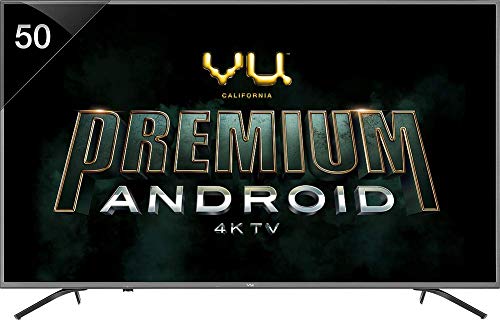
Image: Front view of the VU 50 OA 4K Ultra HD Smart LED TV, showcasing its slim design and display.
Setup
1. Stand Installation
If placing the TV on a table, attach the provided table-top stand:
- Carefully place the TV face-down on a soft, flat surface to prevent screen damage.
- Align the stand with the screw holes on the bottom of the TV.
- Secure the stand using the screws provided.
2. Wall Mounting
A wall mount bracket is included. For wall mounting, professional installation is recommended to ensure safety and proper setup. Ensure the wall can support the TV's weight (18 kg).
3. Connecting Devices
Connect external devices to your TV using the available ports:
- HDMI Ports (3): For set-top boxes, Blu-ray players, gaming consoles.
- USB Ports (2): For connecting hard drives and other USB devices.
- RF Slot (1): For antenna connection.
- Wi-Fi: For internet connectivity.
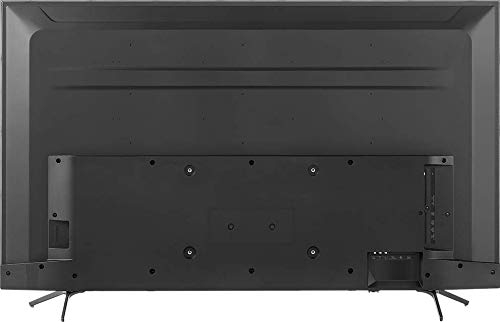
Image: Rear view of the VU 50 OA TV, illustrating the placement of HDMI, USB, and other connectivity ports.
4. Initial Power On and Setup Wizard
After connecting the power cord, press the power button on the remote or TV. The TV will guide you through the initial setup process, including language selection, network connection, and Google account login.
Operating Your TV
1. Remote Control
The included remote control allows full functionality of your TV. Insert two AAA batteries (not included) into the remote.
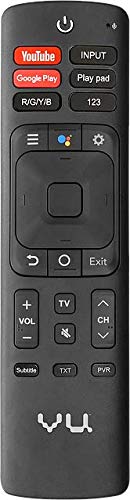
Image: The remote control for the VU 50 OA TV, featuring dedicated buttons for YouTube, Google Play, and Google Assistant.
Key Remote Functions:
- Power Button: Turns the TV on or off.
- Input: Selects input source (HDMI 1/2/3, AV, etc.).
- Volume +/-: Adjusts volume level.
- Channel +/-: Changes TV channels.
- Google Assistant Button: Activates voice control for searching content or controlling smart home devices.
- Navigation Pad: For menu navigation.
- Back/Home/Exit: Navigates through menus and applications.
- Dedicated App Buttons: Quick access to YouTube, Google Play, etc.
2. Smart TV Features (Android OS)
Your TV runs on Android 8.0 OREO, providing access to a wide range of smart features:
- App Access: Download and use apps from the Google Play Store, including streaming services like Hotstar and YouTube.
- Google Assistant: Use voice commands via the remote for search, control, and information.
- Chromecast Built-in: Cast content from your mobile devices to the TV.

Image: The VU 50 OA TV screen showing the Android TV interface, with icons for Google Play Store, YouTube, Hotstar, and other applications.
3. Picture and Sound Settings
Access the TV's settings menu to customize picture and sound:
- Picture Modes: Standard, Dynamic, Movie, Game, User. Adjust brightness, contrast, color, and sharpness.
- Sound Modes: Standard, Music, Movie, Speech, User. Adjust bass, treble, and balance.
- Dolby Vision & HDR10: Automatically enhances compatible content for superior visual experience.
- Dolby MS12 Audio & Dbx-tv: Provides an immersive audio experience with wider soundstage.
Maintenance
1. Cleaning the TV
- Always unplug the TV before cleaning.
- Use a soft, dry cloth to wipe the screen and cabinet.
- For stubborn marks, use a screen cleaner specifically designed for LED TVs, applied to the cloth, not directly to the screen.
- Avoid using abrasive cleaners or solvents.
2. Software Updates
Ensure your TV is connected to the internet to receive automatic software updates. Updates can improve performance and add new features. You can also manually check for updates in the TV's settings menu.
Troubleshooting
Before contacting support, try these common solutions:
| Problem | Solution |
|---|---|
| No Power | Check if the power cord is securely plugged into the TV and the wall outlet. Ensure the outlet is active. Try a different outlet. |
| No Picture, but Sound is Present | Check the input source. Ensure external devices are powered on and connected correctly. Try a different HDMI cable. |
| No Sound, but Picture is Present | Check volume level and mute status. Ensure external audio systems are connected and configured correctly. Check audio output settings on the TV. |
| Remote Control Not Working | Replace batteries. Ensure no obstructions between the remote and the TV's IR sensor. |
| Wi-Fi Connection Issues | Restart your router and modem. Check Wi-Fi settings on the TV. Ensure the TV is within range of your Wi-Fi network. |
| Apps Crashing or Freezing | Restart the TV. Clear the cache for the problematic app in the TV's settings. Ensure the TV's software is up to date. |
Specifications
| Feature | Detail |
|---|---|
| Brand | Vu |
| Model | 50 OA |
| Screen Size | 50 Inches (126 cm) |
| Display Technology | LED |
| Resolution | 4K UHD (3840 x 2160 pixels) |
| Refresh Rate | 60 Hz |
| Operating System | Android 8.0 OREO |
| Memory Storage Capacity | 16 GB |
| HDMI Ports | 3 |
| USB Ports | 2 |
| Audio Output | 24 Watts (Stereo) |
| Special Features | Dolby Vision, HDR10, Dynamic Backlight Control, Google Assistant, Quad Core Processor, Ultra Smooth Motion |
| Connectivity Technology | Wi-Fi |
| Viewing Angle | 178 Degrees |
| Product Dimensions (LxWxH) | 125.1 x 16.1 x 79.7 cm |
| Item Weight | 18 kg |
Warranty and Support
Warranty Information
Your VU 50 OA 4K Ultra HD Smart LED TV comes with a 1 Year Standard Manufacturer Warranty from VU. Please refer to the included Warranty Card for detailed terms and conditions.
Customer Support and Installation
For installation, wall mounting, or product demonstration requests after delivery, please contact VU customer support. You will need to provide the product's model name (VU 50 OA) and the seller's details as mentioned on your invoice. Contact information can typically be found on the warranty card or the official VU website.


