
Introduction
This manual provides essential information for the setup, operation, and maintenance of your Jackson JS Series 5-String Concert Bass JS3V. Please read these instructions carefully before using your instrument to ensure proper function and longevity.
The Jackson JS Series 5-String Concert Bass JS3V is an electric bass guitar featuring a poplar body, maple neck with graphite reinforcement, and an amaranth fingerboard. It is equipped with two Jackson humbucking pickups and a 12"-16" compound-radius fretboard designed for comfortable playability across all five strings.
Setup
1. Unpacking
Carefully remove the bass from its packaging. Inspect the instrument for any signs of damage that may have occurred during shipping. Retain the original packaging for future transport or storage.
2. Battery Installation
The JS3V Concert Bass requires one 9V battery for its active electronics. The battery compartment is typically located on the back of the instrument.
- Locate the battery compartment cover on the back of the bass.
- Open the compartment cover.
- Insert a fresh 9V battery, observing the correct polarity (+/-).
- Close the battery compartment cover securely.
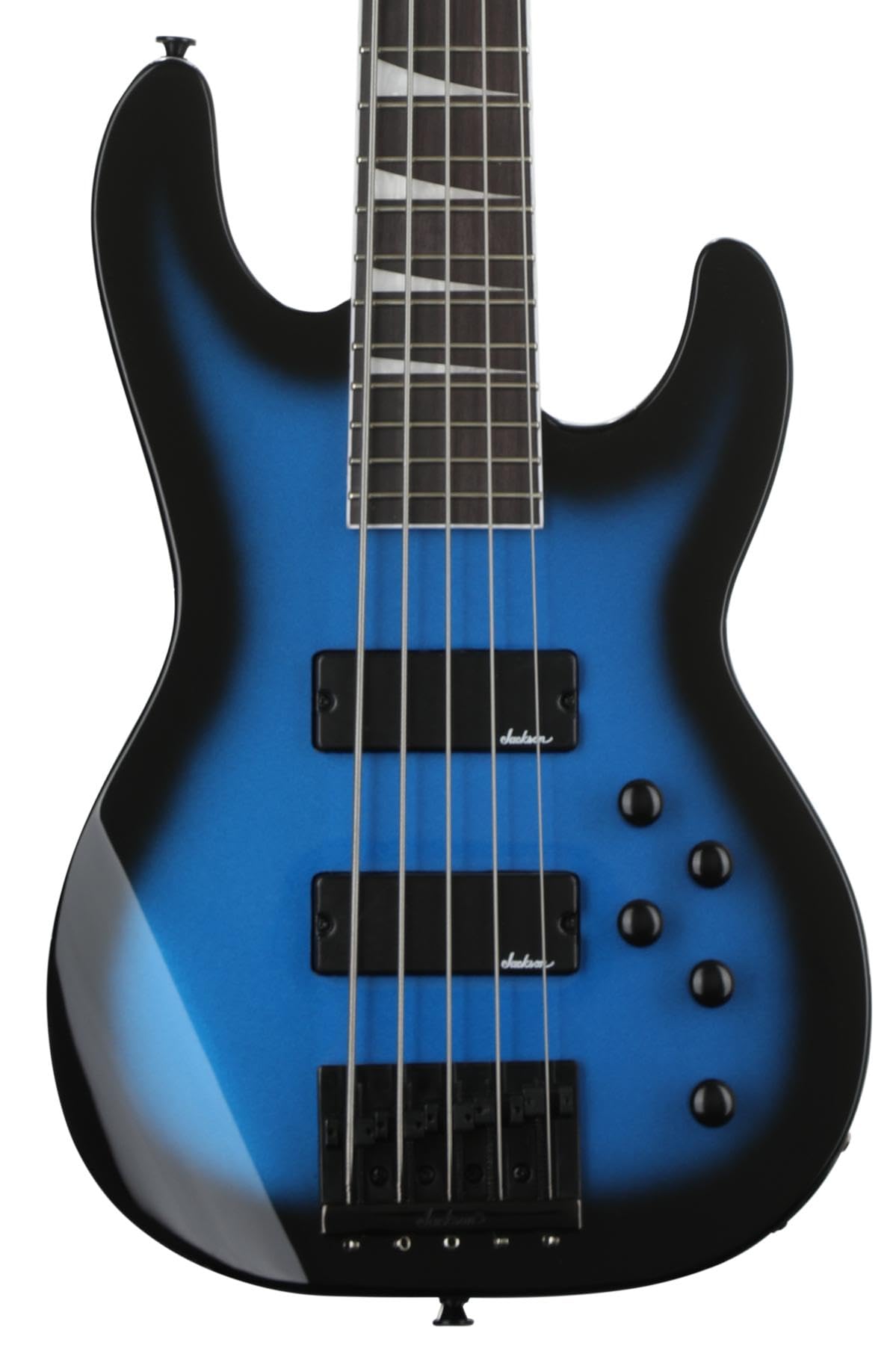
Figure 1: Illustration of the bass guitar's rear, indicating the general location of the 9V battery compartment.
3. Initial Inspection and Tuning
Before playing, ensure all strings are properly seated and the tuning pegs are secure. Tune the bass to standard B-E-A-D-G tuning using an electronic tuner.
4. Connecting to an Amplifier
Connect your bass to an amplifier using a standard 6.35mm (1/4-inch) instrument cable. Insert one end into the output jack on the bass and the other into the input of your amplifier.
Operating
1. Controls Overview
The Jackson JS3V Concert Bass features controls for volume and tone, allowing you to shape your sound. Specific configurations may vary slightly, but typically include:
- Volume Knob(s): Controls the overall output level of the bass.
- Tone Knob(s): Adjusts the treble and bass frequencies to brighten or darken your sound.
- Pickup Selector Switch: (If present) Allows you to select between the neck humbucker, bridge humbucker, or a blend of both.
Figure 2: Front view of the bass, showing the location of volume, tone controls, and pickups.
2. Playing Considerations
The 5-string configuration offers an extended low range (B string). The 12"-16" compound-radius fretboard is designed for comfortable chording near the nut and easier soloing and faster runs in higher positions.
Maintenance
1. Cleaning
- Body: Wipe the body with a soft, dry, lint-free cloth after each use to remove sweat and fingerprints. For deeper cleaning, use a guitar-specific polish sparingly.
- Fingerboard: Periodically clean the amaranth fingerboard with a specialized fretboard cleaner and conditioner to prevent drying and cracking.
- Strings: Wipe down strings after playing to extend their life and maintain tone.
2. String Replacement
Replace strings regularly to maintain optimal tone and playability. When replacing, change one string at a time to maintain neck tension. Use 5-string bass guitar strings of appropriate gauge.
3. Storage
Store your bass in a stable environment, away from extreme temperature changes and humidity fluctuations. A gig bag or hard case is recommended for protection.
Troubleshooting
| Problem | Possible Cause | Solution |
|---|---|---|
| No sound from amplifier | Dead battery, faulty cable, amplifier off/incorrect settings. | Check/replace 9V battery. Test with a different cable. Ensure amplifier is on and settings are correct. |
| Weak or distorted sound | Low battery, dirty output jack, worn strings, incorrect amplifier settings. | Replace battery. Clean output jack. Replace strings. Adjust amplifier settings. |
| Excessive hum or hiss | Grounding issue, interference, faulty cable, amplifier issue. | Ensure proper grounding. Try a different power outlet. Test with a different cable. Consult amplifier manual. |
| Fret buzz | Low string action, uneven frets, neck relief issues. | Adjust bridge saddle height. If persistent, professional setup may be required. |
Specifications
| Model Number | 2919021527 |
| Brand | Jackson |
| Instrument Type | Electric Bass |
| Number of Strings | 5 |
| Body Material | Poplar |
| Back Material | Basswood, Maple, Poplar |
| Top Material | Poplar |
| Fingerboard Material | Amaranth |
| Neck Material | Maple (with graphite reinforcement) |
| Pickups | 2 Humbucking Pickups |
| Connector Type | 6.35mm Jack |
| Batteries Required | 1 x 9V (included) |
| Item Weight | 16.27 pounds |
| Product Dimensions (L x W x H) | 52.11 x 20.96 x 4.79 inches |
| Finish Type | Powder Coated |
| Operation Mode | Electric |
Warranty and Support
Jackson products are manufactured to high standards. For specific warranty details, please refer to the warranty card included with your purchase or visit the official Jackson Guitars website. Keep your proof of purchase for warranty claims.
For technical support or service inquiries, please contact Jackson customer service through their official website or authorized service centers. Provide your model number (JS3V, 2919021527) and a detailed description of the issue when seeking assistance.
Official Product Videos
No official seller-created product videos were found to embed in this manual.

