
1. Introduction
This manual provides instructions for the safe and effective use of your Godox TT585N Flash Speedlite for Nikon cameras. The TT585N is designed to be fully compatible with Nikon cameras and supports the E-TTL II automatic flash system, offering versatile lighting solutions for various photographic needs.
2. Safety Precautions
- Do not disassemble: This product contains high-voltage electronic components. Do not attempt to disassemble or repair it yourself.
- Keep dry: Do not expose this product to rain or moisture.
- Avoid strong vibrations: Dropping or subjecting the flash to strong impacts may cause damage.
- Keep away from children: This device is not a toy.
- Battery safety: Use only specified AA batteries. Do not mix old and new batteries or different types of batteries. Remove batteries during extended periods of non-use.
- High temperature warning: Do not operate the flash in environments with high temperatures or direct sunlight. The flash head may become hot after continuous use.
3. Product Overview
The Godox TT585N Flash Speedlite features a robust design with an intuitive control panel and a powerful flash head. Below are key views of the unit, highlighting its main components.
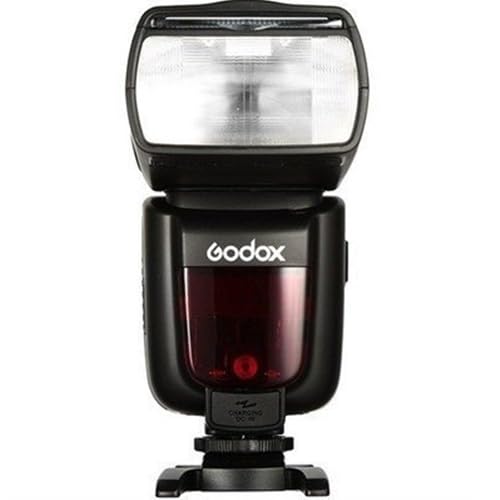
Figure 1: Front and back view of the Godox TT585N Flash Speedlite. The left image displays the rear control panel with the LCD screen, mode buttons, and dial. The right image shows the front of the flash head with the light sensor and focus assist beam.

Figure 2: Side view of the Godox TT585N, illustrating the external power port, PC sync port, and USB update port.
Key Components:
- Flash Head: Adjustable for bounce and swivel.
- LCD Panel: Displays current settings and status.
- Control Buttons: Mode, Zoom, Sync, Gr/Ch, Set, and directional buttons for navigation.
- Hot Shoe: For mounting onto a camera.
- Battery Compartment: Holds four AA batteries.
- External Power Port: For connecting an external power pack.
- PC Sync Port: For wired synchronization with cameras or triggers.
- USB Port: For firmware updates.
4. Setup
4.1 Battery Installation
- Open the battery compartment cover located on the back of the flash unit.
- Insert four AA batteries (alkaline or Ni-MH recommended) according to the polarity markings (+/-) inside the compartment.
- Close the battery compartment cover securely until it clicks into place.
4.2 Mounting the Flash to a Camera
- Ensure your camera is turned off.
- Slide the hot shoe of the TT585N flash completely into your Nikon camera's hot shoe mount.
- Rotate the locking knob on the flash hot shoe clockwise until it is securely tightened.
5. Operating Instructions
5.1 Power On/Off
To power on the flash, press and hold the power button until the LCD screen illuminates. To power off, press and hold the power button again. The flash features an automatic power-off function after approximately 90 seconds of inactivity to conserve battery life.
5.2 Flash Modes
Press the MODE button to cycle through the available flash modes:
- E-TTL II Automatic Flash: In this mode, the flash automatically adjusts its output to achieve correct exposure based on the camera's metering system.
- Manual Flash (M): This mode allows you to manually set the flash output power from 1/1 (full power) to 1/128 power in 1/3 stop increments.
- Multi / Stroboscopic Flash: This function fires a series of rapid flashes during a single exposure, allowing you to capture multiple movements of a subject in one frame. You can set the flash frequency (Hz), flash times, and flash output.
5.3 Zoom Function
The flash head features an automatic and manual zoom function. It can cover a focal length range of 20mm to 200mm. In auto mode, the zoom position automatically adjusts to match the focal length of your lens. In manual mode, you can adjust the zoom position using the ZOOM button and select dial.
5.4 2.4G Wireless Transmission
The TT585N includes an integrated 2.4G wireless transmission system, enabling it to function as a master or slave unit for off-camera flash control. This allows for flexible lighting setups without the need for physical connections. Refer to the detailed wireless section in the full manual for pairing and group settings.
6. Maintenance and Storage
- Cleaning: Use a soft, dry cloth to clean the flash body. For stubborn dirt, a slightly damp cloth can be used, followed by immediate drying. Avoid using solvents or abrasive cleaners.
- Storage: Store the flash in a dry, cool, and well-ventilated area away from direct sunlight and high humidity.
- Battery Removal: If the flash will not be used for an extended period, remove the batteries to prevent leakage and potential damage to the unit.
- Hot Shoe Protection: Keep the hot shoe clean and free from debris. Use the provided hot shoe cover when the flash is not mounted on a camera.
7. Troubleshooting
If you encounter issues with your Godox TT585N, refer to the following common problems and solutions:
- Flash not firing:
- Check if the batteries are correctly installed and have sufficient power.
- Ensure the flash is securely mounted on the camera's hot shoe.
- Verify that the camera and flash settings are compatible (e.g., correct flash mode, sync speed).
- If using wireless mode, ensure the master and slave units are properly paired and within range.
- Incorrect exposure (too dark/too bright):
- Adjust flash exposure compensation on the flash or camera.
- In Manual mode, adjust the flash output power.
- Check the distance to the subject; the flash has a limited effective range.
- Ensure the flash head zoom matches the lens focal length or is set appropriately.
- Flash head not zooming:
- Ensure the flash is in a mode that supports zoom (e.g., E-TTL II or Manual).
- If in manual zoom, try adjusting it using the ZOOM button.
8. Technical Specifications
| Feature | Specification |
|---|---|
| Brand | GODOX |
| Model Number | TT585N |
| Compatible Cameras | Nikon DSLR Cameras |
| Guide Number (GN) | 60 (m ISO 100) |
| Flash Coverage | 20 to 200mm (Auto/Manual Zoom) |
| Flash Duration | 1/300 to 1/20000 seconds |
| Exposure Control System | E-TTL II Auto Flash, Manual Flash, Multi Flash |
| Wireless Flash Function | Master, Slave, Off (2.4G Wireless Transmission) |
| Wireless Transmission Range | Approx. 100 meters (2.4G) |
| Power Source | 4x AA batteries |
| Recycle Time | Approx. 0.1-2.6 seconds |
| Color Temperature | 5600K ± 200K |
| Mount Type | Hot Shoe |
| Weight | 1.39 Kilograms (approximate, with batteries) |
| Included Components | 1 Flash Speedlite for Nikon TT585N |
9. Warranty and Support
This Godox TT585N Flash Speedlite is covered by a 6-month warranty against manufacturing defects from the date of purchase. Please retain your proof of purchase for warranty claims.
For technical support, service, or warranty inquiries, please contact your authorized retailer or visit the official Godox website for customer service contact information.


