
Introduction
This manual provides essential information for the safe and effective use of your FITHOOD CS-LS3900SL Ni-MH battery. This replacement battery is designed for compatibility with various Laser Alignment devices, including models 3900, 3920, 550634, LB-1, and LB-2, and replaces part numbers 0667-01 and 550634. Please read these instructions thoroughly before installation and operation to ensure optimal performance and longevity of your battery.

Image 1: The FITHOOD CS-LS3900SL Ni-MH battery, showing its overall form factor and labeling.
Setup and Installation
Before installing the new battery, ensure your laser alignment device is powered off and disconnected from any power source. Refer to your device's original manual for specific battery compartment access instructions.
- Prepare the Device: Turn off the laser alignment device and unplug it from any charging or power cables.
- Remove Old Battery: Open the battery compartment of your laser alignment device. Carefully disconnect and remove the old battery. Note the orientation of the connector.
- Inspect New Battery: Examine the FITHOOD CS-LS3900SL battery for any visible damage.
- Connect New Battery: Align the connector of the new FITHOOD battery with the corresponding port in your device. Gently push until it clicks into place. Ensure a secure connection.
- Position Battery: Place the new battery into the compartment, ensuring it fits snugly without forcing.
- Close Compartment: Securely close the battery compartment cover.
- Initial Charge: It is recommended to fully charge the battery before its first use. Connect your device to its charger and allow it to charge until the charging indicator shows full.
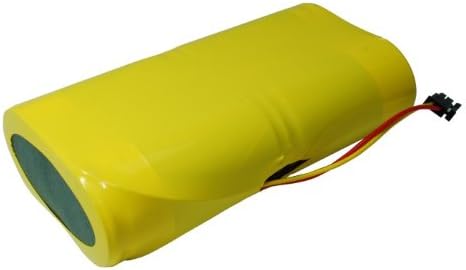
Image 2: Side view of the FITHOOD CS-LS3900SL battery, illustrating its dimensions and cable routing.

Image 3: Close-up of the battery's connector, showing the pin configuration for proper device connection.
Operating Instructions
The FITHOOD CS-LS3900SL is a Ni-MH battery designed for reliable power delivery to your laser alignment device. Proper operation involves understanding its charging and discharge characteristics.
- Charging: Use only the charger specifically designed for your laser alignment device. Ni-MH batteries benefit from a full charge cycle. Avoid frequent partial charges if possible, as this can sometimes lead to a "memory effect" over time, though modern Ni-MH batteries are less susceptible.
- Discharge: For optimal battery life, avoid completely draining the battery to 0% frequently. It is generally better to recharge Ni-MH batteries when they are partially discharged rather than waiting for them to be fully depleted.
- First Use: After initial installation and full charge, the battery is ready for use. Turn on your laser alignment device as per its manufacturer's instructions.
- Performance: The 5000mAh capacity provides extended operational time. Actual runtime will vary based on the power consumption of your specific laser alignment device and usage patterns.
Maintenance and Storage
Proper care and storage will extend the life of your FITHOOD Ni-MH battery.
- Cleaning: Keep the battery contacts clean and dry. Use a clean, dry cloth to wipe off any dust or debris.
- Temperature: Store the battery in a cool, dry place, away from direct sunlight and extreme temperatures. Ideal storage temperature is between 0°C and 25°C (32°F and 77°F). High temperatures can degrade battery performance and shorten its lifespan.
- Long-Term Storage: If storing the battery for an extended period (more than one month), it is recommended to store it with approximately a 50% charge. Recharge the battery every 3-6 months to prevent deep discharge, which can permanently damage Ni-MH cells.
- Safety: Do not disassemble, crush, puncture, or short-circuit the battery. Do not expose it to fire or water. Keep out of reach of children.
- Disposal: Dispose of old or damaged batteries responsibly according to local regulations. Do not dispose of batteries in household waste.
Troubleshooting
If you encounter issues with your FITHOOD battery, refer to the following common problems and solutions:
| Problem | Possible Cause | Solution |
|---|---|---|
| Battery not charging |
|
|
| Short operating time |
|
|
| Battery not recognized by device |
|
|
If these solutions do not resolve the issue, please contact customer support for further assistance.
Specifications
| Feature | Detail |
|---|---|
| Model Number | CS-LS3900SL |
| Battery Type | Ni-MH (Nickel-Metal Hydride) |
| Voltage | 4.8V |
| Capacity | 5000mAh (5.0Ah) |
| Dimensions (L x W x H) | 120.15 x 64.77 x 32.59 mm (approx. 4.73 x 2.55 x 1.28 inches) |
| Weight | Approx. 1.1 pounds (0.5 kg) |
| Certifications | RoHS, CE, ISO9001 |
| Compatible Laser Alignment Models | 3900, 3920, 550634, LB-1, LB-2 |
| Compatible Battery Part Numbers | 0667-01, 550634 |
Warranty Information
FITHOOD offers a one-month free replacement or full refund for any product problems that may arise. This warranty covers manufacturing defects and issues under normal use conditions. Please retain your proof of purchase for warranty claims.
Customer Support
For technical assistance, troubleshooting beyond this guide, or warranty inquiries, please contact our customer support team. When contacting support, please provide your battery details or pictures to help us assist you more efficiently.
Contact: Refer to your purchase documentation or the seller's contact information for the most direct support channels.