
1. Introduction and Overview
This manual provides essential information for the safe and efficient operation of your Sharp Microwave Oven with Grill, Model R-77AT. Please read these instructions thoroughly before using the appliance and retain them for future reference. This microwave oven is designed for reheating, cooking quick meals, defrosting frozen items, and grilling food.
Your Sharp R-77AT microwave oven features:
- 34 Liters Capacity
- 1000 Watts Microwave Output Power
- 1100 Watts Grill Power
- 5 Power Levels
- 9 Automatic Cooking Programs
- Timer Function
- Stainless Steel Exterior
- Safety Lock Feature
2. Important Safety Instructions
When using electrical appliances, basic safety precautions should be followed, including the following:
- Read all instructions before using the appliance.
- Do not operate the oven if the door or door seals are damaged. Contact qualified service personnel.
- Do not heat liquids or other foods in sealed containers as they are liable to explode.
- Only use utensils suitable for microwave ovens.
- Do not use corrosive chemicals or vapors in this appliance.
- This appliance is intended for household use only.
- Always supervise children when they are near the appliance.
- Ensure the appliance is properly grounded.
- Do not immerse the cord, plug, or oven in water or other liquid.
- Do not operate any appliance with a damaged cord or plug, or after the appliance malfunctions or has been damaged in any manner.
3. Product Components
Familiarize yourself with the main parts of your microwave oven.
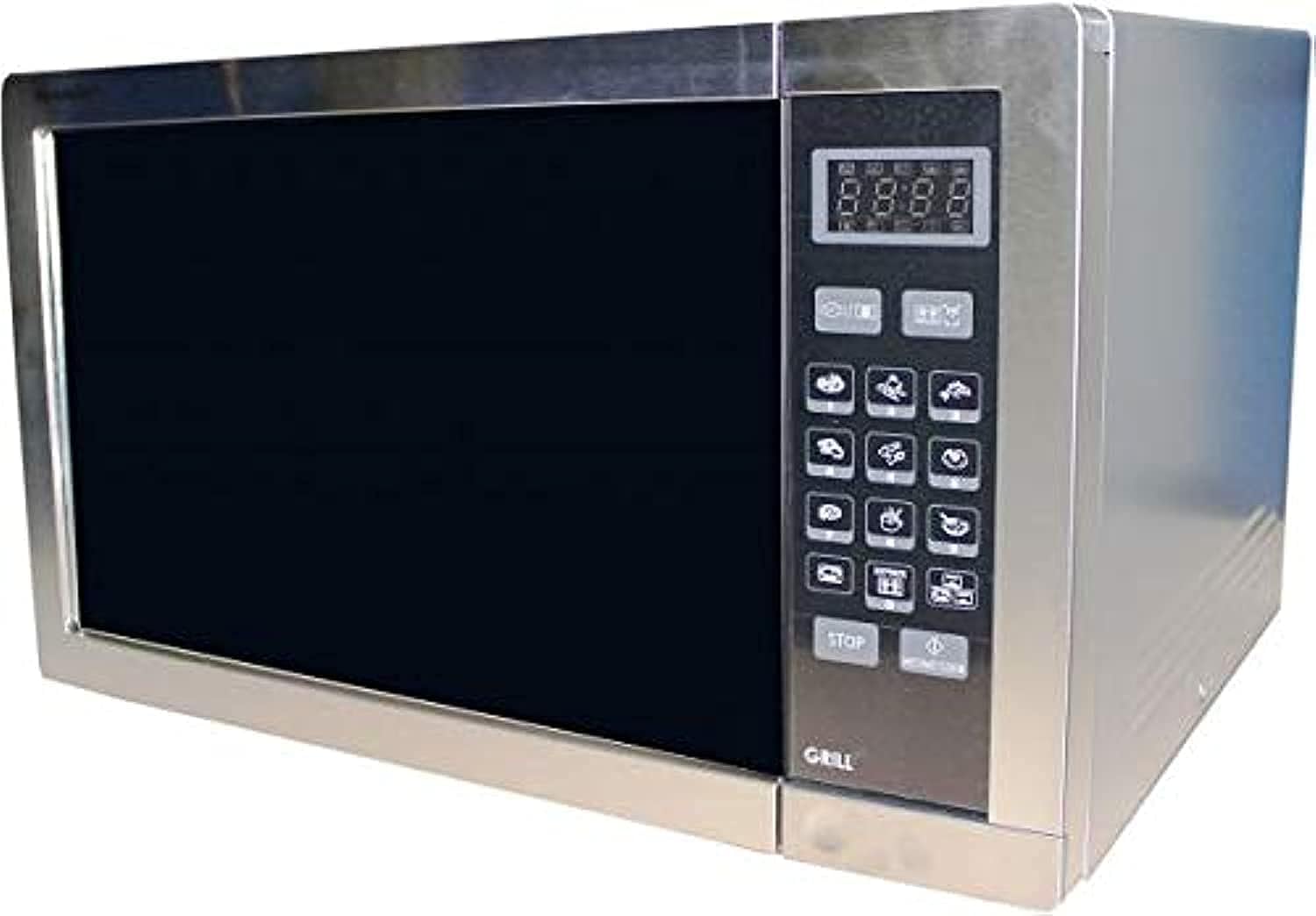
- Oven Cavity: The interior space where food is placed.
- Turntable: A rotating glass tray that ensures even cooking.
- Turntable Support: Supports the turntable.
- Control Panel: Features a digital display, touch buttons for settings, and a timer.
- Door with Safety Lock: Prevents microwave operation when open.
- Grill Rack: Included for use with the grill function.
4. Setup
Follow these steps to set up your microwave oven:
- Unpacking: Remove all packaging materials and accessories. Check the oven for any damage, such as dents or a broken door. Do not install if damaged.
- Placement: Place the oven on a flat, stable surface that can support its weight and the heaviest food likely to be cooked in it. Ensure there is adequate ventilation space: at least 20 cm (8 inches) above the oven, 10 cm (4 inches) at the rear, and 5 cm (2 inches) on each side.
- Power Connection: Plug the power cord into a standard grounded electrical outlet. Ensure the voltage and frequency match the specifications on the rating label of the oven.
- Turntable Installation: Place the turntable support ring in the center of the oven cavity. Position the glass turntable plate securely on top of the support.
5. Operating Instructions
Your Sharp R-77AT microwave oven offers various cooking functions.
5.1. Basic Microwave Cooking
- Place food in a microwave-safe container on the turntable.
- Close the oven door securely.
- Press the 'Microwave' button to select the desired power level (1-5).
- Use the number buttons or dial to set the cooking time.
- Press 'Start' to begin cooking.
5.2. Grill Function
The grill function is ideal for browning and crisping food.
- Place food on the grill rack (if provided) or a heat-resistant dish.
- Press the 'Grill' button.
- Set the desired grilling time using the number buttons or dial.
- Press 'Start' to begin grilling.
- Note: The grill element will heat up and cool down periodically to maintain the set temperature.
5.3. Auto Programs
The oven has 9 pre-set auto programs for common foods.
- Press the 'Auto Menu' button repeatedly or use the dial to select the desired program (e.g., Popcorn, Potato, Pizza).
- Confirm the weight or quantity if prompted.
- Press 'Start' to begin the automatic program.
5.4. Defrost Function
The automatic defrost function allows for quick and even thawing.
- Place the frozen food in a microwave-safe dish.
- Press the 'Defrost' button.
- Enter the weight of the food using the number buttons or dial.
- Press 'Start'. The oven will automatically calculate the defrosting time and may prompt you to turn the food over during the cycle.
5.5. Timer Function
Use the timer for general kitchen timing, independent of cooking functions.
- Press the 'Timer' button.
- Set the desired time using the number buttons or dial.
- Press 'Start'. The timer will count down without activating the microwave or grill.
6. Maintenance and Cleaning
Regular cleaning and maintenance ensure optimal performance and longevity of your microwave oven.
- Exterior: Wipe the exterior with a damp cloth and mild detergent. Avoid abrasive cleaners.
- Interior: Clean the oven cavity after each use. Wipe with a damp cloth. For stubborn food splatters, place a bowl of water with lemon slices inside and microwave for 2-3 minutes to loosen residue, then wipe clean. The interior material is enamel.
- Turntable and Support: The glass turntable and its support can be washed in warm soapy water or in a dishwasher.
- Door Seals: Keep the door seals clean to ensure proper closure and safe operation.
- Grill Rack: Wash the grill rack with warm soapy water after use.
- Power Cord: Regularly check the power cord for any damage.
Always unplug the microwave oven before cleaning.
7. Troubleshooting
If you encounter issues with your microwave oven, refer to the following common problems and solutions:
| Problem | Possible Cause | Solution |
|---|---|---|
| Oven does not start | Power cord not plugged in; Door not closed properly; Fuse blown or circuit breaker tripped. | Ensure plug is securely in outlet; Close door firmly; Check household fuse/circuit breaker. |
| Food not cooking/heating | Door not closed properly; Cooking time/power level not set correctly; Utensil not microwave-safe. | Close door firmly; Adjust time/power; Use microwave-safe cookware. |
| Sparking inside oven | Metal or foil in oven; Food residue on cavity walls. | Remove any metal objects; Clean oven interior thoroughly. |
| Turntable not rotating | Turntable not positioned correctly; Obstruction under turntable. | Reposition turntable and support; Remove any obstructions. |
If the problem persists after attempting these solutions, please contact qualified service personnel.
8. Specifications
| Feature | Specification |
|---|---|
| Brand | Sharp |
| Model Number | R-77AT |
| Capacity | 34 Liters |
| Microwave Power Output | 1000 Watts |
| Grill Power | 1100 Watts |
| Number of Power Levels | 5 |
| Number of Programs | 9 (Auto Programs) |
| Control Type | Touch Buttons |
| Special Features | Timer Function, Safety Lock |
| Defrost System | Automatic Defrost |
| Heating Method | Electric |
| Material (Exterior) | Stainless Steel |
| Material (Interior) | Enamel |
| Color | Silver |
| Frequency | 50 Hz |
| Installation Type | Freestanding |
| Included Components | Grill Rack |
9. Warranty and Support
For warranty information and customer support, please refer to the warranty card included with your product or visit the official Sharp website. Keep your purchase receipt as proof of purchase for any warranty claims.
For technical assistance or service inquiries, please contact Sharp customer service through their official channels.


