1. Safety Instructions
Please read all instructions carefully before using the appliance and retain them for future reference. Failure to follow these instructions may result in electric shock, fire, or serious injury.
- Electrical Safety: Ensure the washing machine is connected to a properly grounded power outlet. Do not use extension cords or adapters. Disconnect the power supply before cleaning or performing any maintenance.
- Water Safety: Ensure water inlet hoses are securely connected to prevent leaks. Do not operate the machine if there is a water leak.
- Child Safety: Keep children away from the washing machine during operation. Do not allow children to play with the appliance.
- General Use: Do not wash items that are soiled with flammable substances. Do not reach into the washing machine while the drum is moving.
2. Product Overview
The Clikon CK613 is a 13kg capacity top-load full automatic washing machine designed for efficient and convenient laundry care. It features a stainless steel diamond drum, Storm Wash 360° cleaning technology, and air drying/spinning technology. The machine offers 5 water levels and 6 wash programs, controlled via a convenient LED display and stylish IMD control panel.
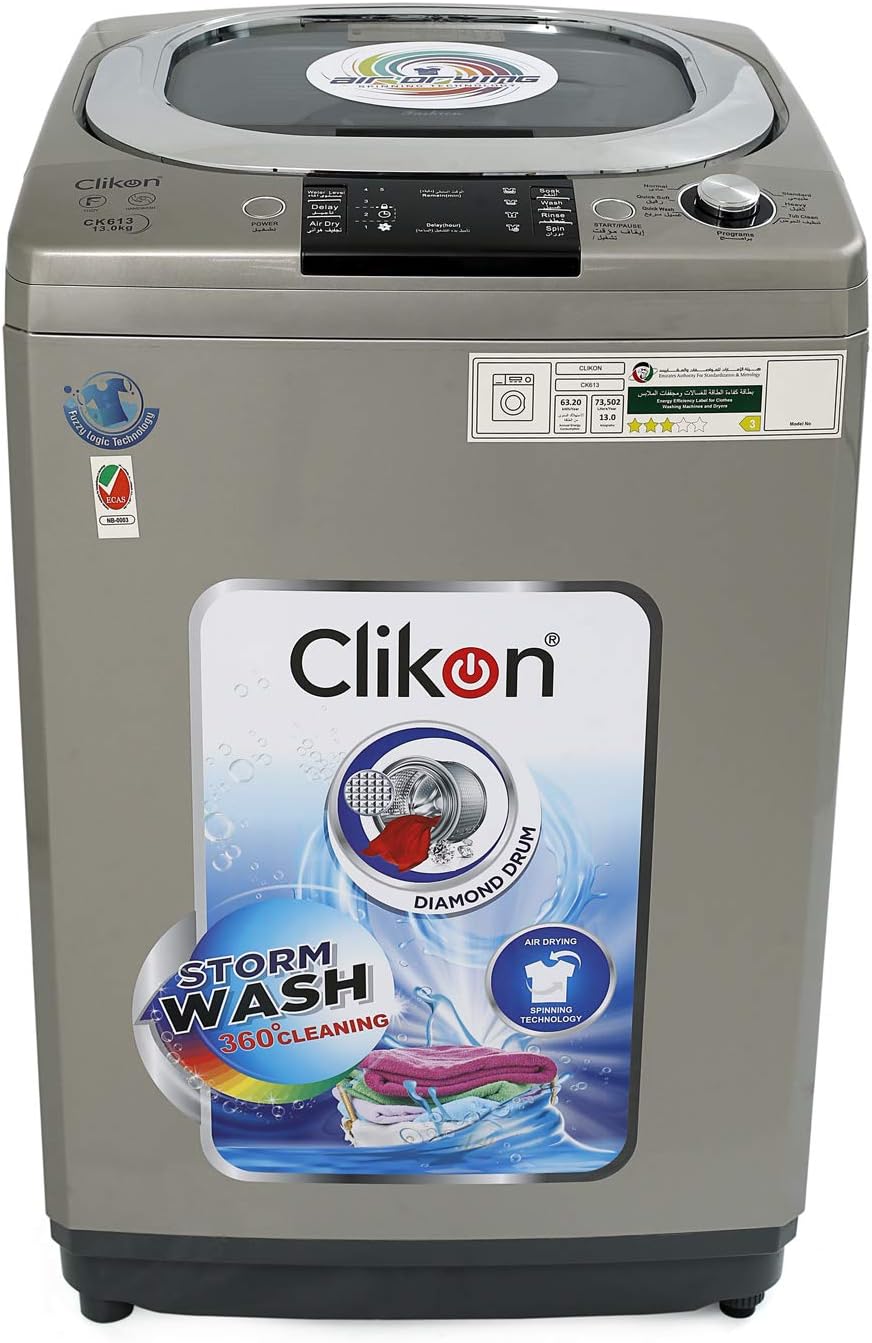
Figure 2.1: Front view of the Clikon CK613 13kg Top Load Washing Machine. This image shows the overall design, control panel, and the Clikon branding.

Figure 2.2: Angled view of the Clikon CK613 washing machine with the top lid open, revealing the washing drum and detergent box area.
3. Installation
3.1 Unpacking
Carefully remove all packaging materials. Inspect the machine for any damage during transit. Retain packaging for potential future transport.
3.2 Location Requirements
Place the washing machine on a firm, level surface. Ensure there is adequate space around the machine for ventilation and maintenance. Avoid direct sunlight or extreme temperatures. The machine requires access to a water supply, drainage, and a grounded electrical outlet.
3.3 Connecting Water Inlet Hoses
Connect the cold water inlet hose to the cold water tap and the corresponding inlet on the back of the machine. Ensure all connections are tight to prevent leaks. Turn on the water supply and check for any drips.
3.4 Drain Hose Setup
Position the drain hose into a standpipe or over the edge of a sink, ensuring it is securely fastened to prevent it from dislodging during the drain cycle. The drain hose should be at an appropriate height to allow for proper drainage.
3.5 Leveling the Machine
Use a spirit level to check if the machine is perfectly level. Adjust the adjustable feet at the bottom of the machine until it is stable and level. This prevents excessive vibration and noise during operation.
3.6 Electrical Connection
Plug the power cord into a grounded electrical outlet. Ensure the voltage and frequency match the specifications of the washing machine.
4. Operation
4.1 Control Panel Overview
The Clikon CK613 features an intuitive IMD control panel with an LED display. The panel includes buttons for Power, Start/Pause, Program Selection, Water Level, and Delay Start.

Figure 4.1: Top view of the Clikon CK613, showing the control panel with LED display and buttons, and the open washing drum.
4.2 Adding Detergent and Fabric Softener
Open the detergent box located on the top edge of the drum. Add the appropriate amount of detergent and fabric softener according to the manufacturer's instructions and the load size.

Figure 4.2: Close-up view of the detergent box inside the Clikon CK613 washing machine.
4.3 Loading Laundry
Open the top lid and place laundry evenly inside the drum. Do not overload the machine. Close the lid securely before starting a cycle.
4.4 Selecting a Wash Program
Press the 'Power' button to turn on the machine. Use the 'Program' button to cycle through the 6 available wash programs (e.g., Normal, Heavy, Delicate, Quick, Spin, Drain). The selected program will be indicated on the LED display.
4.5 Adjusting Settings
Depending on the selected program, you can adjust settings such as 'Water Level' (5 options) or set a 'Delay Start' time using the respective buttons.
4.6 Starting and Pausing a Cycle
Once the program and settings are selected, press the 'Start/Pause' button to begin the wash cycle. To pause a cycle, press the 'Start/Pause' button again. Press it once more to resume.
4.7 End of Cycle
The machine will signal when the wash cycle is complete. Unload the laundry promptly to prevent wrinkles and odors. Turn off the machine and close the water tap.
5. Maintenance
5.1 Cleaning the Exterior
Wipe the exterior of the washing machine with a soft, damp cloth. Do not use abrasive cleaners or solvents that could damage the surface.
5.2 Cleaning the Detergent Dispenser
Regularly clean the detergent dispenser to prevent residue buildup. Remove the dispenser drawer (if removable) and rinse it under running water. Use a small brush to clean any stubborn residue.
5.3 Cleaning the Drum
To maintain hygiene and prevent odors, run a 'Drum Clean' cycle (if available) or a hot wash cycle with an empty drum and a washing machine cleaner or a cup of white vinegar.
5.4 Filter Maintenance
Check and clean the lint filter (if accessible) periodically to ensure efficient operation and prevent drainage issues. Refer to the specific location of the filter in your model for cleaning instructions.
6. Troubleshooting
Before contacting service, please refer to the following troubleshooting guide for common issues.
| Problem | Possible Cause | Solution |
|---|---|---|
| Machine does not start | Power cord unplugged; Lid not closed properly; Water supply off; 'Start/Pause' not pressed. | Check power connection; Ensure lid is fully closed; Turn on water supply; Press 'Start/Pause'. |
| Water does not fill | Water tap closed; Water inlet hose kinked; Water pressure too low. | Open water tap; Straighten hose; Check household water pressure. |
| Water does not drain | Drain hose kinked or blocked; Drain pump filter clogged. | Straighten or clear drain hose; Clean drain pump filter (refer to maintenance section). |
| Excessive vibration/noise | Machine not level; Load unbalanced; Transit bolts not removed. | Adjust leveling feet; Redistribute laundry evenly; Ensure all transit bolts are removed during installation. |
7. Specifications
| Feature | Specification |
|---|---|
| Brand | Clikon |
| Model Number | CK613 |
| Capacity | 13 Kilograms |
| Product Dimensions (W x D x H) | 59.8 x 61.3 x 101 cm |
| Item Weight | 44.5 Kilograms |
| Installation Type | Freestanding |
| Access Location | Top Load |
| Control Console | Push Button |
| Standard Cycles | 6 |
| Material Type | Metal |
| Color | Silver |
| Operation Mode | Fully Automatic |
8. Warranty and Support
This Clikon CK613 washing machine comes with a 2-year warranty from the date of purchase, covering manufacturing defects. Please retain your proof of purchase for warranty claims.
For installations, service support, or warranty inquiries, please contact the authorized service center:
- Service Contact: +966 503568714 / +966 500535657
When contacting support, please have your model number (CK613) and purchase details ready.