
Important Safety Information
Please read all instructions carefully before using the SKY LAND EM-1251 Treadmill. Retain this manual for future reference. Failure to follow these safety guidelines may result in injury or damage to the equipment.
- Always consult with a physician before starting any new exercise program.
- Place the treadmill on a flat, stable surface with adequate clearance around it (at least 2 meters behind and 0.6 meters on each side).
- Keep children and pets away from the treadmill during operation.
- Do not operate the treadmill if it is damaged or malfunctioning.
- Wear appropriate athletic footwear and clothing.
- Use the safety key clip at all times. In case of emergency, the safety key will stop the treadmill.
- Do not step on or off the treadmill while the belt is moving.
- The maximum user weight for this treadmill is 150 kg. For optimal performance and longevity, the ideal maximum user weight is 125 kg (150 kg - 25 kg).
- Unplug the treadmill from the power source when not in use or before cleaning and maintenance.
Product Overview
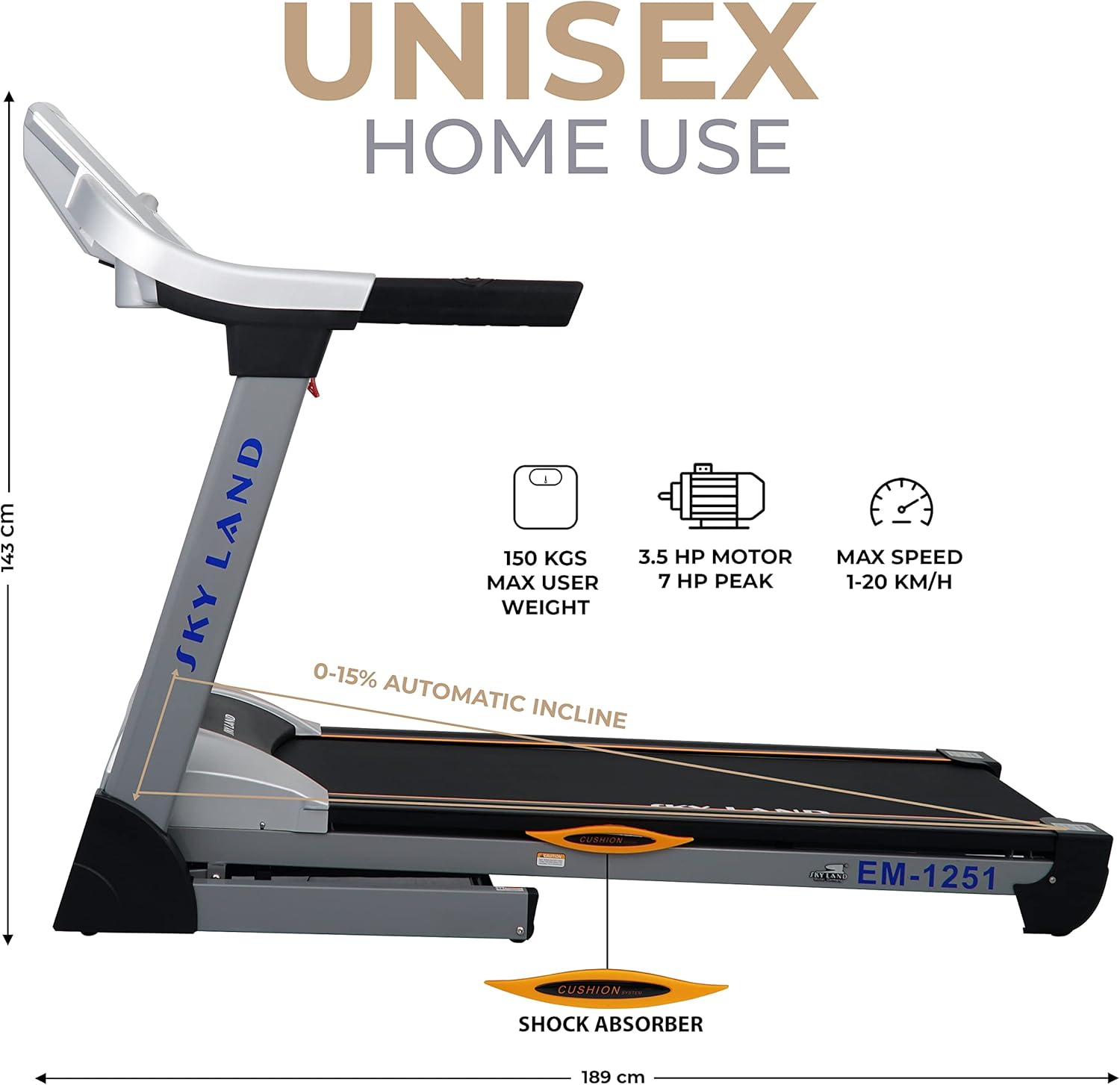
The SKY LAND EM-1251 is a heavy-duty treadmill designed for home use, offering a powerful motor, automatic incline, and smart connectivity for an effective cardio workout.
Assembly and Setup
The EM-1251 treadmill features a simple folding design for space-saving storage and easy setup.
Unfolding the Treadmill
- Ensure the treadmill is unplugged from the power source.
- Gently push the running deck downwards. The hydraulic assist system will slowly lower the deck into the operating position.
- Ensure the deck is fully locked into place before use.
Folding the Treadmill for Storage
- Ensure the treadmill is turned off and unplugged.
- Lift the running deck until it clicks into the upright, folded position. The hydraulic assist system will help with the lift.
- For transportation, tilt the treadmill and use the integrated wheels to move it to your desired storage location.

Operating Instructions
Console Features
The treadmill's console provides essential workout data and control options.
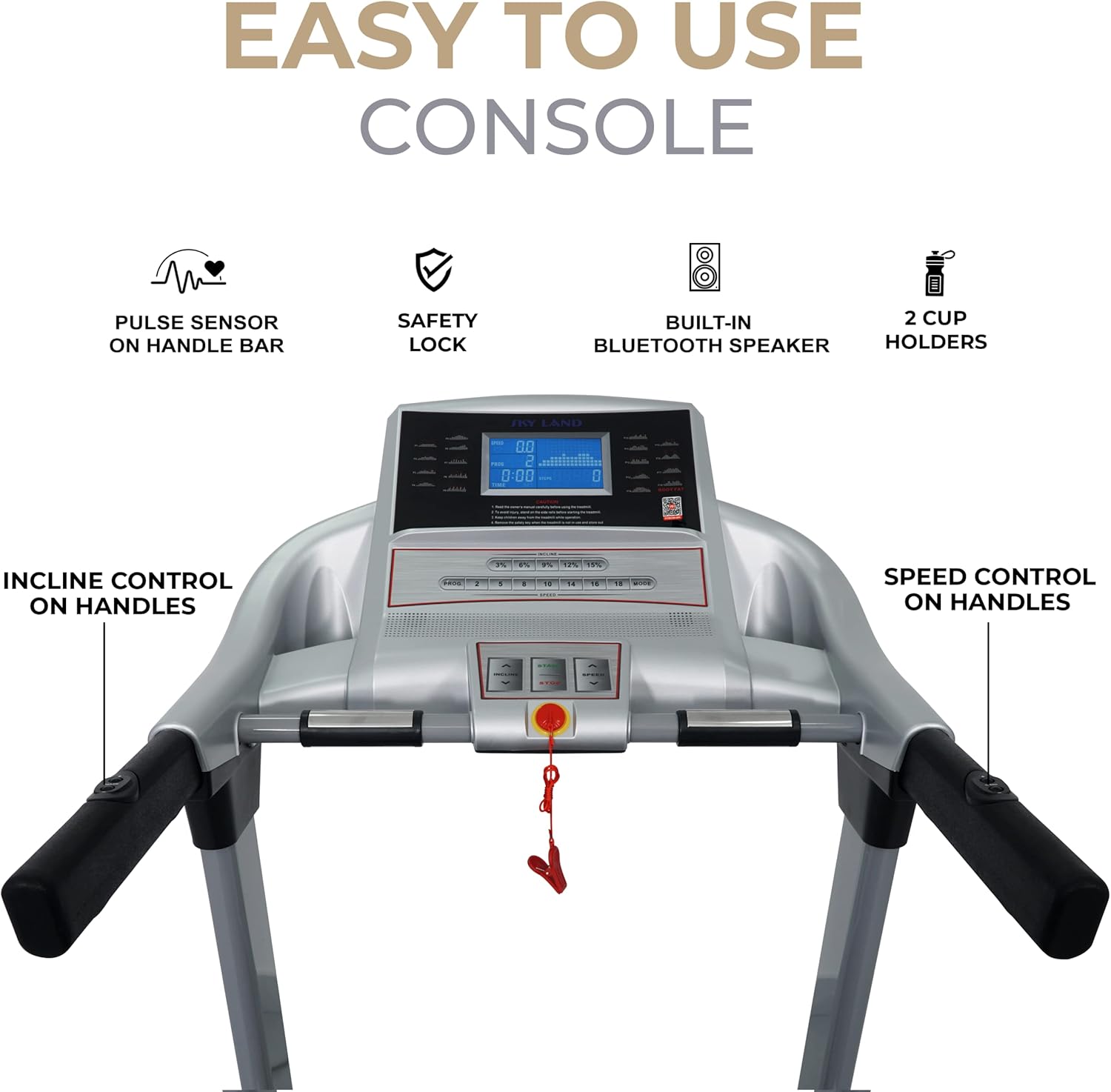
- LCD Display: Shows speed, distance, time, calories burned, and pulse rate.
- Pulse Sensors: Integrated into the handlebars to monitor heart rate.
- Safety Key: A red clip that attaches to your clothing. If pulled, it immediately stops the treadmill.
- Speed Control: Buttons on the console and handlebars to adjust running speed (1-20 km/h).
- Incline Control: Buttons on the console and handlebars to adjust the automatic incline (0-15%).
- Built-in Bluetooth Speaker: Connect your device to play music.
- MP3 Player & AUX Input: For direct audio connection.
- Cup Holders: Two holders for beverages.
Using the Fitshow App
Enhance your workout experience by connecting your treadmill to the Fitshow app via Bluetooth.

- Download the Fitshow app: Scan the QR code on the console or visit the app stores directly. Google Play | App Store
- Enable Bluetooth on your mobile device.
- Open the Fitshow app and follow the on-screen instructions to connect to your EM-1251 treadmill.
- The app allows you to track speed, distance, time, calories, pulse, and BMI, as well as access various workout programs.
Starting a Workout
- Plug in the treadmill and turn on the power switch (usually located at the front base).
- Attach the safety key clip to your clothing and insert the safety key into its designated slot on the console.
- Step onto the side rails of the treadmill.
- Press the 'START' button on the console. The belt will begin to move at a low speed after a short countdown.
- Carefully step onto the moving belt and begin walking.
Adjusting Speed and Incline
- Speed: Use the '+' and '-' buttons on the console or handlebars to increase or decrease speed. Quick speed buttons may also be available for instant speed changes.
- Incline: Use the 'INCLINE +' and 'INCLINE -' buttons on the console or handlebars to adjust the incline level. Quick incline buttons may also be available.
Using Programs
The EM-1251 comes with 18 pre-set exercise programs. Refer to the console's specific instructions for program selection and customization. These programs are designed for weight loss, endurance, and interval training.
Maintenance
Regular maintenance ensures the longevity and safe operation of your treadmill.
- Cleaning: Wipe down the console and other surfaces with a damp cloth after each use. Do not use abrasive cleaners.
- Belt Lubrication: The running belt requires periodic lubrication to reduce friction. Refer to the specific instructions for your model regarding lubrication frequency and type of lubricant.
- Belt Tension and Alignment: Check the running belt tension and alignment regularly. Adjust if the belt slips or drifts to one side. Consult the detailed manual for adjustment procedures.
- Motor Cover: Periodically remove the motor cover and vacuum any dust or debris that may have accumulated. Ensure the treadmill is unplugged before doing so.
- Inspection: Regularly inspect all nuts, bolts, and moving parts for tightness and wear. Tighten or replace as necessary.
Troubleshooting
This section addresses common issues you might encounter with your treadmill.
| Problem | Possible Cause | Solution |
|---|---|---|
| Treadmill does not start | Power cord unplugged, safety key not in place, power switch off, circuit breaker tripped. | Check power connection, ensure safety key is inserted, turn on power switch, reset circuit breaker. |
| Running belt slips | Belt too loose, belt needs lubrication. | Adjust belt tension (refer to manual), lubricate the belt. |
| Unusual noise during operation | Loose parts, belt friction, motor issues. | Check and tighten all bolts, lubricate belt, contact customer support if noise persists. |
| Console display not working | Loose cable connection, power issue. | Check all cable connections to the console, ensure power supply is stable. |
Specifications
Key technical specifications for the SKY LAND EM-1251 Treadmill.
| Feature | Specification |
|---|---|
| Model Number | EM-1251 |
| Motor Horsepower | 3.5 HP (7.0 HP Peak) |
| Maximum Speed | 20 km/h |
| Automatic Incline | 0-15% (15 levels) |
| Running Area | 141 cm x 50 cm |
| Maximum User Weight | 150 kg (Ideal: 125 kg) |
| Product Dimensions (L x W x H) | 189 cm x 82 cm x 143 cm |
| Item Weight | 87 kg |
| Material | Alloy Steel |
| Display Type | LCD |
| Programs | 18 Pre-set Programs |
| Connectivity | Bluetooth, Fitshow App, MP3, AUX |
| Special Features | Foldable design, Hydraulic assist, Transport wheels, Shock absorption |
Warranty and Support
For warranty claims, technical assistance, or any product-related inquiries, please contact SKY LAND customer support.
- Return Policy: This product is eligible for a 15-day return period. Please refer to your purchase agreement for full details.

Contact Information:
- WhatsApp: +971543084588, +971565015399
- Phone (U.A.E.): +97142269180
- Email: customercare@topskyland.com
- Website: www.topskyland.com