
Honor BKK-LX2
Honor 8C User Manual
Model: BKK-LX2
1. Product Overview
The Honor 8C is a versatile smartphone designed for everyday communication and multimedia. It features a large display, capable cameras, and a long-lasting battery, making it suitable for various user needs. This manual provides essential information for setting up, operating, maintaining, and troubleshooting your device.

Figure 1: Front view of the Honor 8C smartphone, showcasing its display and sleek design.
2. Setup Guide
2.1 Inserting SIM and microSD Cards
Your Honor 8C supports Dual SIM functionality and a microSD card for expandable storage. Use the provided SIM ejector tool to open the SIM card tray located on the side of the device.
- Locate the small hole on the SIM card tray on the left side of the phone.
- Insert the SIM ejector tool into the hole and gently push until the tray pops out.
- Place your Nano-SIM cards and/or microSD card into the designated slots on the tray, ensuring the gold contacts face downwards.
- Carefully push the tray back into the phone until it is flush with the side.
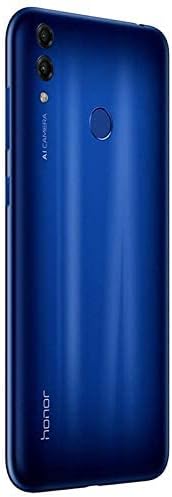
Figure 2: Side view illustrating the location of the SIM card tray.
2.2 Initial Power On and Configuration
To power on your device for the first time:
- Press and hold the Power button (located on the right side) until the Honor logo appears.
- Follow the on-screen prompts to select your language, connect to a Wi-Fi network, and set up your Google account.
- Complete the setup wizard to personalize your device settings.
3. Operating Instructions
3.1 Basic Navigation
The Honor 8C operates on Android 8.1 and uses a touchscreen interface for navigation.
- Tap: Touch the screen once to open apps, select items, or activate buttons.
- Swipe: Drag your finger across the screen to scroll through lists or switch between home screens.
- Pinch-to-zoom: Place two fingers on the screen and move them apart to zoom in, or together to zoom out.
3.2 Camera Usage
The Honor 8C is equipped with a dual rear camera (13MP + 2MP) and an 8MP front camera for capturing photos and videos.
- Open the Camera application from your home screen or app drawer.
- Select your desired mode (Photo, Video, Portrait, etc.) by swiping across the bottom of the screen.
- Tap the shutter button to take a photo or start/stop video recording.
- Use the toggle icon to switch between the front and rear cameras.

Figure 3: Rear view highlighting the dual camera system and fingerprint sensor.
3.3 Connectivity
The device supports various connectivity options:
- Wi-Fi: Connect to wireless networks for internet access. Go to Settings > Wireless & networks > Wi-Fi.
- Bluetooth: Pair with other Bluetooth-enabled devices like headphones or speakers. Go to Settings > Device connection > Bluetooth.
- 4G LTE: Utilize high-speed mobile data through your SIM card. Ensure your mobile data is enabled in Settings > Wireless & networks > Mobile network.
4. Maintenance and Care
4.1 Battery Care
The Honor 8C is equipped with a 4000mAh battery. To maximize battery life:
- Avoid extreme temperatures, as they can degrade battery performance.
- Use the original charger and cable provided with your device.
- Avoid completely draining the battery frequently. Charge it before it reaches very low levels.
- Close unused applications running in the background to conserve power.
4.2 Cleaning Your Device
To keep your Honor 8C clean and functional:
- Use a soft, lint-free cloth to wipe the screen and back panel.
- Avoid using harsh chemicals, abrasive cleaners, or aerosol sprays.
- For stubborn smudges, slightly dampen the cloth with water.
4.3 Software Updates
Regularly check for and install software updates to ensure your device has the latest features, security patches, and performance improvements. Go to Settings > System > Software update.
5. Troubleshooting
5.1 Device Not Powering On
- Ensure the battery is charged. Connect the device to its charger and wait a few minutes before attempting to power it on again.
- Press and hold the Power button for at least 10-15 seconds to perform a forced restart.
5.2 Network Connectivity Issues
- No Signal/Poor Signal: Check if your SIM card is properly inserted. Try restarting the device. If the issue persists, contact your network provider.
- Wi-Fi Connection Problems: Ensure Wi-Fi is enabled on your device and the router is working. Try forgetting the network and reconnecting.
5.3 Apps Crashing or Freezing
- Close and reopen the app.
- Clear the app's cache and data (Settings > Apps > [App Name] > Storage > Clear cache/Clear data).
- Ensure the app is updated to its latest version from the Google Play Store.
6. Technical Specifications
| Feature | Specification |
|---|---|
| Model Number | BKK-LX2 |
| Operating System | Android 8.1 |
| Processor | Snapdragon 632 Octa-Core 8x1.8 GHz |
| RAM | 3 GB |
| Internal Storage | 32 GB |
| Display | 6.26 Inch Notch in-cell Full View Display (1520 x 720 resolution) |
| Rear Camera | 13MP + 2MP |
| Front Camera | 8MP |
| Battery | 4000mAh (Typical value) |
| Connectivity | 4G LTE, Wi-Fi, Bluetooth, GPS (GLONASS) |
| Dimensions | 18.6 x 9.2 x 5.2 cm |
| Weight | 431 g |
| Color | Blue |
7. Warranty and Support
Your Honor 8C device comes with a standard manufacturer's warranty. Please refer to the warranty card included in your product packaging for specific terms and conditions, including warranty period and coverage details.
For technical support, service, or further inquiries, please visit the official Honor support website or contact their customer service hotline. Keep your proof of purchase handy when seeking support.
Online Support: Visit the official Honor website for FAQs, software downloads, and contact options.
Customer Service: Refer to your regional Honor support contact information for phone or email assistance.
Related documentsBKK-LX2


Ask a question about this manual
Ask about setup, troubleshooting, compatibility, parts, safety, or missing instructions. Manuals+ will review the question and use this page’s manual context to help answer it.