
Introduction
This manual provides instructions for the Easytry123 replacement remote control, designed for use with various Sony DVD Home Theater Systems. This remote offers essential functions for controlling your compatible Sony device.
Important Note: This is a replacement remote. While it provides core functionality, some advanced or specific features of your original remote may not be fully supported. Please ensure your Sony system model is listed as compatible before use.
Package Contents
- 1 x Easytry123 Replacement Remote Control
Note: Batteries are not included. This remote requires 2 AA batteries.
Setup
1. Battery Installation
To install batteries:
- Locate the battery compartment on the back of the remote control.
- Press down on the latch and slide the battery cover off.
- Insert two (2) AA batteries, ensuring the positive (+) and negative (-) terminals align correctly with the markings inside the compartment.
- Slide the battery cover back into place until it clicks securely.

Image: The back of the remote control with the battery cover removed, revealing the battery slots. This illustrates where to insert the two AA batteries.
2. Initial Use
This remote control operates using infrared (IR) technology and typically does not require programming for compatible Sony models. Once batteries are installed, point the remote directly at your Sony Home Theater System and begin operation.
Operating Instructions
The Easytry123 replacement remote control features a standard layout for intuitive operation of your Sony Home Theater System. Below is an overview of key buttons and their functions.
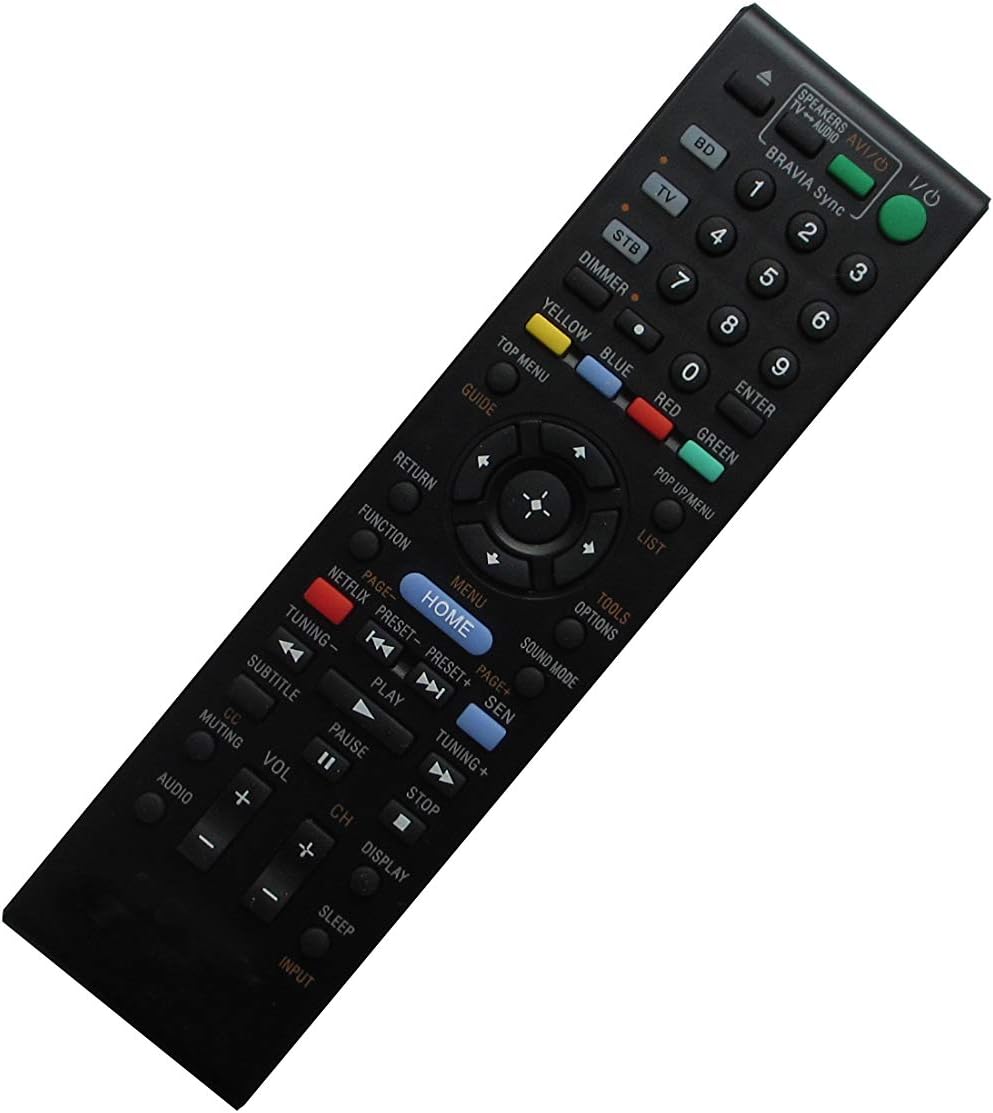
Image: The front face of the remote control, displaying all buttons including power, input selection, number pad, navigation, volume, channel, and playback controls.
Button Functions Overview:
- Power (I/O): Turns the system on or off.
- Input Selectors (BD, TV, STB): Switches between different input sources.
- Number Pad (0-9): For direct channel selection or inputting numbers.
- Volume (+/-): Adjusts the audio volume level.
- Channel (+/-): Changes TV channels or navigates through lists.
- Muting: Mutes or unmutes the audio.
- Home: Accesses the main menu or home screen of your system.
- Menu: Opens the system's menu.
- Navigation Buttons (Up, Down, Left, Right, Enter): Used to navigate menus and confirm selections.
- Return: Goes back to the previous screen or menu.
- Playback Controls (Play, Pause, Stop, Fast Forward, Rewind, Skip): Controls media playback.
- Subtitle (CC): Toggles subtitles or closed captions.
- Audio: Selects audio tracks or modes.
- Sleep: Sets a sleep timer for the system.
- Display: Shows on-screen information.
- Color Buttons (Red, Green, Yellow, Blue): Functionality varies depending on the specific menu or application.
Maintenance
Cleaning the Remote Control
To clean the remote control, use a soft, dry cloth. For stubborn dirt, lightly dampen the cloth with water or a mild, non-abrasive cleaner. Avoid using harsh chemicals or abrasive materials, as these can damage the remote's surface or internal components.
Battery Replacement
Replace batteries when the remote's responsiveness decreases or it stops functioning. Always replace both batteries at the same time with new AA batteries. Do not mix old and new batteries, or different types of batteries.
Storage
When not in use for extended periods, remove the batteries to prevent leakage, which can damage the remote control.
Troubleshooting
- Remote not responding:
- Check if the batteries are inserted correctly with the correct polarity.
- Replace old batteries with new ones.
- Ensure there are no obstructions between the remote and the Sony Home Theater System's IR receiver.
- Confirm that the remote is pointed directly at the system.
- Limited functionality:
- As a replacement remote, some advanced features of your original Sony remote may not be supported. Refer to your Sony system's original manual for specific functions.
- Ensure your Sony model is listed as compatible with this replacement remote.
Specifications
- Brand: Easytry123
- Compatible Devices: Sony DVD Home Theater Systems (e.g., 148944011, RM-ADP060, HBD-L800, BDV-N890, RM-ADP092, BDV-N7100, BDV-N7100W, BDV-N8100, RM-ADP077)
- Connectivity Technology: Infrared (IR)
- Controller Type: Button Control
- Special Feature: Ergonomic design
- Batteries Required: 2 x AA (not included)
Warranty and Support
For product support or inquiries, please contact the seller, Easytry123, through the platform where the purchase was made. Information regarding specific warranty terms may be available from the seller at the time of purchase.