
eKids Av-212
eKids Avengers Endgame FRS Walkie Talkies
Model: Av-212
Instruction Manual
1. Introduction
Thank you for purchasing the eKids Avengers Endgame FRS Walkie Talkies. This manual provides essential information for the safe and effective use of your new two-way radios. Please read it thoroughly before operation and retain it for future reference.
These walkie talkies are designed for clear communication and feature built-in speech and sound effects, making them ideal for indoor and outdoor play. They operate on a single channel with a frequency range of 400-512 MHz and offer a talking range of up to 800 feet under ideal conditions.
2. Important Safety Information
- Battery Safety: This product requires 6 AAA batteries (not included). Always use new batteries of the same type and brand. Do not mix old and new batteries, or different types of batteries. Insert batteries with correct polarity (+/-). Remove exhausted batteries promptly. Do not dispose of batteries in fire; they may explode or leak.
- Choking Hazard: This product contains small parts and is not suitable for children under 3 years of age.
- Water Resistance: These walkie talkies are not water resistant. Avoid exposure to water or moisture to prevent damage.
- Hearing Protection: Do not hold the speaker directly to your ear when operating at high volume. Prolonged exposure to loud sounds may cause hearing damage.
- Supervision: Adult supervision is recommended during use, especially for younger children.
3. Setup and Battery Installation
To begin using your walkie talkies, you must first install the batteries.
- Locate the Battery Compartment: The battery compartment is located on the back of each walkie talkie.
- Open the Compartment: Use a small Phillips head screwdriver to loosen the screw on the battery compartment cover. Remove the cover.
- Insert Batteries: Insert 3 new AAA batteries into each walkie talkie, ensuring the correct polarity (+ and -) as indicated inside the compartment. (Total 6 AAA batteries required, not included).
- Close the Compartment: Replace the battery compartment cover and tighten the screw securely.
- Power On: Locate the ON/OFF/DEMO switch on the back of the walkie talkie. Slide the switch to the "ON" position to power on the device.

Image: Back view of the walkie talkie, highlighting the battery compartment and the ON/OFF/DEMO switch. This image illustrates where to install the 3 AAA batteries and how to power on the device.
4. Operating Instructions
Once batteries are installed and the walkie talkies are powered on, you can begin communication.
- Power On/Off: Slide the ON/OFF/DEMO switch (located on the back) to the "ON" position to turn on the walkie talkie. Slide it to "OFF" to power down. The "DEMO" mode allows for demonstration of sounds without full two-way communication.
- Push-to-Talk (PTT) Button: To speak, press and hold the large "PUSH-TO-TALK" button located on the side of the walkie talkie. Speak clearly into the microphone. Release the button to listen. Both walkie talkies must be on the same channel for communication.
- Speech & Sound Effects (SFX) Button: Press the "SFX" button to send built-in character phrases and sound effects to the other walkie talkie.
- Repeat Button: Press the "Repeat" button to replay the last received message or sound effect.
- Light-Up Graphic: The front graphic will light up during transmission and reception, indicating active communication.
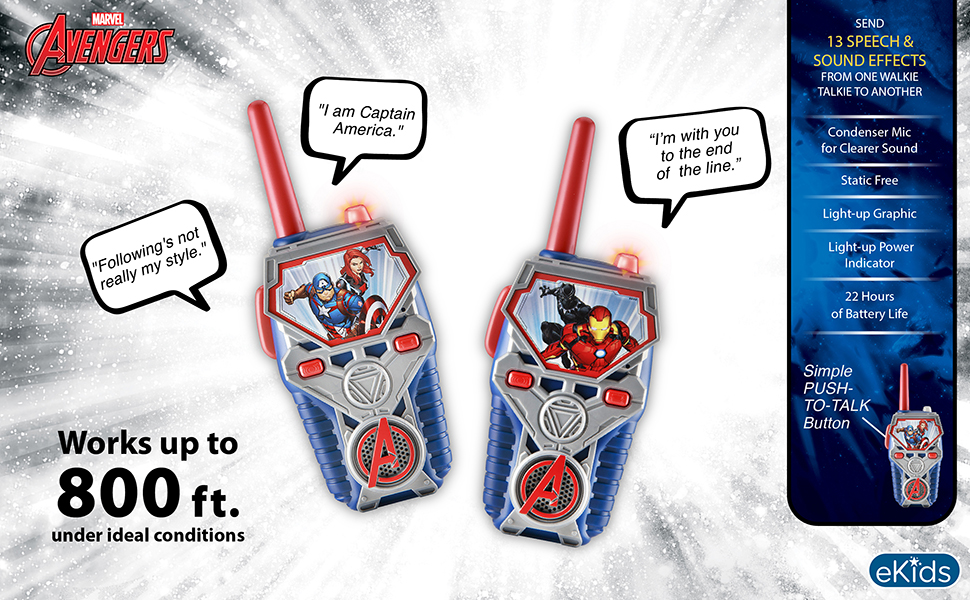
Image: A detailed diagram of the walkie talkie, labeling key components such as the Push-to-Talk button, Microphone, SFX button, Repeat button, Speaker, Power Indicator, and ON/OFF/DEMO switch for easy identification during operation.

Image: This image displays two walkie talkies in use, illustrating their communication capabilities. It highlights key features such as an 800 ft range under ideal conditions, 13 built-in speech and sound effects, a condenser microphone for clear sound, static-free operation, light-up graphics, a power indicator, and up to 22 hours of battery life.
Usage Scenarios

Image: Two children are shown using the walkie talkies indoors, demonstrating their suitability for communication within a home environment.

Image: Two children are depicted using the walkie talkies outdoors, illustrating their functionality for communication in open spaces.
5. Care and Maintenance
- Cleaning: Wipe the walkie talkies with a soft, dry cloth. Do not use abrasive cleaners or solvents.
- Storage: When not in use for extended periods, remove the batteries to prevent leakage and corrosion. Store the devices in a cool, dry place away from direct sunlight.
- Avoid Drops: While durable, avoid dropping the walkie talkies from significant heights to prevent internal damage.
6. Troubleshooting
| Problem | Possible Cause | Solution |
|---|---|---|
| No power | Batteries are dead or incorrectly installed. | Replace with new AAA batteries, ensuring correct polarity. Check ON/OFF switch position. |
| Poor reception or static | Out of range, obstructions, or low batteries. | Move closer to the other walkie talkie. Avoid large metal objects or dense structures. Replace batteries. |
| Cannot transmit or receive | PTT button not pressed/released correctly, or devices are not on. | Ensure PTT button is held down while speaking and released to listen. Verify both units are powered on. |
| Sound effects not working | SFX button not pressed, or low batteries. | Press the SFX button firmly. Replace batteries if sound is weak. |
7. Product Specifications
| Feature | Detail |
|---|---|
| Model Number | Av-212 |
| Product Dimensions | 7 x 1 x 2.5 inches (each unit) |
| Item Weight | 8.8 ounces (total for both units) |
| Batteries Required | 6 AAA batteries (3 per unit, not included) |
| Manufacturer Recommended Age | 3 years and up |
| Number of Channels | 1 |
| Frequency Range | 400-512 MHz |
| Talking Range Maximum | 800 Feet (under ideal conditions) |
| Water Resistance Level | Not Water Resistant |
| Included Components | 2 FRS Walkie Talkies |
8. Warranty Information
This product is covered by a one-year limited warranty from the date of original purchase. This warranty covers defects in materials and workmanship under normal use. It does not cover damage resulting from accident, misuse, abuse, improper installation or operation, or unauthorized repairs.
Please retain your proof of purchase for warranty claims.
9. Customer Support
If you have any questions or require further assistance with your eKids Avengers Endgame FRS Walkie Talkies, please refer to the contact information provided with your product packaging or visit the official eKids website for support resources.
Manufacturer: Kid Designs
Ask a question about this manual
Ask about setup, troubleshooting, compatibility, parts, safety, or missing instructions. Manuals+ will review the question and use this page’s manual context to help answer it.