
1. Introduction
Thank you for purchasing the Bonsaii L311-A Laminator. This device is designed to protect and preserve your important documents, photos, and other materials with a durable, clear laminate finish. It supports various sizes from business cards to A3, and is compatible with both 100μm and 150μm laminating films. Please read this manual thoroughly before use to ensure safe and optimal operation.

The Bonsaii L311-A Laminator, capable of laminating documents up to A3 size with films up to 150μm thickness.
2. Safety Instructions
To prevent injury or damage to the laminator, always follow these basic safety precautions:
- Read all instructions before operating the laminator.
- Keep the laminator away from water or other liquids.
- Do not insert fingers or foreign objects into the film entry or exit slots.
- Ensure the power cord is not damaged and is properly plugged into a grounded outlet.
- Do not touch the laminator rollers during operation as they can become hot.
- Unplug the laminator when not in use or before cleaning.
- Use only laminating films specified for this machine (100μm or 150μm).
- Avoid laminating items that are too thick, irregular, or contain metal objects.

Usage Precautions: Avoid common mistakes like cutting the film, overlapping documents, laminating items larger than the film, using single-sided film, inserting at an angle, or inserting in reverse. These can cause jams or damage.
3. Product Overview
Familiarize yourself with the components of your Bonsaii L311-A Laminator:
- Power Switch: Turns the laminator on/off.
- Film Thickness Switch: Selects between 100μm and 150μm film settings, and Cold Laminate mode.
- Jam Release / Reverse Button: Used to clear film jams by reversing the rollers.
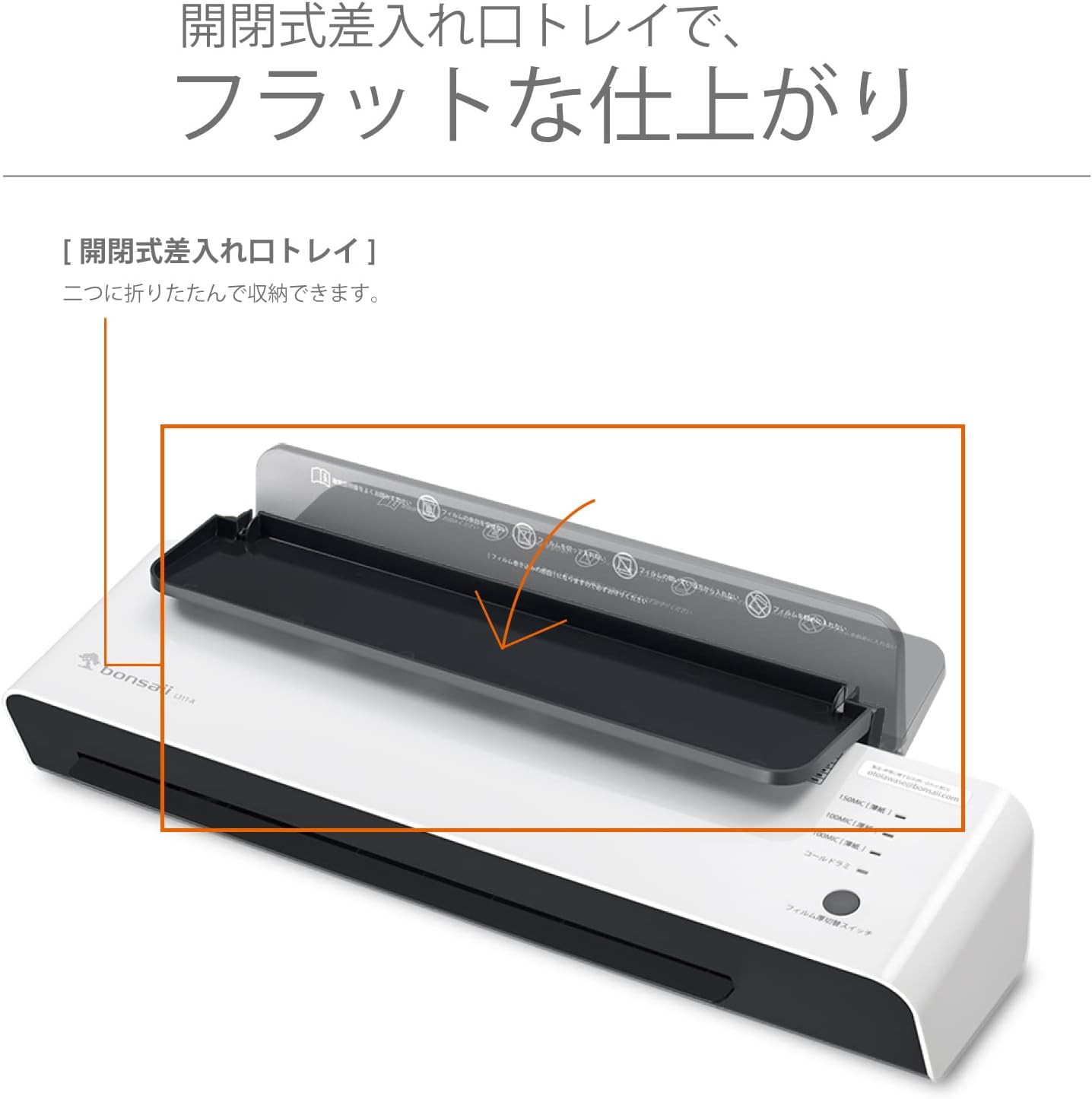
- Film Guide: Helps align documents and film for straight insertion. The foldable design allows for compact storage.
- Input Tray: Where the film is inserted.
- Output Tray: Where the laminated document exits.

Key Features: The laminator includes a film guide for easy insertion, a reverse function for jam release, and a cold laminate mode for heat-sensitive materials. It supports 100μm to 150μm film thicknesses.
4. Setup
- Unpack: Carefully remove the laminator from its packaging.
- Placement: Place the laminator on a flat, stable, and heat-resistant surface. Ensure there is enough space behind the machine for laminated documents to exit freely.
- Connect Power: Plug the power cord into a standard electrical outlet.
The Bonsaii L311-A Laminator set up on a flat surface, ready for operation.
5. Operating Instructions
- Power On and Warm-up: Turn the power switch to the 'ON' position. The indicator light for 'Cold Laminate' will illuminate blue. The laminator will begin to warm up. This typically takes about 5 minutes. Once warmed up, the 'Ready' indicator light (green) will illuminate.
- Select Film Thickness: Press the 'Film Thickness Switch' to select the appropriate setting for your film (100μm or 150μm). The corresponding indicator light will turn green.
- Prepare Document and Film: Place your document neatly inside the laminating pouch, ensuring it is centered and there is an even border of film around it.
- Laminating Process: Insert the sealed edge of the laminating pouch into the film entry slot, using the film guide for straight alignment. The laminator will automatically feed the film through.
- Cooling: Once the laminated document exits the machine, place it on a flat surface to cool and harden.
- Cold Lamination Mode: For heat-sensitive materials, select the 'Cold Laminate' setting using the film thickness switch. Ensure you use specialized cold laminating pouches for this mode.
- Jam Release Function: If a film jam occurs, immediately press and hold the 'Jam Release / Reverse Button' to reverse the rollers and carefully pull the film out.

Easy Lamination Steps: 1. Turn on power. 2. Select film thickness. 3. Set film and paper. 4. Lamination complete as film passes through.
6. Maintenance
- Cleaning: Ensure the laminator is unplugged and completely cool before cleaning. Wipe the exterior with a soft, dry cloth. Do not use abrasive cleaners or solvents.
- Roller Cleaning: Occasionally, run a cleaning sheet through the laminator to remove any adhesive residue from the rollers.
- Storage: Store the laminator in a clean, dry place when not in use. The foldable film guide allows for compact storage.
7. Troubleshooting
If you encounter issues, refer to the following common problems and solutions:
- Film Jam: If the film gets stuck, immediately press and hold the 'Jam Release / Reverse Button' to reverse the rollers and gently pull the film out. Ensure you are using the correct film thickness setting and inserting the film straight.
- Poor Lamination Quality (Bubbles, Wrinkles):
- Ensure the laminator has fully warmed up before use.
- Verify the correct film thickness setting is selected.
- Make sure the document is centered within the pouch and not too close to the edges.
- Avoid laminating overly thick or irregular items.
- Laminator Not Heating: Check if the power cord is securely plugged in and the power switch is 'ON'. If the issue persists, contact support.
8. Specifications

Product Specifications: This image details the laminator's capabilities, including a maximum laminate width of 330mm, maximum laminate thickness of 0.5mm, compatibility with 100μm and 150μm films, a lamination speed of approximately 5mm/second, up to 2 hours of continuous use, and a warm-up time of approximately 5 minutes.
| Feature | Description |
|---|---|
| Brand | bonsaii |
| Model | L311-A |
| Dimensions (L x W x H) | 46.6 x 12 x 8.5 cm |
| Max Laminate Width | 330 mm (A3 size) |
| Max Laminate Thickness | 0.5 mm |
| Film Thickness Compatibility | 100 μm / 150 μm |
| Lamination Speed | Approx. 5 mm/second |
| Warm-up Time | Approx. 5 minutes |
| Continuous Use Time | Approx. 2 hours |
| Supported Document Sizes | A3, A4, B5, Postcard, Business Card |
| UPC | 765756170017 |
9. Warranty Information
This Bonsaii L311-A Laminator comes with a 1-year warranty from the date of purchase. Please retain your proof of purchase for warranty claims. The warranty covers defects in materials and workmanship under normal use. It does not cover damage caused by misuse, accident, unauthorized modification, or failure to follow the instructions in this manual.
10. Support
For product inquiries, technical assistance, or repair services, please contact us via email:
Service Hours: Weekdays 9:00 AM - 12:00 PM / 1:00 PM - 5:00 PM (Excluding Saturdays, Sundays, national holidays, summer holidays, year-end, and New Year holidays, or company-specific holidays).

Contact information for product and repair inquiries is also displayed on the product body.