
Introduction
This manual provides essential information for the safe and efficient operation of your Panasonic RX-D70BTEG-K All-in-One Radio. Please read these instructions thoroughly before using the product and retain them for future reference.
Safety Information
Always observe the following safety precautions to prevent electric shock, injury, or damage to the unit:
- Do not expose this unit to rain, moisture, dripping, or splashing.
- Do not place objects filled with liquids, such as vases, on the unit.
- Ensure proper ventilation. Do not block ventilation openings.
- Do not install near any heat sources such as radiators, heat registers, stoves, or other apparatus (including amplifiers) that produce heat.
- Only use attachments/accessories specified by the manufacturer.
- Unplug this unit during lightning storms or when unused for long periods.
- Refer all servicing to qualified service personnel.
Package Contents
Verify that all items are present in the package:
- Panasonic RX-D70BTEG-K All-in-One Radio Unit
- AC Power Cord
- Quick Start Guide
Product Overview
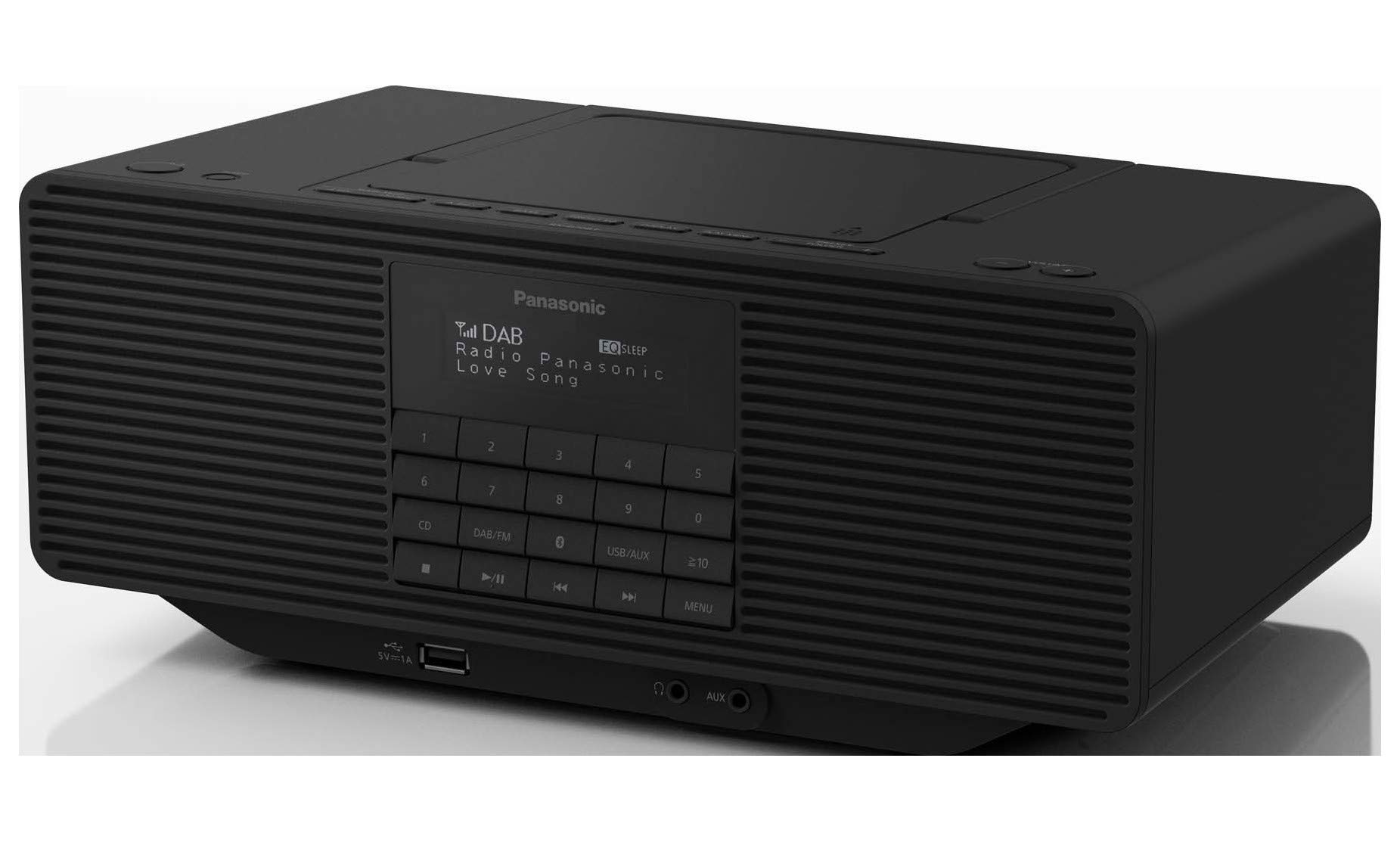
The Panasonic RX-D70BTEG-K is a versatile audio system offering multiple playback options. It features a DAB/DAB+/FM radio tuner, a CD player, Bluetooth connectivity for wireless streaming, and USB/Aux-in ports for external devices. The unit can be powered by AC mains or batteries for portable use.
Setup
Power Connection
The unit can be powered by AC mains or batteries.
AC Power
- Connect the supplied AC power cord to the AC IN jack on the rear of the unit.
- Plug the other end of the AC power cord into a wall outlet.
Battery Power
The unit requires 6 D-size batteries (not included).
- Open the battery compartment cover on the bottom of the unit.
- Insert 6 D-size batteries, ensuring correct polarity (+/-).
- Close the battery compartment cover securely.
Antenna
For optimal radio reception, fully extend the telescopic antenna when listening to FM or DAB/DAB+ radio. Adjust its position for the best signal.
Operating Instructions
Basic Operation
- Power On/Off: Press the [POWER] button to turn the unit on or off.
- Volume Control: Use the [VOLUME +/-] buttons to adjust the sound level.
- Source Selection: Press the [FUNCTION] button repeatedly to cycle through available sources (DAB, FM, CD, Bluetooth, USB, AUX).
FM/DAB/DAB+ Radio Tuning
- Select the DAB or FM function using the [FUNCTION] button.
- For DAB/DAB+, press [SCAN] to perform a full scan for available stations.
- For FM, press [TUNE +/-] to manually tune or hold to auto-scan.
- To save a preset, press and hold a numbered preset button (1-10) until the display confirms.
CD Playback
- Select the CD function.
- Open the CD compartment and insert a CD with the label side facing up.
- Close the CD compartment. Playback will start automatically or by pressing [PLAY/PAUSE].
- Use [SKIP +/-] to navigate tracks.
Bluetooth Pairing

- Select the Bluetooth function. The unit will enter pairing mode, indicated by a flashing Bluetooth icon on the display.
- On your Bluetooth device (e.g., smartphone), enable Bluetooth and search for available devices.
- Select "RX-D70BTEG-K" from the list of devices.
- Once paired, the Bluetooth icon will stop flashing, and you can play audio from your device through the radio.
USB Playback
- Insert a USB flash drive into the USB port.
- Select the USB function. The unit will automatically detect and begin playing compatible audio files (e.g., MP3).
- Use [SKIP +/-] to navigate tracks.
Aux-in Connection
- Connect an external audio device (e.g., MP3 player) to the AUX IN jack using a 3.5mm audio cable (not included).
- Select the AUX function.
- Play audio from your connected device.
Clock and Timer Functions
Refer to the Quick Start Guide for detailed instructions on setting the clock and programming timer functions, as these may vary.
Maintenance
Cleaning
- Wipe the unit with a soft, dry cloth.
- Do not use abrasive cleaners, waxes, or solvents.
- For stubborn stains, lightly dampen a cloth with water and mild detergent, then wipe dry.
Storage
If storing the unit for an extended period, remove the batteries to prevent leakage and damage.
Troubleshooting
| Problem | Possible Cause | Solution |
|---|---|---|
| No power | AC cord not connected; Batteries depleted or incorrectly inserted. | Check AC cord connection; Replace batteries or ensure correct polarity. |
| Poor radio reception | Antenna not extended or positioned incorrectly; Weak signal. | Fully extend and adjust the telescopic antenna; Try moving the unit to a different location. |
| Bluetooth pairing fails | Device too far; Bluetooth not enabled on device; Incorrect pairing procedure. | Ensure device is within 10 meters; Enable Bluetooth on your device; Repeat pairing steps. |
| CD not playing | CD inserted incorrectly; CD is dirty or scratched; CD compartment not closed. | Insert CD with label side up; Clean or replace CD; Ensure CD compartment is fully closed. |
| USB not playing | USB format not supported; Incompatible file types. | Ensure USB is FAT16/FAT32 format; Check if audio files are MP3. |
Specifications
- Model Name: RX-D70BTEG-K
- Brand: Panasonic
- Dimensions (L x W x H): 20.5 x 31 x 12.8 cm (8.07 x 12.2 x 5.04 inches)
- Weight: 2.3 kg (5.07 lbs)
- Power Source: AC Cable / 6 x D-size batteries
- Speaker Output Power: 4 Watts (Stereo)
- Connectivity Technology: Bluetooth
- Audio Output Mode: Stereo
- Control Type: Button, Tactile
- Speaker Size: 8 Centimeters
- Signal-to-Noise Ratio: 70 dB
- Material: Plastic or Metal
- Special Features: Bluetooth, Stereo, CD Player, USB Playback, Aux-in, DAB/DAB+/FM Radio
Warranty and Support
For warranty information and customer support, please refer to the warranty card included with your product or visit the official Panasonic website for your region. Keep your purchase receipt as proof of purchase.