
Introduction
This manual provides detailed instructions for setting up and operating your SINGTRONIC Complete Professional 3000W Digital Karaoke System. Please read this manual thoroughly before use to ensure proper functionality and to maximize your karaoke experience. This system features HDMI-Arc, Bluetooth, Digital Equalizer, and Optical Input for versatile connectivity.
What's in the Box
Your SINGTRONIC KSP-1000Pro system includes the following components:
- Digital Karaoke 3000W Mixing Amplifier (KSP-1000Pro) with Built-in HDMI, Arc, Optical & Bluetooth
- Anti-Feedback 2 x UHF Metallic Wireless Microphones (Pair)
- Vocalist 3000W Karaoke Speakers (Pair)
- Heavy Duty Tripod Adjustable Speaker Stands (Pair)
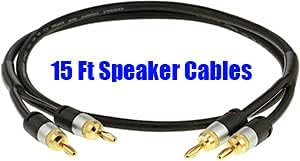
- Speaker Cables
- Optical Cable
- Laser Disco Light

Setup Instructions
Follow these steps to correctly set up your karaoke system:
1. Amplifier and Microphone Setup

Place the KSP-1000Pro Digital Karaoke Mixing Amplifier in a stable location. Ensure adequate ventilation around the unit. Connect the wireless microphones to the amplifier as shown in the general connection diagram.
2. Speaker Placement and Connection

Position the Vocalist 3000W Karaoke Speakers on the provided Heavy Duty Tripod Adjustable Speaker Stands. Use the included speaker cables to connect the speakers to the amplifier's speaker outputs. Ensure correct polarity (red to red, black to black).

3. Connecting to a TV/Display
Your karaoke system can connect to a TV or other display for video output and audio input. Refer to the diagrams below for common connection methods.
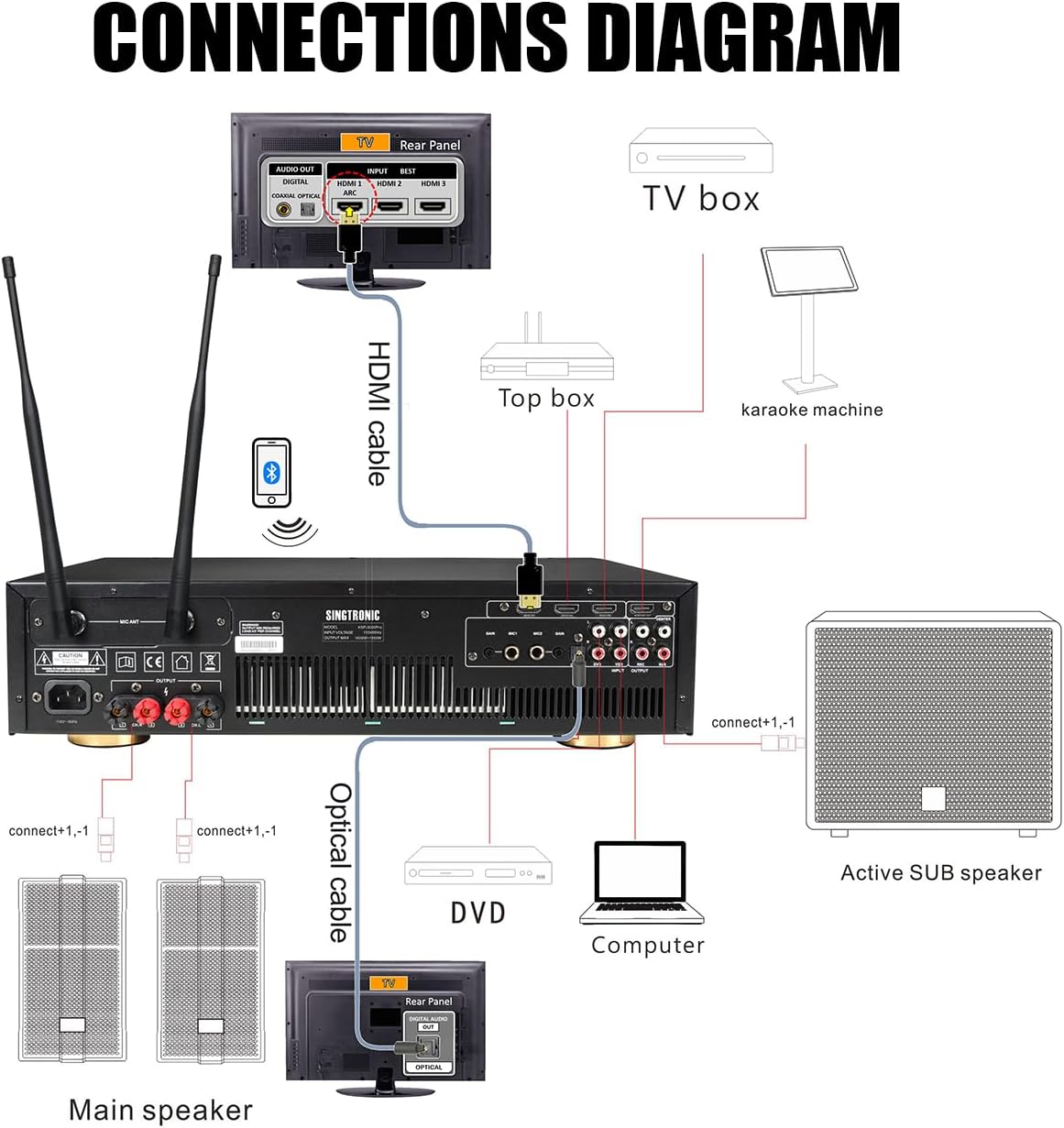

For optimal digital audio, connect your TV's HDMI-ARC output to the amplifier's HDMI-ARC input using an HDMI cable. Alternatively, use the Optical cable to connect your TV's Optical Audio Out to the amplifier's Optical input.
4. Power Connection
Connect the amplifier to a suitable power outlet using the provided power cable. Ensure all connections are secure before powering on the system.
Operating Instructions
Once your system is set up, follow these steps to begin your karaoke session:
1. Power On and Input Selection
Power on the amplifier and your TV. Select the appropriate input source on your amplifier (e.g., HDMI-ARC, Optical, Bluetooth, USB) corresponding to your connected device.
2. Playing Karaoke Songs via YouTube
You can use a smartphone, tablet, or PC to select songs from YouTube. Connect your device to the amplifier via Bluetooth or a suitable cable (e.g., HDMI for video/audio, Optical for audio). On your device, open the YouTube app or website and search for your desired song followed by "karaoke" (e.g., "Bohemian Rhapsody karaoke").
3. Adjusting Audio Settings
Use the controls on the amplifier to adjust the master volume, microphone volume, echo, and other effects to your preference. For TV audio settings, ensure the sound output is set to Optical or HDMI-ARC (PCM format) rather than TV speakers.
Specifications
| Feature | Detail |
|---|---|
| Brand | SINGTRONIC |
| Model | KSP-1000Pro |
| Power Output | 3000W (System) |
| Connectivity | HDMI, Optical, Coaxial, ARC, RCA, USB, Bluetooth, WiFi |
| Speaker Count | 2 (Vocalist 3000W Karaoke Speakers) |
| Microphones | 2 x UHF Metallic Wireless Microphones |
| Special Features | Wireless, Built-in 3.5" Touch Screen, Digital Equalizer, Anti-Howling & Feedback |
| Recommended Uses | Home Use, Commercial Use |

Troubleshooting
If you encounter any issues, please refer to the following common troubleshooting tips:
- No Sound from Speakers: Ensure all speaker cables are securely connected to both the amplifier and speakers. Check the amplifier's volume levels and input selection. Verify that the TV's audio output is set to Optical/HDMI-ARC (PCM) and not internal TV speakers.
- Microphone Not Working: Ensure microphones are powered on and paired with the amplifier. Check microphone volume levels on the amplifier.
- No Video on TV: Confirm the HDMI or other video cable is securely connected between your source device (e.g., tablet, PC) and the TV. Select the correct input source on your TV.
- Audio Distortion: Reduce volume levels on both the amplifier and source device. Check for loose connections.
Warranty and Support
For warranty information and technical support, please refer to the documentation provided with your purchase or contact SINGTRONIC customer service directly. Keep your proof of purchase for warranty claims.


