1. Introduction
The Serounder Universal Learning Remote Control is designed to simplify your home entertainment experience by replacing multiple original remote controls. This compact remote learns functions directly from your existing remotes, making it suitable for controlling various devices such as TVs, Set-Top Boxes (STB), DVD players, Hi-Fi systems, and VCRs. Its design focuses on essential functions like power, volume, and channel control, making it user-friendly for all ages.

Image 1.1: The Serounder Universal Learning Remote Control, showcasing its compact design and large, easy-to-read buttons.
2. Product Features
- Universal Compatibility: Replaces original remote controls for various devices including TV, STB, DVD, Hi-Fi, and VCR.
- Durable Construction: Made from wear-resistant ABS material.
- User-Friendly Design: Features a small size with large buttons for enhanced convenience, particularly for elderly users and children.
- Learning Functionality: Capable of learning functions directly from your existing infrared remote controls.
- Operating Range: Effective remote distance up to 10 meters (33 feet), though actual range may vary based on device and environment.
- Battery Powered: Requires 2 AAA batteries (not included).
3. Package Contents
Upon opening the package, please ensure all items are present:
- 1 x Serounder Universal Learning Remote Control
- 1 x User Manual (this document)
Note: 2 AAA batteries are required for operation and are not included in the package.
4. Specifications
| Feature | Detail |
|---|---|
| Model Number | Serounderuf2x5q1zmk |
| Shell Material | ABS |
| Color | Gray (Grigio) |
| Dimensions (L x W x H) | Approx. 17.4 x 3 x 2 cm (6.85 x 1.18 x 0.79 inches) |
| Item Weight | 1.16 ounces (approx. 33g) |
| Remote Control Distance | Up to 10 meters (33 feet) |
| Power Supply | 2 x AAA batteries (DC 3V, not included) |
| Compatible Devices | TV, STB, DVD, Hi-Fi, VCR |

Image 4.1: Dimensions of the Serounder Universal Learning Remote Control.

Image 4.2: Illustration of the remote control's effective operating distance, up to 10 meters.
5. Setup
5.1. Battery Installation
- Open the battery compartment cover located on the back of the remote control.
- Insert two (2) AAA batteries, ensuring the correct polarity (+ and -) as indicated inside the compartment.
- Close the battery compartment cover securely.

Image 5.1: View of the battery compartment with the cover removed, showing where to insert two AAA batteries.
5.2. Programming (Learning Function)
This remote control learns commands from your original remote. You will need your original, working remote control for this process.
- Preparation: Place the Serounder learning remote and your original remote control on a flat surface, facing each other, with their infrared emitters 2-5 cm (1-2 inches) apart.
- Enter Learning Mode: Press and hold the POWER button and the CH ▲ (Channel Up) button on the Serounder remote simultaneously for approximately 4 seconds. The LED indicator on the Serounder remote will start blinking continuously, indicating it is in learning mode. Release both buttons.
- Select Button to Program: Briefly press the button on the Serounder remote that you wish to program (e.g., POWER, VOL +, CH ▲). The LED will blink slowly, waiting for a signal.
- Transmit Command: Press and hold the corresponding button on your original remote control for at least 2 seconds. While receiving the command, the LED on the Serounder remote will blink slowly. Once the command is successfully received, the LED will blink rapidly three times, then remain steadily lit for a few seconds.
- Repeat for Other Buttons: Repeat steps 3 and 4 for each button you wish to program (e.g., VOL -, CH ▼, AV).
- Exit and Save: After programming all desired buttons, press and hold the POWER button and the CH ▲ (Channel Up) button on the Serounder remote simultaneously again to exit learning mode and save the programmed settings. The LED will turn off.
Important Notes:
- If the LED blinks four times quickly and then once longer (4&1 pattern), it indicates the command was not understood. Please repeat the programming step for that button.
- Ensure the original remote has fresh batteries for optimal signal transmission during programming.
- Some original remotes may require holding the button for a slightly longer duration to transmit the full signal.
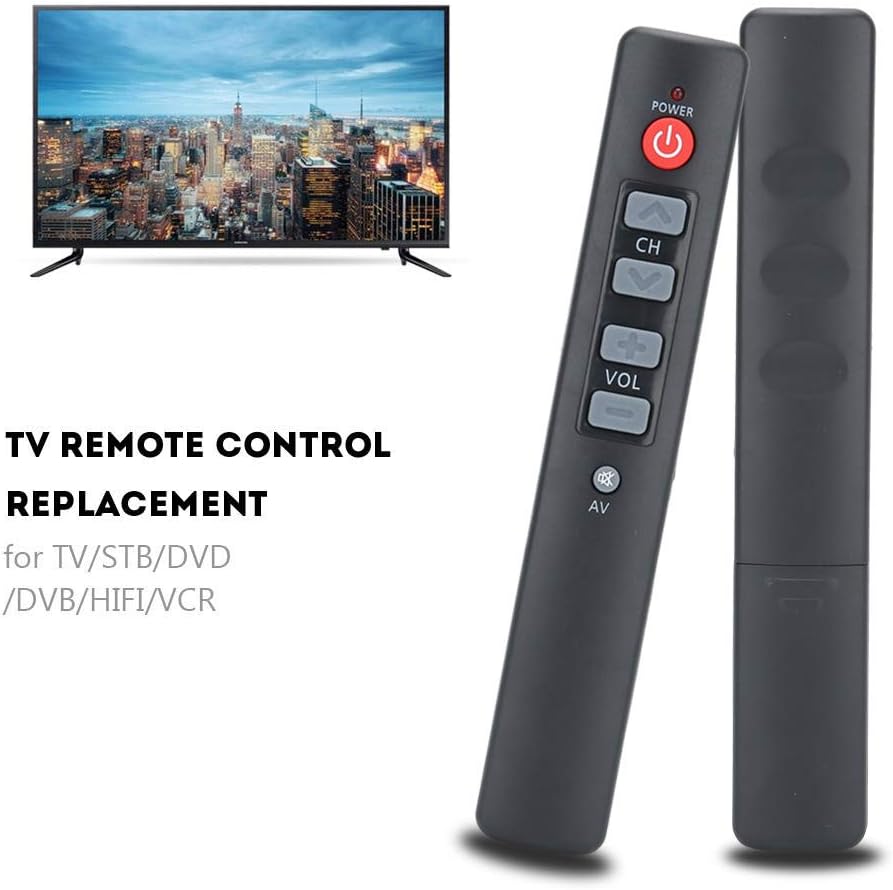
Image 5.2: Illustration of the remote control and a television, demonstrating the intended use after successful programming.
6. Operating Instructions
Once programmed, the Serounder Universal Learning Remote Control operates like your original remote for the learned functions.

Image 6.1: Close-up view of the large buttons on the Serounder remote, including Power, Channel Up/Down, Volume Up/Down, and AV input.
- Power Button (POWER): Press to turn your device (TV, STB, etc.) on or off.
- Channel Buttons (CH ▲ / CH ▼): Press CH ▲ to go to the next channel or CH ▼ to go to the previous channel.
- Volume Buttons (VOL + / VOL -): Press VOL + to increase the volume or VOL - to decrease the volume.
- AV Button (AV): Press to switch between input sources (e.g., HDMI 1, HDMI 2, AV).

Image 6.2: A hand holding the Serounder remote control, illustrating its comfortable grip and accessibility of buttons.
7. Maintenance
- Cleaning: Wipe the remote control with a soft, dry cloth. Do not use liquid cleaners or abrasive materials.
- Battery Replacement: Replace batteries when the remote's performance diminishes or if the LED indicator does not light up during use. Always replace both batteries at the same time with new AAA batteries.
- Storage: Store the remote in a cool, dry place away from direct sunlight and extreme temperatures.
- Avoid Drops: While durable, avoid dropping the remote control to prevent internal damage.
8. Troubleshooting
| Problem | Possible Cause | Solution |
|---|---|---|
| Remote does not respond after programming. | Incorrect programming; batteries low or inserted incorrectly. | Ensure batteries are fresh and correctly inserted. Repeat the programming steps carefully, ensuring the LED blinks correctly during each stage. |
| LED indicator does not light up. | Batteries are dead or inserted incorrectly. | Replace with new AAA batteries and check polarity. |
| Remote only works at very close range. | Low batteries; interference; infrared emitter/receiver blocked. | Replace batteries. Ensure a clear line of sight between the remote and the device. Remove any obstructions. |
| Specific button not working after programming. | Programming error for that specific button. | Re-enter learning mode and reprogram only the problematic button. Ensure the original remote transmits a strong signal. |
| Volume button only changes volume a few steps, not continuously. | Limitation of the learning function for continuous signals. | This can be a characteristic of some learning remotes. You may need to press the volume button multiple times for larger adjustments. Some users program volume up/down to two different buttons for single-press increments. |
9. Warranty Information
Specific warranty details for the Serounder Universal Learning Remote Control are not provided in this manual. Please refer to the product packaging or the retailer's website for information regarding warranty coverage and terms.
10. Support
For technical assistance or further inquiries, please contact the retailer or manufacturer directly. Contact information may be available on the product packaging or the official Serounder website.